Documentation Index
Fetch the complete documentation index at: https://auth0.com/ai/docs/llms.txt
Use this file to discover all available pages before exploring further.
Use the Vercel AI SDK, OpenAI GPT-4, and the Auth0 Next.js SDK to create personalized Spotify playlists based on user input like mood, vibe, or activity.
Prerequisites
Before using this example, make sure you: createPlaylist tool that uses GPT-4 to create a new Spotify playlist for the user:
- When the tool calls
getAccessTokenForConnection() to fetch a Spotify access token, pass in spotify-custom as the connection name.
import { openai } from "@ai-sdk/openai"
import { streamText, tool } from "ai"
import { z } from 'zod';
import { auth0 } from "@/lib/auth0";
export const maxDuration = 60;
export async function POST(req) {
  const { messages } = await req.json()
  const system = `You're a helpful AI agent that can call external APIs`
  const response = streamText({
    model: openai('gpt-4o'),
    messages,
    system,
    maxSteps: 10,
    tools: {
      // Spotify tool to create a playlist
      createPlaylist: tool({
        description: "Create a new Spotify playlist for the user.",
        parameters: z.object({
          description: z.string().describe("Optional description of the playlist"),
        }),
        execute: async ({ description }) => {
          const { token: accessToken } = await auth0.getAccessTokenForConnection({ connection: "spotify-custom" });
          // search for songs based on description
          const query = new URLSearchParams({
            q: description,
            type: 'track',
            limit: '10',
          }).toString();
          const searchResponse = await fetch(`https://api.spotify.com/v1/search?${query}`, {
            method: 'GET',
            headers: {
              Authorization: `Bearer ${accessToken}`,
            },
          });
          const searchData = await searchResponse.json();
          const trackUris = searchData.tracks.items.map(track => track.uri); // save track URIs for playlist
          // Get current user's Spotify ID
          const userRes = await fetch("https://api.spotify.com/v1/me", {
            headers: {
              Authorization: `Bearer ${accessToken}`,
            },
          });
          const user = await userRes.json();
          // Create playlist
          const playlistRes = await fetch(`https://api.spotify.com/v1/users/${user.id}/playlists`, {
            method: "POST",
            headers: {
              Authorization: `Bearer ${accessToken}`,
              "Content-Type": "application/json",
            },
            body: JSON.stringify({
              name: `Playlist - ${description} `,
              description: `A custom AI-generated playlist for ${description}`,
              public: true,
            }),
          });
          const playlistData = await playlistRes.json();
          // add the songs to the playlist
          await fetch(`https://api.spotify.com/v1/playlists/${playlistData.id}/tracks`, {
            method: "POST",
            headers: {
              Authorization: `Bearer ${accessToken}`,
              "Content-Type": "application/json",
            },
            body: JSON.stringify({ uris: trackUris }),
          });
          return {
            message: `Playlist created for ${description}`,
            name: playlistData.name,
            playlist_url: playlistData.external_urls.spotify,
          }
        },
      }),
    }
  })
  return response.toDataStreamResponse();
}
2. Call from the frontend Chat UI
Use the @ai-sdk/react hook to wire up the chat component:
'use client';
import { useChat } from '@ai-sdk/react';
export default function Chat() {
    const { messages, input, handleInputChange, handleSubmit } = useChat();
    return (
        <div className="flex flex-col w-full max-w-3xl py-24 mx-auto stretch text-gray-100">
            {messages.map(message => (
                <div key={message.id} className="whitespace-pre-wrap">
                    {message.role === 'user' ? 'User: ' : 'AI: '}
                    {message.parts.map((part, i) => {
                        switch (part.type) {
                            case 'text':
                                return <div key={`${message.id}-${i}`}>{part.text}</div>;
                        }
                    })}
                </div>
            ))}
            <form onSubmit={handleSubmit}>
                <input
                    className="fixed bottom-0 w-full max-w-3xl p-2 mb-8 border border-zinc-300 rounded shadow-xl text-black"
                    value={input}
                    placeholder="Say something..."
                    onChange={handleInputChange}
                />
            </form>
        </div>
    );
}
Example UI
Navigate to https://localhost:3000 to see the chat UI:
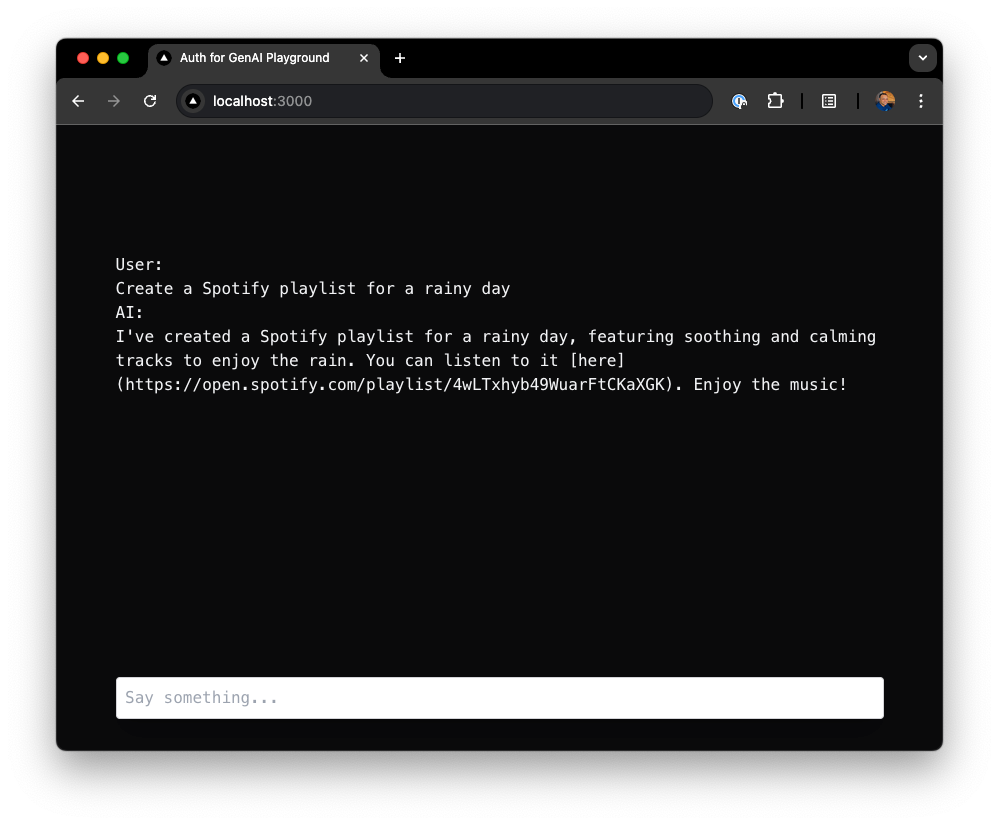 When the user sends a message like
 Create a Spotify playlist for a rainy day, GPT-4 interprets the request and invokes the createPlaylist tool, which uses Auth0 to fetch a Spotify access token and creates the playlist via the Spotify API.
You can extend this flow to support playlist naming confirmation, track previews, or genre filters.