

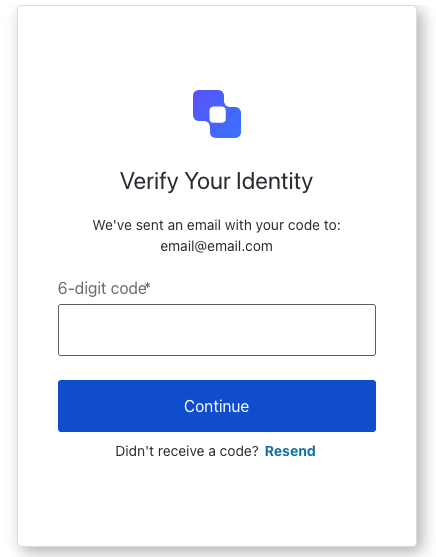
email-identifier-challenge screen functionality. This screen prompts the user to enter a verification code sent to their email address to confirm their identity.
Constructors
Create an instance of EmailIdentifierChallenge screen manager:Example
Properties
Provides branding-related configurations, such as branding theme and settings.
Provides client-related configurations, such as
id, name, and logoUrl, for the email-identifier-challenge screen.Provides country code data for phone number entry, such as
available and recommended, for the email-identifier-challenge screen.The active Experiment Center experiment for this screen, or
null when no experiment is active (or the screen has not opted in via context_configuration).Provides information about the user’s Organization, such as
id and name.Contains data about the current prompt in the authentication flow.
Contains details specific to the
email-identifier-challenge screen, including its configuration and context.Contains data related to the tenant, such as
id and associated metadata.Provides transaction-specific data for the
email-identifier-challenge screen, such as active identifiers and flow states.Handles untrusted data passed to the SDK, such as user input during the email challenge flow.
Details of the active user, including
username, email, and roles.Methods
This method changes the display language of the Universal Login page.Method Parameters
Example
Error[]
This method retrieves the array of transaction errors from the context, or an empty array if none exist.
Resends the verification code to the user’s email address.This method submits a form to Auth0. Auth0 renders this screen again, or renders the
interstitial-captcha screen if a captcha is required. In both cases, the browser loads a new page and the JavaScript context, including component state and timers, is lost.When you call resendCode(), keep the following in mind:- Code that runs after
await resendCode()can’t rely on state that the code sets, such as a “code sent” message or a countdown. - If the resend fails, for example because of a rate limit, Auth0 renders this screen again without an error to avoid revealing whether the user exists. No error appears in
transaction.errors, and the returned promise doesn’t reject. - The returned promise resolves when the form is submitted, before the page reloads. The promise doesn’t confirm that Auth0 sent a new code.
resendManager(). The resendManager() method stores the countdown in localStorage, so the countdown persists across the page reload. The method also disables resending when screen.data.resendLimitReached is true.Example
Returns a Method Parameters
ResendControl object that manages resending with a cooldown. The startResend() method of the object triggers the resend and starts a cooldown period before the user can resend again. The countdown persists across the page reload that a resend causes. Resending is also disabled when screen.data.resendLimitReached is true.Example
This method switches the authentication flow from email OTP verification to password-based authentication.
Example