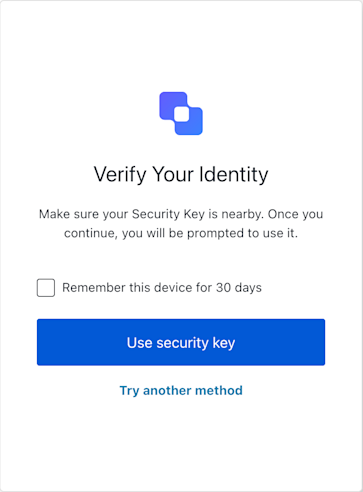
ResetPasswordMfaWebAuthnRoamingChallenge
Example
// In your UI component for the reset-password-mfa-webauthn-roaming-challenge screen:
const sdk = new ResetPasswordMfaWebAuthnRoamingChallenge();

async function handleSecurityKeyAuth() {
  try {
    const userWantsToRemember = document.getElementById('remember-device-checkbox')?.checked || false;
    await sdk.useSecurityKey({ rememberDevice: sdk.screen.showRememberDevice && userWantsToRemember });
    // On success, Auth0 typically handles redirection.
  } catch (err) {
    console.error("Security key authentication failed:", err);
    // If it's a WebAuthn API error, report it to Auth0
    if (err.name && err.message) { // Basic check for DOMException-like error
      try {
        await sdk.showError({ error: { name: err.name, message: err.message } });
      } catch (reportError) {
        console.error("Failed to report WebAuthn error:", reportError);
      }
    }
    // Update UI to inform the user, e.g., "Security key verification failed. Please try again."
    // Also check `sdk.transaction.errors` if the page might have reloaded with an error message from the server.
  }
}

Constructors

ResetPasswordMfaWebAuthnRoamingChallenge
Constructor
Initializes a new instance of the ResetPasswordMfaWebAuthnRoamingChallenge class. It retrieves the necessary context (screen, transaction, etc.) from the global

Throws

If the Universal Login Context is not available or if the screen name in the context does not match ResetPasswordMfaWebAuthnRoamingChallenge.screenIdentifier.

Properties

branding
client
organization
prompt
screen
Holds the specific screen data and properties for this screen,(for the WebAuthn challenge) and showRememberDevice.
tenant
transaction
untrustedData
user
screenIdentifier
string
The unique identifier for this screen, used for internal SDK logic and telemetry.

Methods

getErrors
Retrieves the array of transaction errors from the context, or an empty array if none exist.An array of error objects from the transaction context.
showError
Promise<void>
Reports a client-side WebAuthn API error (from navigator.credentials.get()) to Auth0. This method is intended to be called when useSecurityKey (or a direct call to navigator.credentials.get()) fails due to a standard WebAuthn API error (e.g., NotAllowedError if the user cancels, NotFoundError, SecurityError, timeout). It submits the error details with action: "showError::{errorDetailsJsonString}" and an empty response.A promise that resolves when the error report is successfully submitted. Auth0 may re-render the page with specific error messages in this.transaction.errors or redirect.

Throws

Throws an error if the form submission itself fails (e.g., network error, invalid state).
Example
// In your UI, after catching an error from `sdk.useSecurityKey()` or `navigator.credentials.get()`:
if (webAuthnError instanceof DOMException) {
  await sdk.showError({
    error: { name: webAuthnError.name, message: webAuthnError.message },
    rememberDevice: userWantsToRemember // if applicable
  });
}
tryAnotherMethod
Promise<void>
Allows the user to opt-out of the WebAuthn roaming authenticator challenge and select a different MFA method. This action submits action: "pick-authenticator" to Auth0, which should navigate the user to an MFA factor selection screen.A promise that resolves when the ‘pick-authenticator’ action is submitted.

Throws

Throws an error if the form submission fails (e.g., network error, invalid state).
Example
// When the user clicks a "Try Another Way" button:
await sdk.tryAnotherMethod({ rememberDevice: userWantsToRemember });
// Auth0 handles redirection to the MFA selection screen.
useSecurityKey
Promise<void>
Initiates the WebAuthn security key challenge. This method internally calls navigator.credentials.get() using the challenge options provided in this.screen.publicKey. If the user successfully authenticates with their security key, the resulting PublicKeyCredential is stringified and submitted to Auth0 with action: "default".A promise that resolves when the verification attempt is submitted. A successful operation usually results in Auth0 redirecting the user.

Throws

Throws an error if this.screen.publicKey is missing (indicating missing challenge options), if getPasskeyCredentials (which wraps navigator.credentials.get()) fails (e.g., user cancellation, no authenticator found, hardware error), or if the final form submission to Auth0 fails. It is crucial to catch errors from this method. WebAuthn API errors (like NotAllowedError) should be reported using showError.
Example
// In your UI component for the reset-password-mfa-webauthn-roaming-challenge screen:
const sdk = new ResetPasswordMfaWebAuthnRoamingChallenge();

async function handleSecurityKeyAuth() {
  try {
    const userWantsToRemember = document.getElementById('remember-device-checkbox')?.checked || false;
    await sdk.useSecurityKey({ rememberDevice: sdk.screen.showRememberDevice && userWantsToRemember });
    // On success, Auth0 typically handles redirection.
  } catch (err) {
    console.error("Security key authentication failed:", err);
    // If it's a WebAuthn API error, report it to Auth0
    if (err.name && err.message) { // Basic check for DOMException-like error
      try {
        await sdk.showError({ error: { name: err.name, message: err.message } });
      } catch (reportError) {
        console.error("Failed to report WebAuthn error:", reportError);
      }
    }
    // Update UI to inform the user, e.g., "Security key verification failed. Please try again."
    // Also check `sdk.transaction.errors` if the page might have reloaded with an error message from the server.
  }
}