

- S’inscrire et se connecter à l’aide d’un nom d’utilisateur et d’un mot de passe ou d’un compte Google.
- Authentifier et autoriser les utilisateurs à l’aide d’OAuth 2.0 et d’OpenID Connect.
Choisissez votre pile technologique
- Next.js
- FastAPI
 Next.js
 FastAPI
- Use sample app (recommended)
- Integrate into your app
Download sample app
Start by downloading and extracting the sample app. Then open in your preferred IDE.Install packages
Ensure you havenpm installed or follow the instructions to install npm in its documentation.
In the root directory of your project, install the required packages:Create your environment file
In the root directory of your project, create a new.env.local file and add the following content:.env.local
AUTH0_DOMAIN, AUTH0_CLIENT_ID, and AUTH0_CLIENT_SECRET, navigate to Applications > Applications in the Auth0 Dashboard and select your client application. You’ll find these values in the Basic Information section at the top.
Copy each value to the matching setting.Next, run this command to generate a random 32 byte value and copy it to the AUTH0_SECRET field:generate random 32 byte value
Run your application
Run this command to start your server:http://localhost:3000 in your browser.You will see: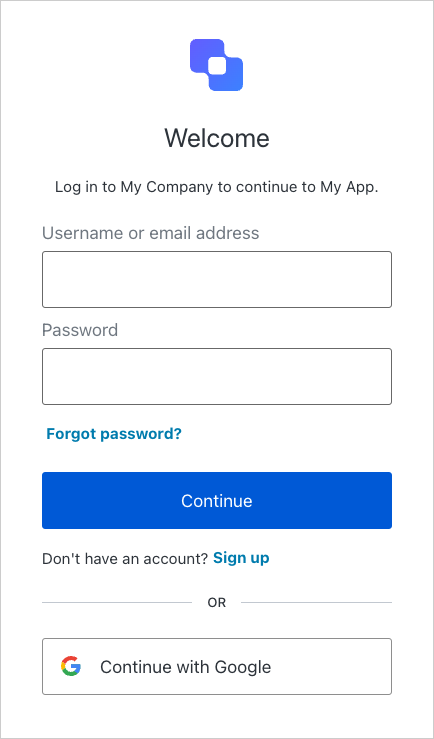
Prochaines étapes
- Pour configurer l’appel d’outils internes, suivez le guide de démarrage rapide Appeler des API internes au nom de l’utilisateur.
- Pour configurer l’appel d’outils tiers, suivez le guide de démarrage rapide Appeler des API tierces au nom de l’utilisateur.
- Pour en savoir plus, consultez la page Authentification des utilisateurs.