

- Publish discovery files so personal agents find where to sign in, which scopes you offer, and how to use your APIs and website.
- Register the personal agents you allow by the URL of their client metadata document. Only clients manually registered by a tenant administrator are supported.
- Let users connect an agent to their account with a consent page that names the agent and the scopes it asks for.
- Let an agent’s browser join your website as a guest or as the signed-in user, while your web application receives standard Auth0 tokens that name the agent in the
actclaim. - Accept agent calls at your APIs, signed out with a signed
Poppy-Sessionheader, or signed in with an access token as well.
Use cases
- Tiered access for agents: Any agent can search your catalog as a guest. A signed-in agent can see the user’s orders. Only the scopes the user approved allow the agent to act on their behalf, such as starting a return.
- Agent-aware websites: Your web application knows when an agent drives the browser, which agent it is, and what the user allowed it to do. You can log agent activity and keep sensitive operations for the user or require their explicit confirmation, for example with Client-Initiated Backchannel Authentication (CIBA).
- Secure access revocation: The agent never holds the user’s password, only tokens issued to it. Revoking those tokens, or removing the agent, ends its access to the account without the user changing their password or affecting their other sessions.
Architecture overview
Poppy splits the work in two layers:- OAuth at Auth0. The personal agent is a confidential OAuth client identified by the URL of its client metadata document (CIMD). It authenticates with Private Key JWT. The user signs in with the authorization code flow and PKCE, which Poppy calls Direct Sign-In. Refresh and revocation are standard.
- Sessions at your application. Every agent request carries a signed
Poppy-Sessionheader. It names the agent, a Session that the agent chooses for a task, and a pairwise User ID that the agent gives its user for your company. A signed-in request also carries an access token.
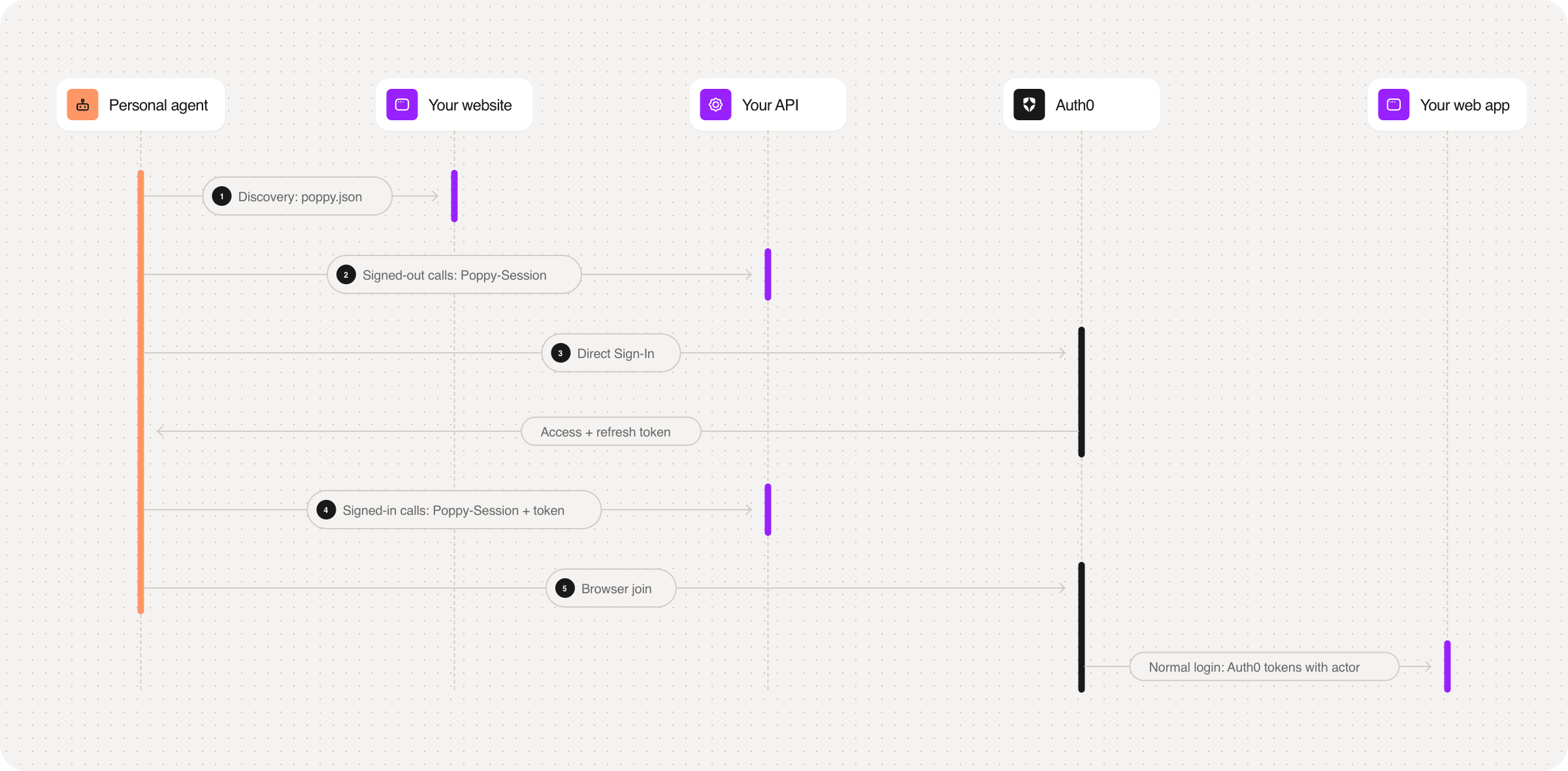
To learn more, read How Personal Agent Protocol Works.
Get started
To see it work end to end, follow the Quickstart: add Poppy to a sample store and shop with it using a personal agent. To add Poppy to your own application:- Set up your tenant with the Auth0 CLI (recommended) or set it up manually.
- Add Personal Agent Protocol to your web app.
- Add Personal Agent Protocol to your API.
- Test your setup.