

Identifiers
Your API and web application should record the Session ID they receive with the agent and the User ID. The Session ID lets you correlate what an agent did as a guest with what it does after the user signs in, for example, a cart filled as a guest and a checkout after sign-in. To learn more, read Correlate activity with Sessions.
Discovery
Before it does anything else, the agent reads three documents and checks that they point to each other:https://{company-domain}/.well-known/poppy.json: describes your company to the agent: its name and domain, the scopes it offers with descriptions and hints, its APIs, and its browser join endpoint.https://{company-domain}/.well-known/oauth-protected-resource: describes your protected resources and names your Auth0 issuer as the authorization server that protects them.- Auth0’s
/.well-known/oauth-authorization-server: describes the Auth0 authorization server, so the agent knows how to get access to your APIs. It confirms the issuer and lists your company domain, and the identifiers of your Personal Agent Protocol APIs, inprotected_resources.
poppy.json file from your tenant’s settings, so you can serve it as is.
A typical journey
The following example shows an agent that browses as a guest, then asks the user to sign in to see their orders: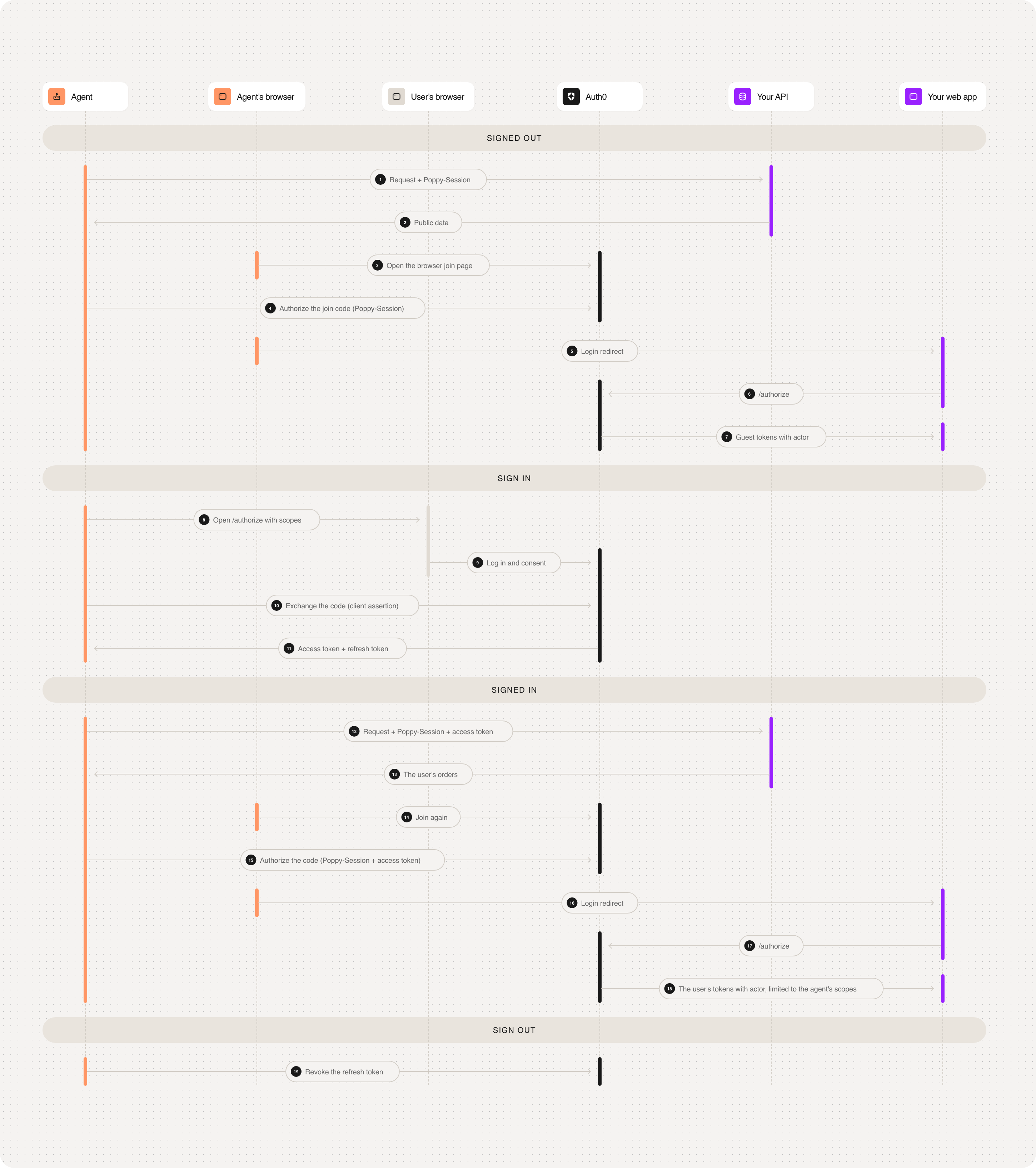
Signed out
A signed-out agent needs nothing from Auth0 to call your APIs. It signs aPoppy-Session header for each request, and your API verifies it with the agent’s public keys. Your API decides which operations are public, the same way it does for anonymous visitors today.
Direct Sign-In
When a task needs the user’s account, the agent signs the user in with the authorization code flow. The user logs in to the system browser as they normally do and sees a consent page that names the agent. The agent receives an access token for your API and a refresh token. The agent’s sign-in serves its ongoing interactions with your API, across its Sessions. When the agent needs more scopes, it asks the user to sign in again and consent to the full set. A browser join, in contrast, belongs to the Session that joined, andact.poppy_sid names it. To get a token for a specific API or MCP server, the agent sends the resource parameter with the API’s identifier. To learn more about the resource parameter, read Enable resource parameter compatibility profile.
Browser join
When yourpoppy.json lists a browser join endpoint, the agent joins its browser to a Session before browsing your website. The join works both signed out and signed in:
- Signed out (guest): your web application receives a guest login, with the agent as actor in
act. Scope what a guest can do as you do for any visitor who isn’t logged in. - Signed in: your web application receives the user’s login with the agent as actor. When your web application calls your APIs with its Auth0 tokens, it can’t exceed the permissions the user approved for the agent.
- The agent’s browser opens the join page. Auth0 returns a one-time code and sets a short-lived cookie that ties the code to that browser.
- The agent authorizes the code from its backend with its
Poppy-Sessionheader and, for a signed-in join, its access token. A signed-in join needs thepoppy:browser-sign-inscope. - The browser submits the code. Auth0 redirects it to your web application’s Application Login URI.
- Your web application starts a normal login. Auth0 completes it without prompts and returns tokens that name the agent in
act.
When the tokens include an acting agent, your web application can also restrict sensitive operations for the user, or ask the user to confirm them, for example with Client-Initiated Backchannel Authentication (CIBA).
Sign-out
The agent signs out by revoking its refresh token. Under the protocol, its Sessions continue signed out. The user can also disconnect the agent, which revokes its access to the account. The agent’s browser can log out of your web app as usual, which ends the website session and the Auth0 session.During the beta, signing out or disconnecting the agent doesn’t end a website session that a join created: it ends at logout, or when it expires within 2 hours.
Website access
poppy:browser-sign-in is the one scope the protocol defines. A signed-in browser join requires it, and your website decides what it means. The mode is a statement your website makes to agents in poppy.json, not an Auth0 setting:
Auth0 doesn’t enforce
web.unscoped: your website does. In both modes, Auth0 limits the tokens your web application gets after a browser join to the API and scopes the user approved for the agent. Use unscoped mode only when your website doesn’t call your APIs with Auth0 access tokens, for example when it uses Auth0 only to log users in.