

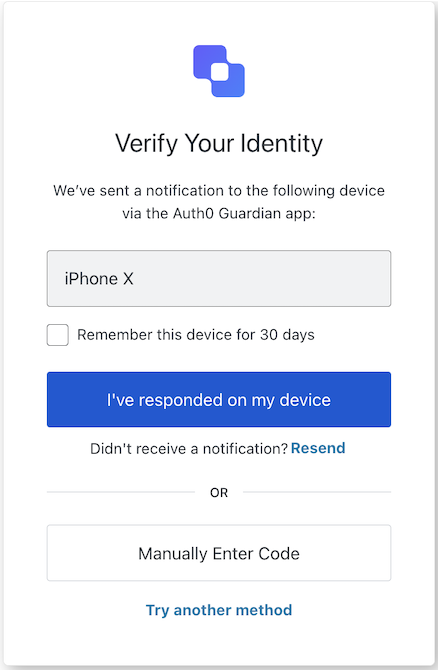
mfa-push-challenge-push screen prompts the user to approve an MFA push notification sent to their mobile device.
Import
Each screen has its own set of hooks and methods. The SDK supports partial import and root import for each screen.- Using partial import allows you to include only the code you need for your specific use case.
- Using root import allows you to load all screens from a single bundle, which is useful when you want a unified build to handle all possible screens.
Import Example
Context Hooks
Screen-scoped hooks that provide read-only access to Auth0 context data on themfa-push-challenge-push screen. Import them from @auth0/auth0-acul-react/mfa-push-challenge-push.
() => BrandingMembers
This hook provides branding configurations, such as logo, colors, and theme settings displayed on the
mfa-push-challenge-push screen.Example
() => ClientMembers
This hook provides client-related configurations, such as
id, name, and logoUrl, for the mfa-push-challenge-push screen.Example
() => ExperimentMembers
This hook provides the active Experiment Center experiment for the
mfa-push-challenge-push screen, or null when no experiment is active (or the screen has not opted in via context_configuration).Example
() => OrganizationMembers
This hook provides information about the user’s Organization if the MFA flow is Organization scoped. Returns
null when no Organization context is present.Example
() => PromptMembers
This hook contains data about the current prompt in the authentication flow.
Example
This hook contains details specific to the
mfa-push-challenge-push screen, including its configuration and context.Example
() => TenantMembers
This hook contains data related to the tenant, such as
id and associated metadata.Example
() => TransactionMembers
This hook provides transaction-specific data for the
mfa-push-challenge-push screen, such as the current MFA flow state.Example
This hook handles untrusted data passed to the screen, such as prefilled values from URL parameters.
Example
() => UserMembers
This hook provides details of the active user, including
username, email, and available authentication methods.Example
This hook returns all methods and context available on the
mfa-push-challenge-push screen.Methods
This method completes the push challenge after the user has approved the notification on their mobile device.Method Parameters
Example
This method navigates to the manual code entry screen so the user can enter an OTP code instead of using the push notification.
Example
Resends the push notification to the user’s mobile device.This method submits a form that asks Auth0 to send a new push notification. Auth0 renders this screen again, so the browser reloads the page and React state, effects, timers, and active polling are lost.When you call Method Parameters
resendPushNotification(), keep the following in mind:- Code that runs after
await resendPushNotification()can’t rely on state that the code sets, such as a “notification sent” message. - Server-side errors appear in
useErrors()after the page reloads. These errors don’t reject the returned promise. - The returned promise resolves when the form is submitted, before the page reloads. The promise doesn’t confirm that Auth0 sent a new notification.
Example
This method navigates to the MFA method selection screen so the user can choose a different authentication factor.
Example