

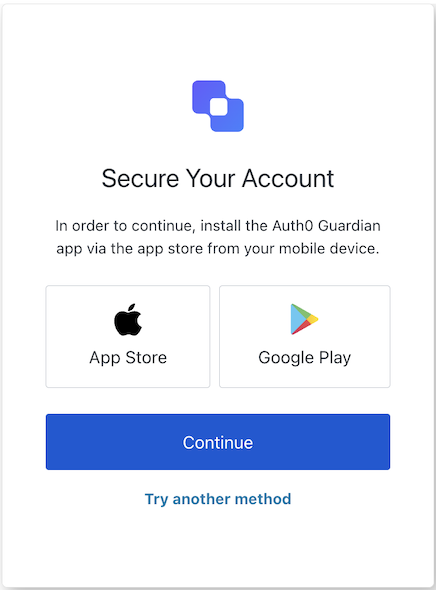
mfa-push-welcome screen introduces the user to push notification MFA and prompts them to enroll or choose a different authenticator.
Import
Each screen has its own set of hooks and methods. The SDK supports partial import and root import for each screen.- Using partial import allows you to include only the code you need for your specific use case.
- Using root import allows you to load all screens from a single bundle, which is useful when you want a unified build to handle all possible screens.
Import Example
Context Hooks
Screen-scoped hooks that provide read-only access to Auth0 context data on themfa-push-welcome screen. Import them from @auth0/auth0-acul-react/mfa-push-welcome.
() => BrandingMembers
This hook provides branding configurations, such as logo, colors, and theme settings displayed on the
mfa-push-welcome screen.Example
() => ClientMembers
This hook provides client-related configurations, such as
id, name, and logoUrl, for the mfa-push-welcome screen.Example
() => ExperimentMembers
This hook provides the active Experiment Center experiment for the
mfa-push-welcome screen, or null when no experiment is active (or the screen has not opted in via context_configuration).Example
() => OrganizationMembers
This hook provides information about the user’s Organization if the MFA flow is Organization scoped. Returns
null when no Organization context is present.Example
() => PromptMembers
This hook contains data about the current prompt in the authentication flow.
Example
This hook contains details specific to the
mfa-push-welcome screen, including its configuration and context.Example
() => TenantMembers
This hook contains data related to the tenant, such as
id and associated metadata.Example
() => TransactionMembers
This hook provides transaction-specific data for the
mfa-push-welcome screen, such as the current MFA flow state.Example
() => UntrustedDataMembers
This hook handles untrusted data passed to the screen, such as prefilled values from URL parameters.
Example
() => UserMembers
This hook provides details of the active user, including
username, email, and available authentication methods.Example
This hook returns all methods and context available on the
mfa-push-welcome screen.Methods
This method navigates to the authenticator selection screen so the user can choose a different MFA method.
Example