

read:connections_options and update:connections_options.
We are additionally deprecating the ability to access or update the options field without the appropriate scopes, resulting in the following breaking changes:
- Responses from the Get All Connections and Get Connection by Id endpoints do not include the
optionsfield unless the caller has theread:connections_optionsscope. - Requests to the Update a Connection endpoint fail if the request body contains the options field and the caller does not have the
update:connections_optionsscope. Successful responses do not include theoptionsfield unless the caller has theread:connections_optionsscope.
options field, you must update your application grants to include the new scopes. Follow the steps below to identify whether your tenant and integrations are affected, migrate to the options-specific scopes, and finally opt out of the deprecated behavior.
Identify affected tenants
Use Auth0 Dashboard to confirm if a tenant is allowed to access connection options without the new scopes and requires migration.- Navigate to Auth0 Dashboard > Tenant Settings > Advanced.
- Scroll down to the Migrations section.
- Look for the Allow Connections Management without Options Scopes toggle: A. If the toggle is on, your tenant can still access connection options without the new scopes, and you must migrate before the deadline. B. If the toggle is absent or off, no further action is required.
Identify affected integrations
Review thedepnote tenant logs to determine which applications and integrations use the impacted endpoints. The following sample query demonstrates how you can query for the deprecation notice tenant logs specific to this deprecation:
client_id field to identify each application that may be potentially affected. Due to the nature of the changes, the existence of a deprecation notice for a specific client application does not necessarily mean that the application is impacted.
If the client_id field has an empty value, this means that the request to the impacted endpoint originated from an extension. Several Auth0 extensions can cause deprecation notice tenant logs that are false positives. Once you complete the extension-specific steps listed in the Update extensions section, you can ignore deprecation notices with an empty client identifier.
Update application grants
For applications retrieving or updating theoptions field using the impacted endpoints, update their Management API grants to include the necessary scopes.
- Navigate to Auth0 Dashboard > Applications > APIs.
- Select the Auth0 Management API, then the Machine to Machine Applications tab.
- Next to the application requiring an update, select the down-arrow icon to expand the section.
- In the Permissions section, search for
“connections_options”. Enable one or both of the new scopes. Then, choose Update to save your changes.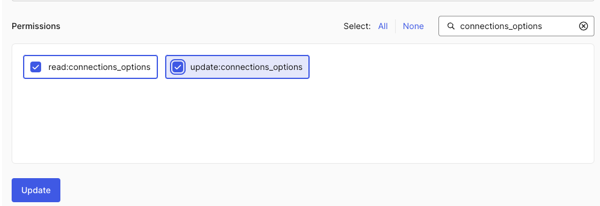
Update extensions
Update to the latest version of the Delegated Administration Dashboard extension. This update is necessary because the extension requires access to the connection options field to function properly. If you use this extension, ensure it is updated to maintain its functionality.Opt-Out (Finalize Migration)
Once your integrations no longer depend on the deprecated behavior, we recommend configuring your tenant to explicitly opt out of allowing connections management without options scopes. This lets you choose exactly when your tenant adopts the new behavior, providing more control over your migration process.- Navigate to Auth0 Dashboard > Tenant Settings > Advanced.
- Under the Migrations section, toggle off the Allow Connections Management without Options Scopes option.