
Event Stream Actions are currently available in Early Access.To learn more about Auth0’s product release cycle, review Product Release Stages.
Event Stream Actions are logic-based functions that execute asynchronously when specific events occur within your Auth0 tenant. These are non-blocking actions and won’t impact the latency of your user’s experience. Each Event Stream Action is associated with an Event Stream, and listens for a pre-defined set of Event Types (for example, successful logins, password changes, or user deletions). When a subscribed event occurs, the Action is triggered. Unlike Login or Pre-Registration Actions, Event Stream Actions run in the background and do not affect the primary transaction of the user.
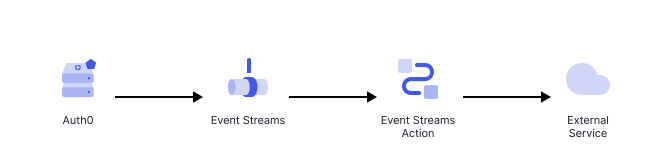
Diagram showing the TBD.
These Actions are non-blocking (asynchronous), suscribed to a specific set of Event Types.

Triggers

Event Stream

The event-stream Actions are functions executed when subscribed Event Types happen.

References

  • Event object: Provides context for both Event Stream message and Action execution.
  • API object: Provides methods to modify the flow behavior.

Use cases

Synchronization

A event-stream Action can be used to communicate a particular event to an external service based on custom logic. The following Action demonstrates how to securely forward an event message to an external service using a stored API key.
/**
* Handler to be executed while processing events in an Event Stream.
* @param {Event} event - Details about the incoming event.
* @param {EventStreamAPI} api - Methods and utilities to define event stream processing.
*/
exports.onExecuteEventStream = async (event, api) => {
  const message = event.message;

  try {
    await fetch(event.secrets.URL, {
      method: 'POST',
      headers: {
        'X-API-Key': event.secrets.API_KEY,
      },
      body: JSON.stringify(message),
    });
  } catch (err) {
    throw new Error('External service failure');
  }

  return;
};
To learn more about writing Actions, read Write Your First Action. To learn more about creating an Event Stream, read Create an Event Stream.