

Key benefits
XAA delivers key benefits for every role in your enterprise ecosystem:- For Enterprise IT administrators: Centralized control, visibility, and policy enforcement over application access to enterprise and user data.
- For SaaS providers and developers: Standardized and secure integration for enterprise AI to foster ecosystem growth.
- For end-users: Streamlined and frictionless connections between applications, eliminating complex OAuth consent flows.
Use cases
Common use cases for XAA include:- Enterprise-Managed Authorization (agent-to-app): An employee uses an AI agent acting as an MCP Client to read from their calendar app and post an update in the enterprise messaging app. Instead of requiring the employee to go through redirection flows and consent prompts, the agent uses XAA to securely call the calendar and messaging app APIs, exposed as MCP servers, if approved by the enterprise access policy.
- Connect SaaS applications (app-to-app): In our previous example, the enterprise calendar and messaging app both support XAA. Employees can seamlessly connect the messaging app to access the calendar app’s API without user redirection or consent while following enterprise access policies.
How it works
The XAA flow involves the following actors:- Requesting App: The application or AI agent that needs to access a resource.
- Resource App: The application that owns the protected resource and exposes it via an API
- Enterprise IdP: The IdP, such as Okta, that authenticates employees.
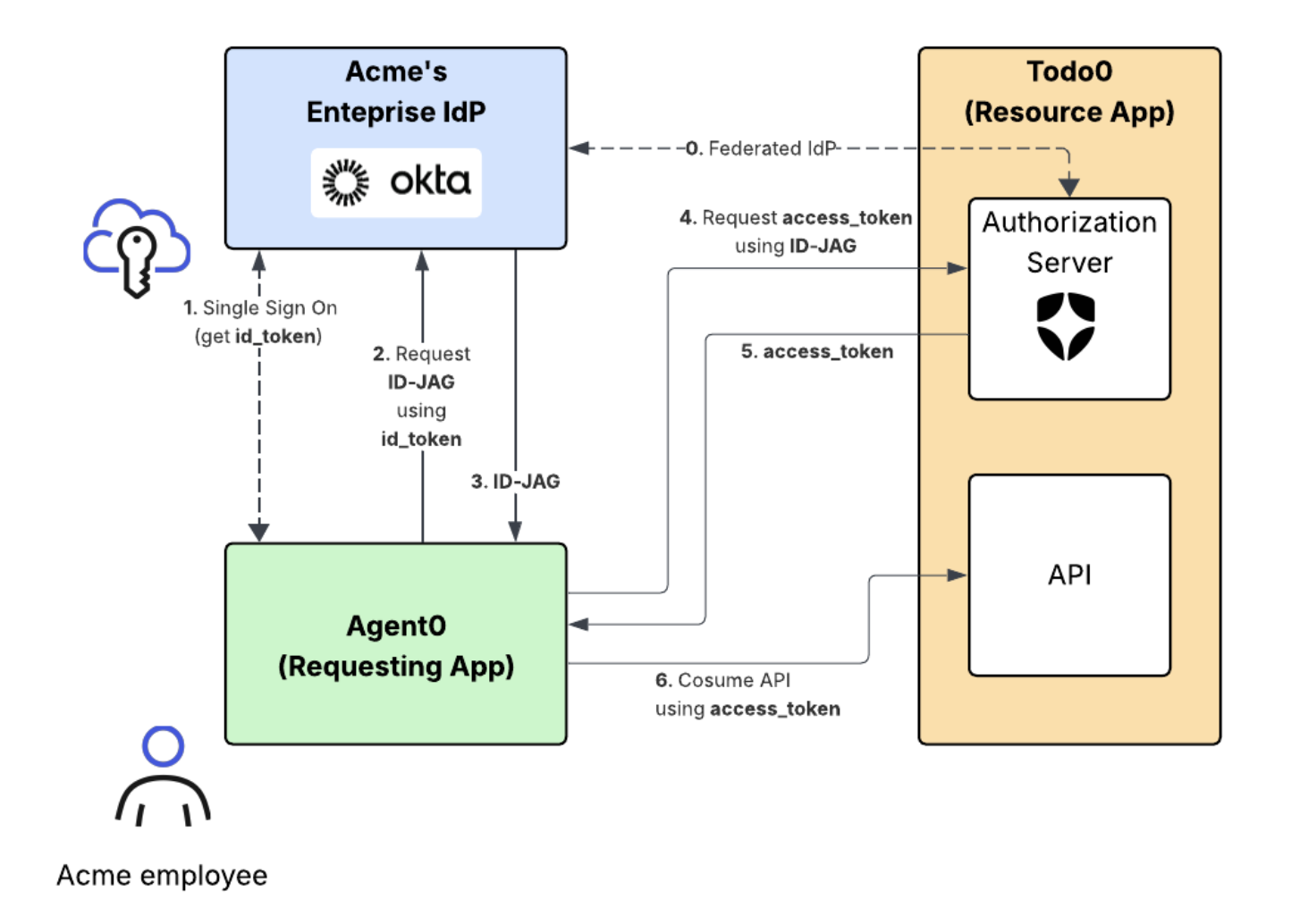
- The Resource App (Todo0) Authorization Server is federated with the enterprise IdP through OIDC so that it can generate access tokens for end-users authenticated by that IdP.
- The Requesting App (Agent0) is registered with the Resource App Authorization Server as an OAuth 2.0 client with a valid client_id and credentials to request access tokens from the Resource App Authorization Server.
- The Acme IT admin has defined XAA access controls between Agent0 and Todo0.
End-to-end XAA flow
With our Acme example in mind, the end-to-end XAA flow has the following steps:- The Acme employee logs into the Requesting App (Agent0) using SSO with the enterprise IdP. The Requesting App obtains an ID token to verify the Acme employee’s identity.
- The Requesting App makes a token exchange request to the IdP to exchange the ID token for a cross-domain Identity Assertion JWT Authorization Grant, also known as ID-JAG. The IdP validates the request and checks the XAA policy defined by the Acme IT Admin.
- If the XAA policy allows for it, the IdP returns the ID-JAG to the Requesting App.
- The Requesting App makes a token request using the ID-JAG to the Resource App Authorization Server.
- The Resource App Authorization Server validates the ID-JAG using the public key it also uses for its OpenID Connect flow with the IdP. If valid, the authorization server returns an access token.
- The Requesting App makes a request with the access token to the Resource App’s API.
The Requesting App and Resource App can each use OIDC or SAML to federate with the enterprise IdP for this SSO step. Read End-to-end Testing to understand the how the XAA flow works in each case.
Get started
Auth0 supports both sides of the XAA flow. Depending on your role in the ecosystem, you can configure your Auth0 tenant as the Resource App, the Requesting App, or both.Set up Auth0 as Resource App
Configure your Auth0 tenant as the Resource App Authorization Server so that your SaaS application can accept incoming ID-JAG requests and issue access tokens for your API. This is the right path if you are a SaaS provider or API owner who wants enterprise AI agents and applications to securely consume your API without requiring end-user consent flows.Set up Auth0 as Requesting App
Configure your Auth0 tenant as the Requesting App so that your AI agent or SaaS application can call third-party APIs on a user’s behalf without requiring OAuth consent flows. Access is governed by the enterprise IT admin’s policy in their IdP. Auth0 stores and reuses the tokens your application retrieves via XAA in Token Vault.Early Access limitations
XAA Early Access has the following limitations:- There can only be one XAA-enabled connection for the Resource App per Enterprise IdP issuer. For example, the same Okta tenant can’t be used for more than one XAA-enabled enterprise Resource App connection.
- Token Vault with XAA Requesting App support requires exactly one valid XAA-enabled identity linked to the user’s profile at token exchange time. To learn more, read Cross App Access with Token Vault.
- Organization support is limited:
- A connection has a 1:1 assignment with an Organization. Multiple Organizations cannot map to the same connection for XAA access.
- When the Requesting App is configured to require the use of Organizations, users must already be members of the target organization.
- No dynamic user creation: The user must have previously logged into your Resource App using the configured Enterprise connection. Otherwise, the request to exchange the ID-JAG assertion for an access token will fail with a
User not founderror.
Rate limits
In XAA Early Access, ID-JAG exchanges on the/token endpoint of your Auth0 tenant are rate-limited to up to 50% of your tenant’s global Authentication API rate limit. In Private Cloud, XAA Requesting App token exchanges use the Token Vault rate limits for each subscription plan. To learn more, including the exact limit for your subscription plan, read Rate Limit Configurations.