

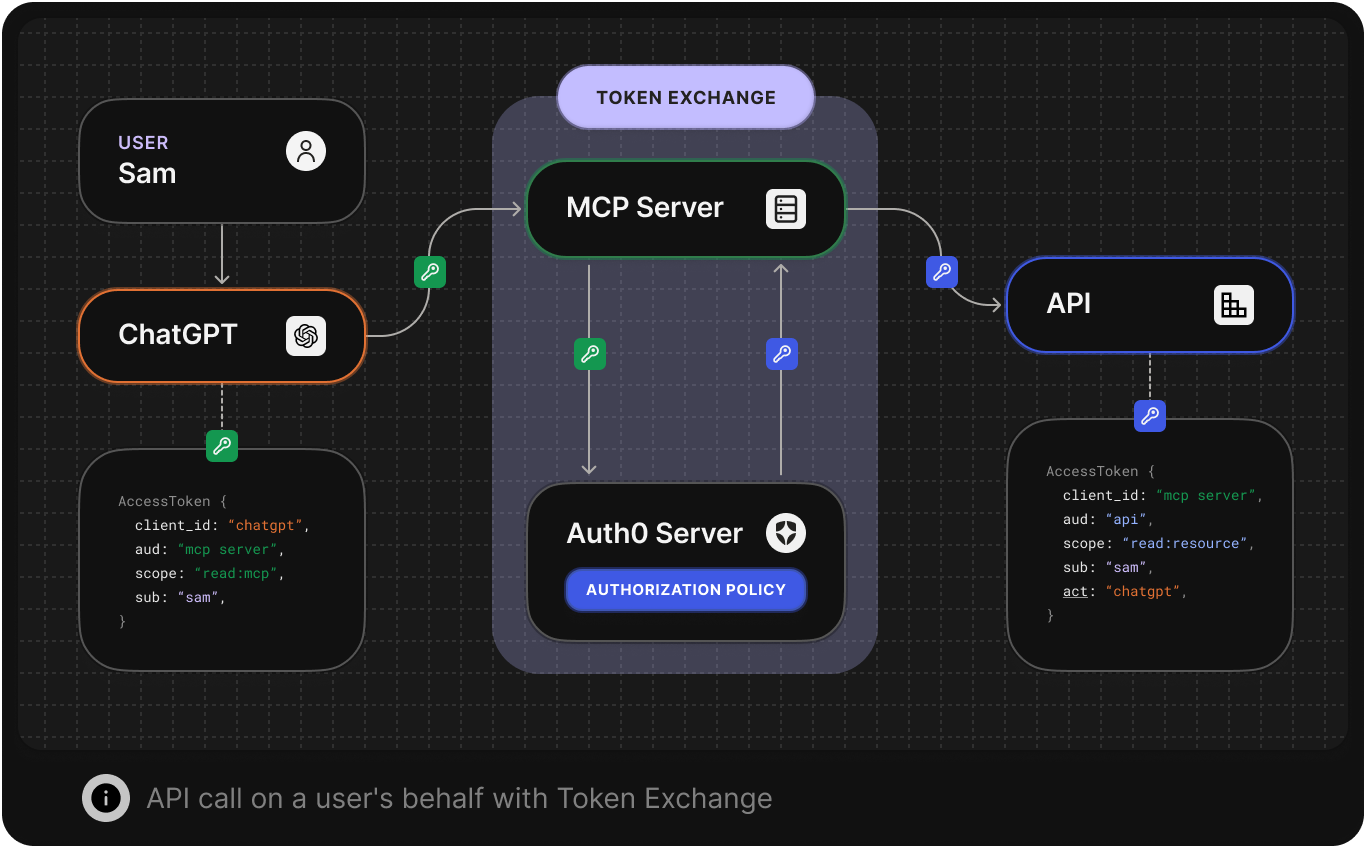
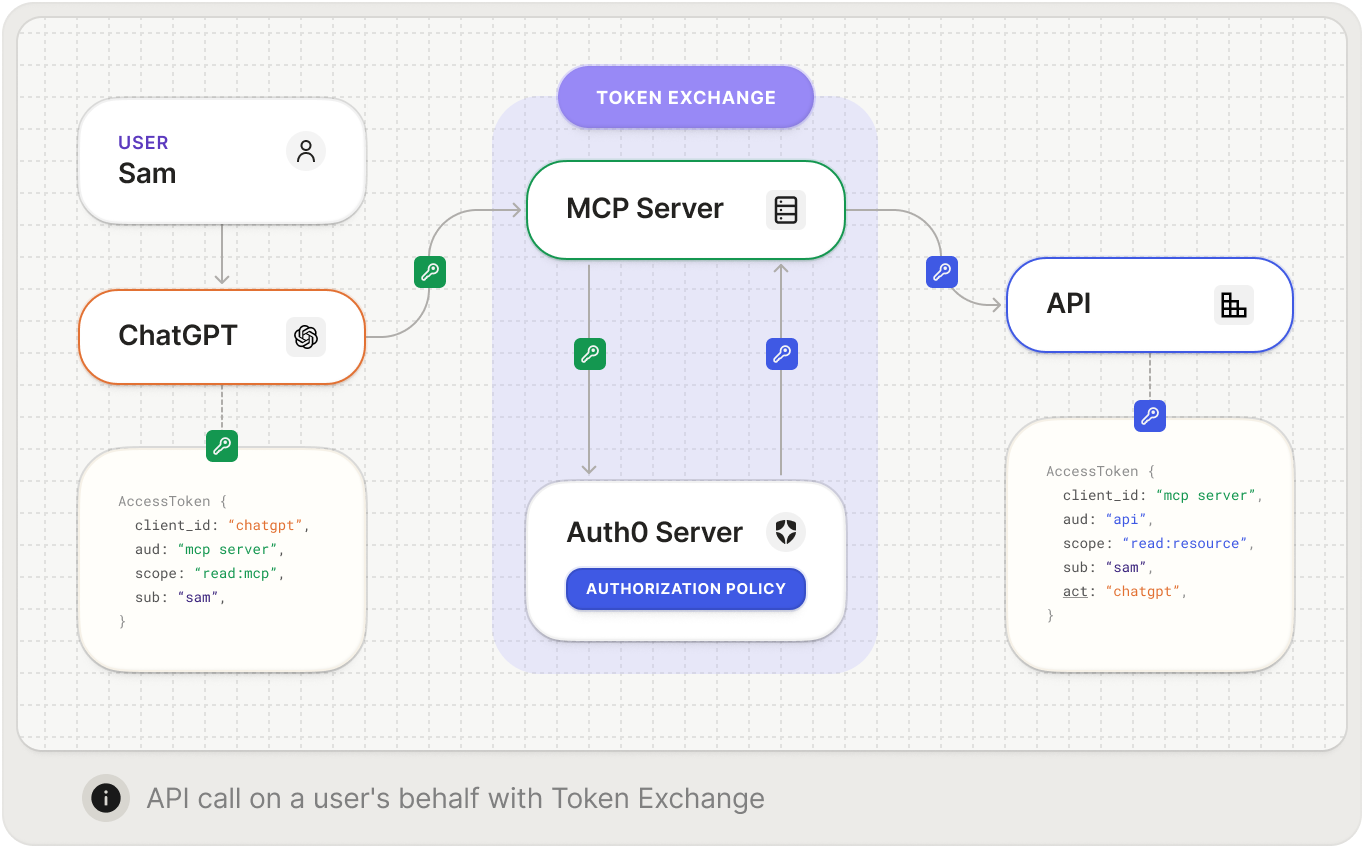
- Un serveur MCP qui appelle vos API protégées au nom d’utilisateurs authentifiés grâce à l’échange de jetons OBO
- La vérification et l’échange de jetons à l’aide de la bibliothèque
@auth0/auth0-api-js(JavaScript) ouauth0-api-python(Python) - Un exemple fonctionnel illustrant le flux complet d’échange de jetons OBO, du client à l’API en aval, en passant par le serveur MCP
Prerequisites
1. Create or log in to your Auth0 account
1. Create or log in to your Auth0 account
To continue with this quickstart, you need to have an Auth0 account.
3. Install the Auth0 CLI
3. Install the Auth0 CLI
This guide uses Auth0 CLI to configure an Auth0 tenant for secure MCP tool access.Confirm you are in the correct tenant by double-checking the tenant domain in the terminal, or run the command below:If more than one tenant is configured, the default tenant will be indicated by an arrow.
- Follow the Auth0 CLI installation instructions.
- Log in to your account with the Auth0 CLI:
4. Install jq
4. Install jq
To simplify the process of interacting with the Auth0 CLI, we recommend installing jq. This will allow you to easily parse JSON responses from the CLI.
- macOS
- Linux
- Windows
Configurer les paramètres du locataire
1. Promote the connection to a domain-level connection
1. Promote the connection to a domain-level connection
To allow third-party clients like MCP Inspector to use a connection such as a username-and-password database or a social connection, you need to promote the connection to a domain-level connection. Learn more about configuring third-party applications.
1
List Your Connection
List your connections to get their IDs
2
Choose Your Connections
From the list, identify which connections you want to use for the MCP server and copy the ID.
- For the username-and-password database, look for the connection with the strategy
auth0. - For the Google social connection, look for the connection with the strategy
google-oauth2.
3
Upgrade the Connection to Domain-Level
For each of those specific connection IDs, run the following command to mark it as a domain-level connection. Replace
YOUR_CONNECTION_ID with the actual ID (e.g., con_XXXXXXXXXXXXXXXX).2. Create roles
2. Create roles
The sample application in this quickstart is prepared to show different tools depending on the role of a given user. For example, a Tool Administrator will have access to different tools than a Tool User.Let’s create roles that allow you to control which users can access which tools.For each role you need (e.g., “Tool Administrator”, “Tool User”), run the create command as below.Save the IDs from the output (they start with
rol_), as you’ll need them in a later step to assign permissions and users to these roles.3. Assign roles to users
3. Assign roles to users
Find users and assign them to the roles. You can search by their email address:Copy the user ID (
USERID) from the last command’s output, then assign the role to the user:Configurer les applications et les API Auth0
En raison de son double rôle, le serveur MCP nécessite deux configurations dans Auth0 :- En tant que serveur de ressources : une API appelée par le client MCP
- En tant que client : une application capable d’échanger des jetons pour appeler des API en aval
Créer une API pour représenter votre serveur MCP
An MCP server is treated just like any other API in your Auth0 tenant, which means you can use the same access control, scoping, and authorization features. The API (also known as a Resource Server) represents your protected MCP Server. Run the following command to create an API in Auth0:rfc9068_profile_authz is used as the token dialect to include the permissions claim in the access token, which can be useful for the API to check user permissions without making additional calls.
For more details on protecting APIs with Auth0, check our quickstarts.
Assign permissions to roles
Assign permissions to roles
After creating the API and roles, assign the API permissions to the roles.Replace
YOUR_ADMIN_ROLE_ID and YOUR_USER_ROLE_ID with the role IDs you saved when creating the roles.Créer une application pour votre serveur MCP
Créez une application qui permet à votre serveur MCP d’agir comme client pour l’échange de jetons OBO. Cette application doit :- Avoir le même identifiant que l’API de votre serveur MCP (
resource_server_identifier) - Utiliser
app_type: resource_serverpour la lier au serveur MCP - Activer l’échange de jetons OBO dans la configuration
token_exchange
client_id et client_secret affichées dans la sortie; vous en aurez besoin pour configurer l’environnement de votre serveur MCP.
Créer une API en aval
Créez l’API protégée que votre serveur MCP appellera au nom de l’utilisateur. Cette API correspond à votre API de logique métier (p. ex., une API de calendrier, une API de documents, etc.). La commande suivante crée une API avec la configuration suivante :- Autorisations client : accorde au serveur MCP un accès délégué par l’utilisateur et un accès client à l’API
- Application des permissions : exige des autorisations précises (
read:private) - Statut interne (première partie) : contourne le consentement de l’utilisateur pour vos propres applications
API_AUTH0_AUDIENCE.
Assign permissions to roles
Assign permissions to roles
After creating the downstream API and roles, assign the Replace
read:private permission to the roles.YOUR_ADMIN_ROLE_ID and YOUR_USER_ROLE_ID with the role IDs you saved when creating the roles.Application d’exemple
- Javascript
- Python
- Utiliser l'application d'exemple (recommandé)
- Cloner le dépôt GitHub
Commencez par télécharger l’application d’exemple de ce Démarrage rapide. L’exemple comprend un serveur MCP FastMCP intégré à Auth0 et une API protégée conçue avec
Fastify.Une fois le téléchargement terminé, extrayez les fichiers et ouvrez le projet dans votre IDE préféré.
greet qui :- Reçoit une requête authentifiée d’un client MCP
- Échange le jeton contre un accès à l’API en aval
- Appelle votre API protégée au nom de l’utilisateur
- Renvoie le résultat
Installer les paquets
Assurez-vous que npm est installé. Ensuite, dans le répertoirefastmcp-mcp-on-behalf-of-tokenexchange-js, installez les paquets requis :Créer votre fichier d’environnement
From the root of your sample app directory, run the following command to create a new.env file populated with all the required environment variables:Exécuter le serveur MCP et l’API
Run this command to start your server:Échanger votre jeton d’accès
To call your APIs on a user’s behalf, the MCP server uses the OBO token exchange to exchange the Auth0 access token it received from the MCP client (with the audience set to the MCP server itself) for a new Auth0 access token with the audience set to your API.Token exchange implementation
The MCP server exchanges tokens in two steps:1. Wrapper function: bearerForUpstream()
This function safely handles the token exchange process and error handling:bearerForUpstream() calls exchangeTokenOnBehalfOf() and, upon a successful exchange, returns the new accessToken and its associated scope. If the exchange fails, it logs the error and re-throws it to be handled upstream.2. Exchange function: exchangeTokenOnBehalfOf()
This function, located in src/auth0.ts, calls Auth0’s OBO token exchange endpoint using the SDK.First, initialize the ApiClient with the credentials of the MCP server application:exchangeTokenOnBehalfOf() function uses the client’s getTokenOnBehalfOf() method to perform the token exchange.getTokenOnBehalfOf() implements the OBO token exchange flow, which allows the MCP server to obtain a new token to call the downstream API while preserving the user’s identity. It takes in the accessToken, audience, and scope parameters.Testing your MCP server
Now that your MCP server is up and running, you can test it by using tools like MCP Inspector.Learn how to test your Auth0-powered MCP server
Prochaines étapes
- Pour configurer l’autorisation de votre serveur MCP, suivez le guide de Démarrage rapide Autorisation pour votre serveur MCP.