

Availability varies by Auth0 plan
This feature is available for B2C Professional, B2B Professional, and Enterprise plans. To learn more, read Pricing.
custom-token-exchange trigger is the first step in the Auth0 pipeline. After the Auth0 Authorization Server validates that the Custom Token Exchange request is valid and maps to an existing Custom Token Exchange Profile, the trigger executes the single Action associated with that profile. If the Action successfully completes and sets a user for the transaction, post-login Actions and the rest of the Auth0 pipeline are then executed for that logged-in user.
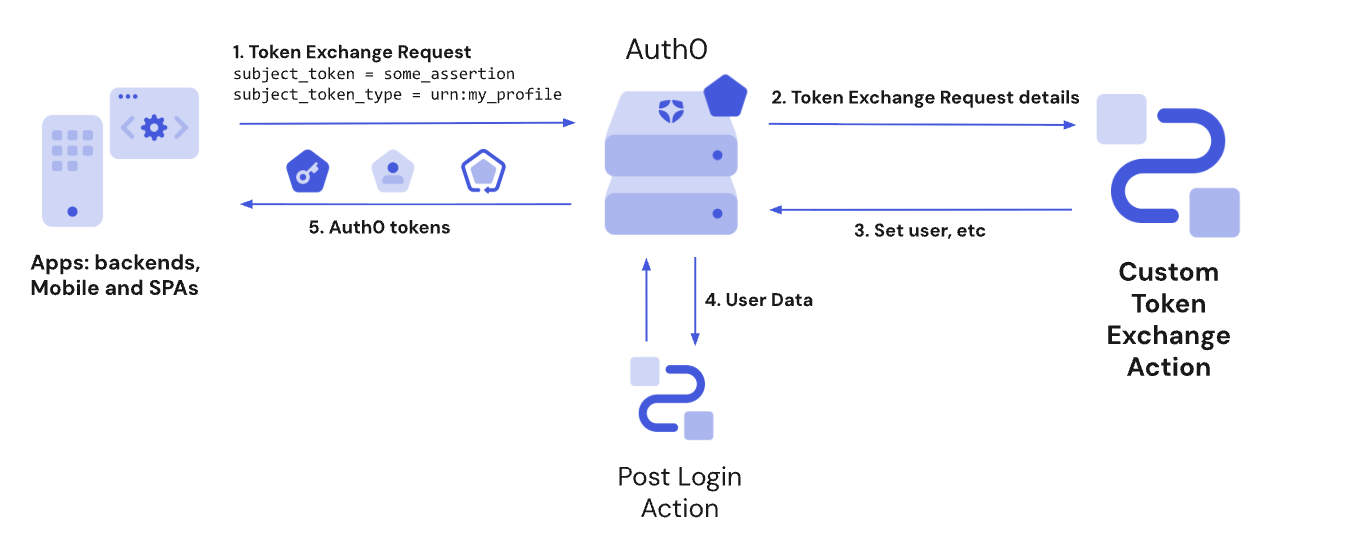
Custom Token Exchange vs Post Login Actions
The Post Login Actions trigger executes after the Custom Token Exchange Action runs for the user you set for the transaction. For other use cases, such as adding custom claims to access tokens, use the Post Login Action trigger. The Custom Token Exchange uses the token exchange grant type, where theevent.transaction.protocol is set to oauth2-token-exchange in the Post Login Action trigger. Both the Custom Token Exchange and Native Social Login use the token exchange grant type. To distinguish between the two, use the value of the subject_token_type, which should correspond to one of your Custom Token Exchange Profiles.
Custom Token Exchange doesn’t support
api.authentication.challengeWith(), api.authentication.enrollWith(), api.redirect.*, or api.prompt.*. If you use those methods with your Post-Login Action, make sure you don’t use those methods when event.transaction.protocol === 'oauth2-token-exchange' depending on the subject_token_type value.Actor support for delegation
Thecustom-token-exchange trigger supports delegated authorization scenarios. The Action can call api.authentication.setActor() to include an act claim in issued tokens, identifying the principal acting on behalf of the subject user.
setActor() can be called regardless of whether the request includes an actor_token. The actor_token parameter is one way for the calling application to pass actor information to the Action, but the actor identity can also be embedded in the subject_token itself or obtained through other custom means within the Action code.
When the request does include actor_token and actor_token_type, these values are available in event.transaction. If actor_token_type is urn:ietf:params:oauth:token-type:id_token and the token is a valid Auth0 ID token from the same tenant, the server automatically validates the token and populates event.transaction.actor_token_user with the actor’s user profile.
The act claim set via setActor() is also available in Post-Login Actions via event.transaction.actor.
Auth0 supports issuing a Session Transfer Token with the actor in its context, so a delegated web session can be established for another user. To learn more, read Session Delegation.
Share data with Post-Login Actions
A Custom Token Exchange Action can pass arbitrary data forward to Post-Login Actions in the same transaction using Actions Transaction Metadata. This is useful, for example, when setting a custom claim in access tokens or ID tokens in the Post-Login Action based on information already obtained or processed from thesubject_token or actor_token.
References
- Event object: Provides contextual information about the Token Exchange request, including the
subject_token, IP address, client, and more. - API object: Provides methods to use with your Token Exchange Action that allow you to set the user, set the actor for delegation, reject the transaction, set user metadata, access the Actions cache, and more.