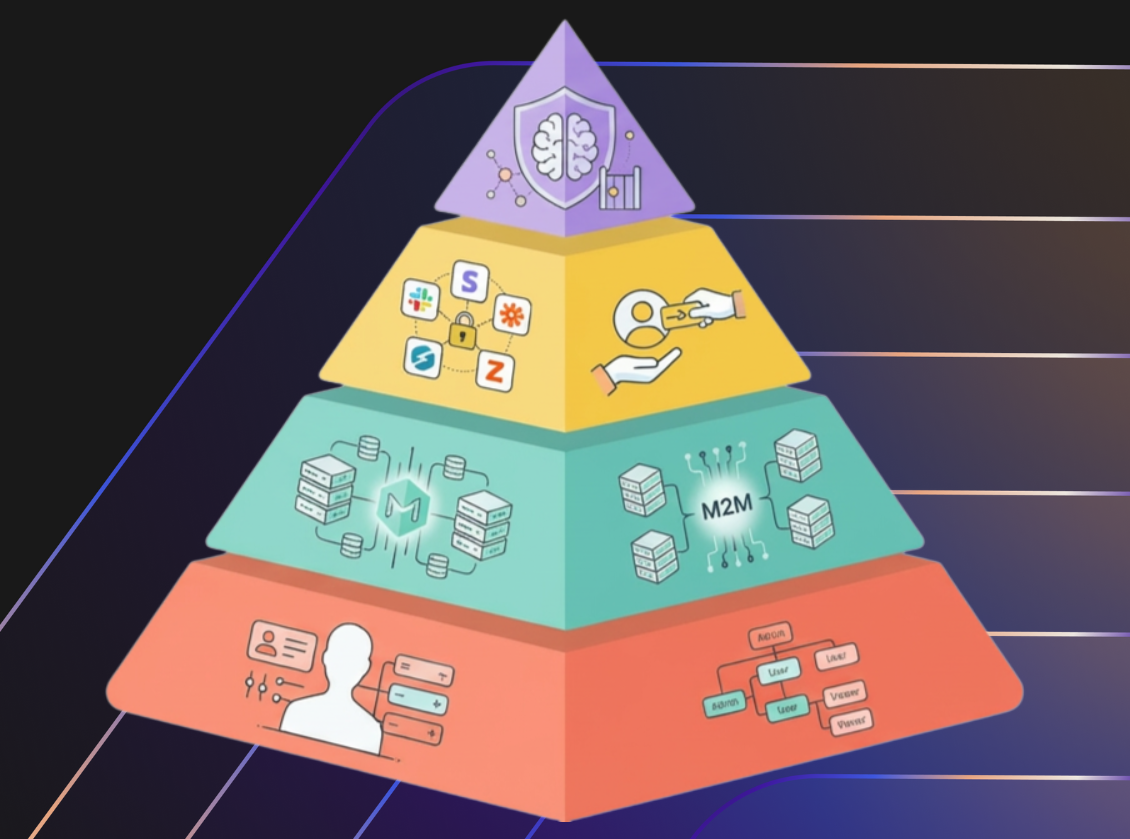
Every engineering leader is currently facing the same pressure: "When can we enable our product to be used by AI agents?”
The vision is seductive. We want users to use their preferred LLM and write "Summarize my team's work this week," and have an AI autonomously fetch data, reason over it, and deliver the result. But before you can expose your application to AI agents, you have to face a hard truth: There are no shortcuts in authorization.
To enable your product to be used by LLMs and agents, you need to provide an external API for your product. If your API authorization layer isn't mature enough to handle complex human hierarchies, it will crumble under the weight of autonomous agents. AI agents can become loose cannons, capable of hallucinating its way into administrative privileges, leaking data across tenant boundaries or even deleting your entire database.
To illustrate this, let's look at an API Authorization Hierarchy of Needs. We’ll use a standard B2B Project Management system (like Jira or Asana) as our running example. Our goal is to enable agents to use the product’s API to perform specific tasks.
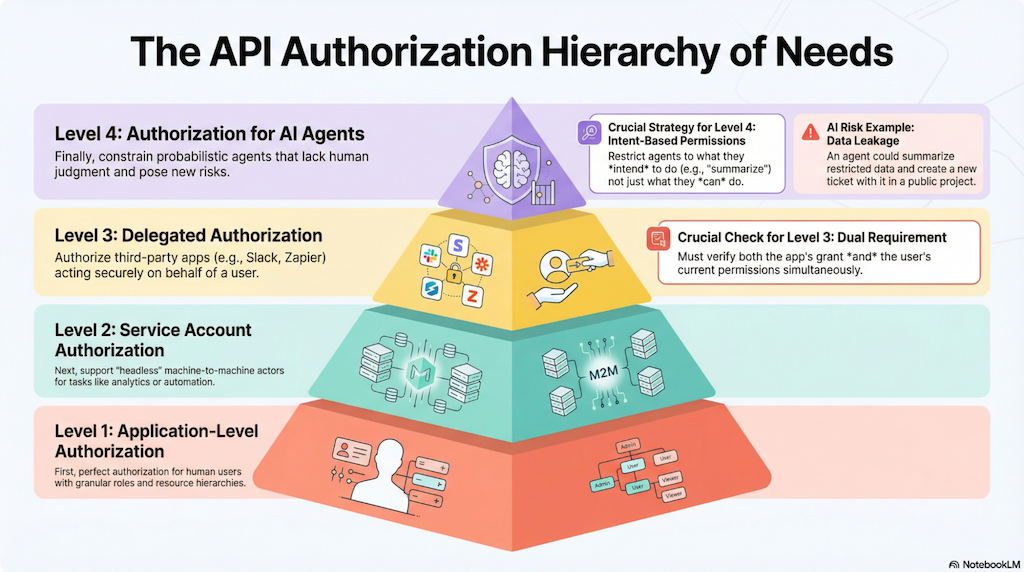
Level 1: The Foundation (Application-Level Authorization)
Before you can think about machines, you must perfect authorization for humans. This is the base of the pyramid. It requires deep implementation at the application level, addressing several layers of complexity:
- Multi-tenancy: Ensuring data isolation between customers
- Granular Roles: You need Tenant-level roles (admin, billing manager), Project-level roles (owner, team members), and Ticket-level roles (viewer, editor).
- Resource Hierarchy: Permissions must inherit logic. A Tenant Admin should view everything; a Project Owner should create tickets only within their projects. Regular users should see projects and tickets from their teams, or the tickets directly shared with them.
If your system relies on simple, role-based, flat permissions, you are not ready to move up.
Level 2: Service Accounts (Machine-to-Machine)
Once human access is solid, your API authorization layer needs to evolve to support service account clients acting on behalf of themselves. These can be regular API clients or agents.
Your customers will want to pull data for analytic reports (like ticket completion times), or automatically create tickets when certain events happen (an issue is closed, a project goes over its due date, or a support issue gets escalated to engineering).
This requires enabling customers to create service account credentials using API keys or OAuth Client Credentials. These accounts have access to a single tenant with a pre-defined set of permissions that each tenant can configure.
Level 3: Delegated Authorization (On-Behalf Of)
You go over a delegated authorization flow each time you enable one application to use another on your behalf. For example, you let the Google Calendar app in Slack access your calendar. It relies on the standard OAuth patterns where a third party acts on behalf of a user.
For example, you might want to allow a Slack plugin to create tickets in your system. These applications need to capture the user's consent for a specific project.
Your APIs need to authorize both the user and the application:
- The Grant: The API must verify that the user granted the application permission to perform the action on the project.
- The User Permission: The API must also verify that the user currently holds that permission to act on the project.
If I authorize a Slack app to create tickets in Project A, your API must check that I authorized Slack to do that, and that I am still allowed to create tickets in Project A.
Most APIs do not support an OAuth delegation flow, and if they do, the scopes are coarse grained. For example, the scope can be `create:ticket` and not `create:ticket:project_A`. Without fine-grained consent flows, AI agents will be over-provisioned for the task at hand.
Level 4: The Summit (AI Agents)
Only after addressing the concerns above can you expose your application to AI agents.
Agents introduce a new vector of risk. While they essentially use service account credentials or user-bounded credentials, they lack human judgment. We need to restrict them further than we would a standard user.
Agents are very good at answering questions based on a set of documents. They use Retrieval-Augmented Generation (RAG) techniques to find relevant information. If they need to summarize a set of tickets how can you make sure they only summarize tickets from the projects the user can access for the task at hand?
Consider the risks in our Project Management example:
Data Leakage: A user asks for a summary. The agent reads tickets from a restricted project, summarizes them, and creates a new ticket with that summary in a public project visible to the whole company.
Unauthorized data: A user asks for a summary. The agent uses a vector database containing tickets from all projects and applies Retrieval-Augmented Generation (RAG) techniques to craft the answer. This design guarantees that the user will inadvertently be shown data from projects they are not authorized to access.
Orchestration Failure: A user says, "Email a summary to my manager." Without strict boundaries, the agent might email the entire company or an external contact. This happens because the Agent inherits the user's full permissions. If the user can email the company, the Agent can too. We need to restrict the Agent to the specific task, not the user's total potential.
As an industry, we are exploring certain patterns to address some of these scenarios:
- Add authorization to RAG pipelines by pre-filtering or post-filtering the documents returned by the vector database, based on the user’s permissions.
- Keep a human in the loop for destructive actions. This often leads to approval fatigue where users just click "Yes" to everything.
- Use an emerging solution is Intent-Based Permissions. Where we restrict access based on what the agent is trying to achieve: If the intent is "Summarize Tickets," the agent should have Read-Only access (it cannot Create a ticket). If the intent is "Send a summary to my Manager," the scope is restricted specifically to the manager's email address. However, intent needs to be inferred by an LLM based on a predefined set of possible intents. The paper, Delegated Authorization for Agents Constrained to Semantic Task-to-Scope Matching, explains the problem and possible solutions.
If Level 3 is about constraining a deterministic Slack bot, Level 4 is about constraining a probabilistic AI that might hallucinate or pursue a specific intent.
The industry is defining standards like MCP Authorization, creating AI/MCP Gateways, or implementing standards like Cross App Access to address these needs. However it’s still early and we have a lot to learn.
Without Authorization There Is No Agentic Future
It is still early days, and we don't know which architectural patterns will prevail. But one thing is not up for discussion: Without properly handling authorization for users and clients in your API layer first, there is no Agentic AI future.
You cannot build the roof if you haven't poured the foundation. The complexity of Level 3 and 4, modeling hierarchy, delegation, and granular intent, is too difficult to manage with simple roles or database columns.
You can start the journey today by learning how to use Auth0 FGA to address the authorization challenges in every layer. Stay tuned for a follow-up article with a detailed explanation on how to address every scenario.
Frequently Asked Questions
About the author

Andrés Aguiar
Director, Product Management
I’ve been at Auth0 since 2017. I’m currently working as a Director, Product Management for the Auth0 FGA and OpenFGA products. Previously, I worked in the teams that owned the Login and MFA flows.
I spent my entire 20+ year career building tools for developers, wearing different hats. When I'm not doing that, I enjoy spending time with my family, singing in a choir, cooking, or trying new kinds of local cheese.