

Every application that handles user data makes authorization decisions — and many get them wrong. Broken Access Control has topped the OWASP Top 10 since 2021, remaining the foremost security threat in web applications.
The gap between "who are you?" and "what can you do?" is where breaches happen. Let's define both precisely:
- Authentication: The process of verifying identity — the login prompt, the password check, the multi-factor challenge. It answers: "Who are you?"
- Authorization: The process of enforcing policy after identity is established. It answers: "What are you allowed to do?"
Why Authorization Is Your Application's First Line of Defense
A robust authorization strategy is your application's most critical internal safeguard. The guiding principle behind it is simple yet powerful: The Principle of Least Privilege.
Any user or application should only receive the absolute minimum set of permissions required to perform its legitimate function — nothing more. Implementing this correctly reduces your attack surface and eliminates authorization-related technical debt.
To implement it correctly with Auth0, you need to understand four core components.
The Core Components of Auth0 Authorization
Each component plays a distinct role in determining who can do what, and in which context.
- Roles: A Role is a named collection of Permissions assigned to users. Instead of assigning dozens of permissions directly, you create a role (like Inventory Manager), assign it the relevant permissions, and then assign that role to users.
- Permissions: A Permission is a granular operation defined on your API (for example, read:orders). Permissions are the most fundamental unit of authorization, defined in your API’s settings in the Auth0 dashboard.
- Client Grants: A Client Grant defines which permissions an application itself is authorized to request. A Client Grant assigns permissions directly to an application itself. This serves two purposes: securing Machine-to-Machine (M2M) communication via the Client Credentials Flow, and acting It acts as a permission ceiling for the user-facing applications — enforcing least privilege regardless of who logs in.
Scopes: Scopes serve dual duty. They are the permissions an application requests during the authorization flow, and — after Auth0 evaluates your configuration — the permissions actually granted in the access token. The gap between requested and granted is where your security policy lives. For further information about the difference between permissions, privileges and scopes you can take a look at a previous blog, Permissions, Privileges, and Scopes.
The Two Settings That Control Token Permissions
The four components above are what you define. The following two settings control how Auth0 combines them when minting an access token.
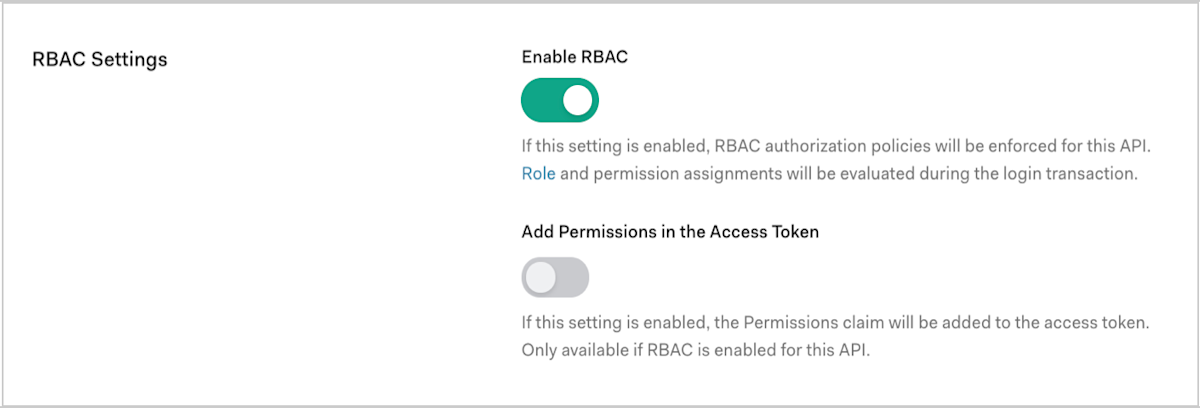
- RBAC (Enable Role-Based Access Control): When enabled, Auth0 evaluates the user's assigned Role and its associated Permissions during the authorization flow. When disabled, user-level permissions are not factored into the token — the user's role is effectively ignored.
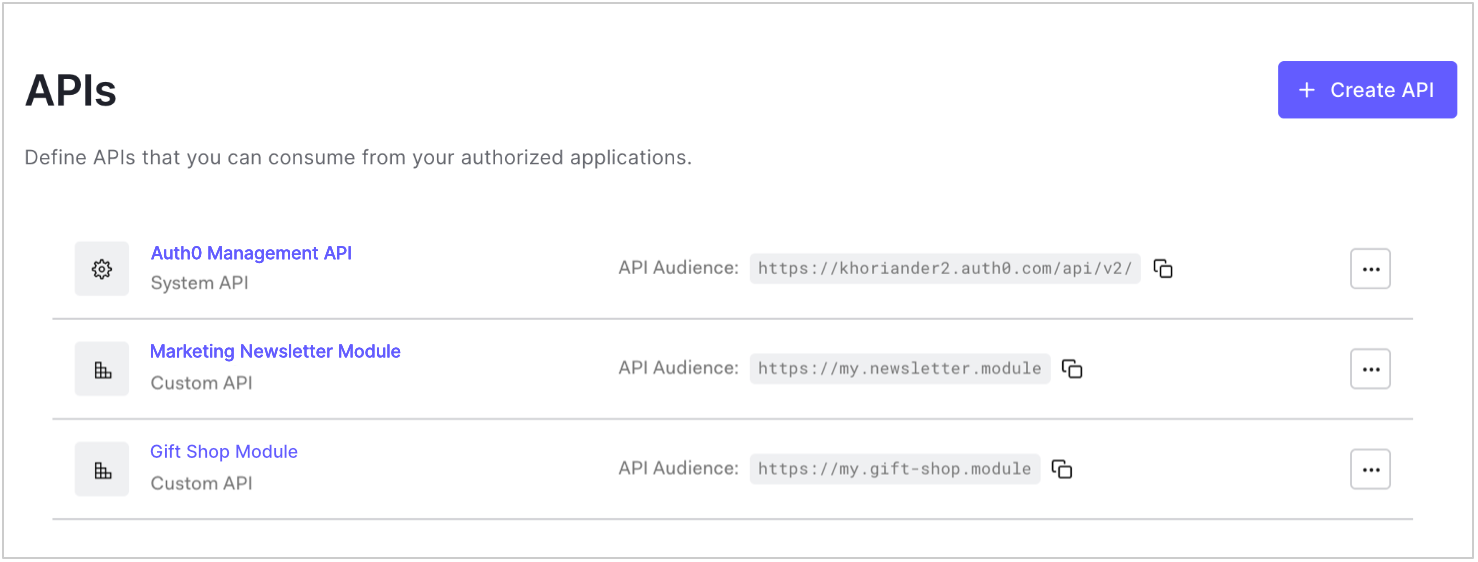
Auth0 Dashboard under APIs > [Your API] > Settings > RBAC Settings
There you scroll to the RBAC settings and toggle Enable RBAC.
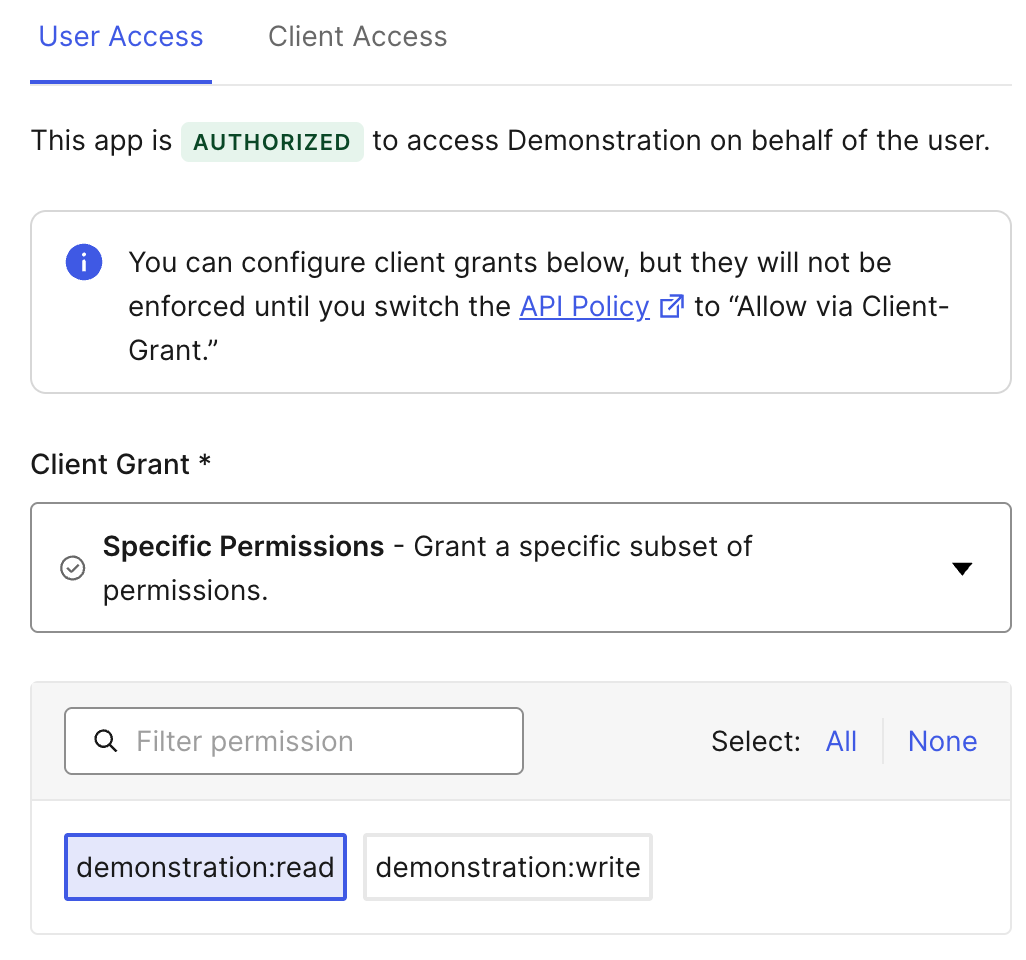
- Application Access Policy (For user access): This setting determines whether the application's Client Grant acts as a permission ceiling:
- Allow: The application is trusted without restriction. Token scopes are derived from the user's permissions alone (requires RBAC to be enabled to have effect).
- Allow via Client Grant: The application's Client Grant becomes a hard boundary. Only permissions explicitly granted to the application can appear in the token — regardless of what the user's role authorizes.
- Deny: The application is not trusted, and consequently, it is restricted from accessing any API permissions..
Auth0 Dashboard under APIs > [Your API] > Application Access

Click the “Edit” Button for your API to grant the specific permissions for the “Allow via client-grant” policy:
The combination of these two settings produces three fundamentally different authorization models. The following scenarios demonstrate each one.
Three Scenarios Featuring Auth0 Authorization in Action
The same four building blocks, configured differently, produce radically different security outcomes.
Scenario 1: The Internal Admin Portal (User-Centric Control)
- Use Case: An internal retail app where a Support Agent can only read orders (
read:orders), but an Inventory Manager can read and write products (read:products,write:products). - Configuration:
- API RBAC: Enabled
- Application Access Policy -> For user access: Allow
- Result: The access token’s scopes are determined solely by the user's assigned role. The application itself has no permission ceiling — it trusts Auth0's RBAC to govern access entirely.
Example decoded JWT scope claim for the Support Agent:
{
  "scope": "read:orders"
}
Example decoded JWT scope claim for the Inventory Manager:
{
  "scope": "read:products write:products"
}
What happens if you get it wrong: If you enable RBAC but forget to assign a Role to a user, the token arrives with zero scopes — and your API rejects every request. RBAC with no roles assigned means no access, not full access. This is the least privilege working as designed.
When to use this model: Internal tools and admin portals where user identity and role are the only trust signals you need.
Scenario 2: The Third-Party Partner App (Application-Centric Control)
- Use Case: A B2B SaaS partner application that must only be allowed to read analytics data (
read:analytics), even if an admin withdelete:analyticsprivileges logs in. - Configuration:
- API RBAC: Disabled
- Application Access Policy -> For user access: Allow via Client Grant
- Result: The application's Client Grant creates a permission ceiling. The token contains only the scopes granted to the application itself, regardless of the user's permissions.
Example decoded JWT scope claim — even for an admin user:
{
"scope": "read:analytics"
}
The admin's delete:analytics permission never reaches the token. This configuration directly addresses OWASP A01:2025 Broken Access Control by ensuring that even a compromised admin session cannot exceed the application's permission boundary.
What happens if you get it wrong: If you set this policy but forget to configure the Client Grant, the application has no granted permissions — the token is empty, and all API calls fail.
When to use this model: External integrations, partner apps, and any scenario where the application must be constrained regardless of who authenticates.
Scenario 3: The Secure Mobile App (The Principle of Least Privilege in Action)
- Use Case: A healthcare mobile app that is only allowed to read patient data (
read:patient_history), while the doctors using it have broader permissions (includingwrite:patient_history) that they use in a separate full-featured web portal. - Configuration:
- API RBAC: Enabled
- Application Access Policy -> For user access: Allow via Client Grant
- Result: The final scopes in the token are the intersection of the user's permissions and the application's permissions. The
write:patient_historypermission is excluded because the mobile app’s Client Grant does not include it — even though the doctor’s role does.
Example decoded JWT scope claim:
{
"scope": "read:patient_history"
}
What happens if you get it wrong: If you enable RBAC but set the policy to "Allow" instead of "Allow via Client Grant," the Client Grant ceiling is bypassed entirely — the doctor's full write:patient_history permission flows into the mobile app's token, creating exactly the privilege escalation this model is designed to prevent.
When to use this model: Mobile apps, regulated industries, multi-tenant SaaS — any scenario where both the user and the application must be independently trusted.
How the Scopes of a Token Are Calculated
The access token an application receives is the calculated result of several factors intersecting at the moment of the request. Auth0 evaluates four inputs:
- Audience: The API the token is intended for.
- Requested Scopes: The permissions the application asks for in the authorization request.
- User's Permissions: The complete list of permissions granted to the user via their assigned roles.
- Application's Permissions: The permissions explicitly granted to the application via its Client Grant.
Auth0 processes these inputs based on your API's configuration to mint the final token. In every case, the requested scopes act as a filter — you never receive more than you ask for, even if the user and app are both authorized for more.
Auth0 issues JWTs by default when you specify an audience (decode them at jwt.io for debugging). It will deliver an opaque access token by default if no audience is specified. For details on token formats, see the Auth0 Access Token documentation.
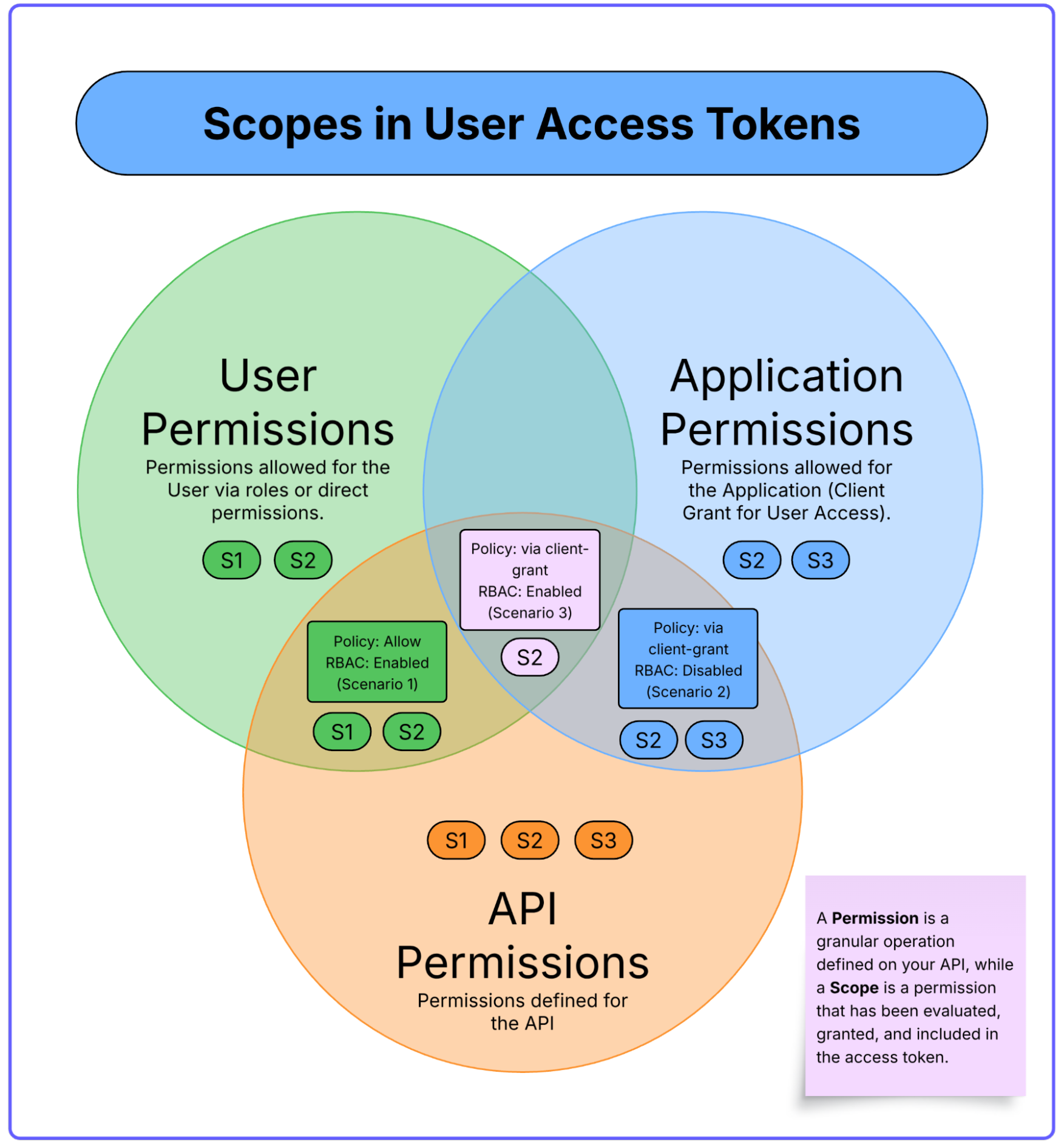
A Summary of Logic from the Three Scenarios
| Scenario | Core Principle | Key Auth0 Configuration | Final Token Scopes (Simplified) |
|---|---|---|---|
| 1. The Admin Portal | The User's Role is King | RBAC: Enabled Policy: Allow | Token = User Permissions ∩ Requested Scopes |
| 2. The Partner App | The Application is King | RBAC: Disabled Policy: Allow via Client Grant | Token = App Permissions ∩ Requested Scopes |
| 3. The Secure Mobile App | The Intersection is King | RBAC: Enabled Policy: Allow via Client Grant | Token = (User Permissions ∩ App Permissions) ∩ Requested Scopes |
Four Rules for Architecting a Resilient Authorization Strategy
- Name permissions using
verb:resourceformat. Define permissions likeread:orders,write:products, anddelete:analyticsyour API settings. This convention maps cleanly to scope claims in your JWTs, makes policy audits trivial, and is self-documenting across teams. - Default to minimum access, always. Start every user, role, and client grant with zero permissions and add deliberately. It is always easier to grant a permission later than to revoke one after an incident.
- Centralize coarse-grained authorization logic in Auth0 — not your code. Configure Roles, Permissions, and Client Grants in the Auth0 Dashboard. When your business rules change, update them in one place without redeploying your application.
The Auth0 Advantage
Auth0 operationalizes this strategy through three capabilities:
- Decoupled policy management: Roles and permissions are configured in the Dashboard, not your codebase. Your team updates policies without a deployment.
- Extensible logic via Actions: Auth0 Actions let you inject custom authorization logic into the login flow. For example, use a post-login Action to add a user's department to the token for downstream filtering..
- Unified model for users and machines: The same API and permission definitions secure both interactive user sessions and M2M service communication, eliminating the need for parallel authorization architectures.
Beyond Roles with Fine-Grained Authorization (FGA)
What if the Inventory Manager from Scenario 1 should only manage products in their assigned warehouse? Or the doctor from Scenario 3 should only read histories of patients in their care unit?
These questions require evaluating the relationship between a specific user and a specific resource — something roles and scopes alone cannot express. This is Relationship-Based Access Control (ReBAC), and it's exactly what Auth0 FGA is built for.
The practical signal: When your access rules shift from "does this user have this role?" to "does this user have a relationship to this specific object?" — you've outgrown standard RBAC.
Put It Into Practice
- Experiment: These features are available on every Auth0 plan. Sign up for a free account and replicate one of the three scenarios from this post.
- Go deeper: Read the official documentation on Role-Based Access Control and API Authorization.
- Ask questions: Join the Auth0 Community Forum — architects, developers, and Auth0 engineers discuss real-world authorization challenges daily.
Authorization is not a feature you bolt on — it's an architectural decision. Auth0 gives you the tools to make it right from the start.