TL;DR: Auth0 for AI Agents is now available in GA! Connect your AI agents to apps and data more securely, give users control over the actions AI agents can perform and the data they can access, and enable human confirmation for critical agent actions. Start building today.
The Challenge: Build Powerful AI Agents without Sacrificing Security
As your teams move quickly to build AI agents, it’s essential to strike a balance between speed and precision. Today, the easiest way to get up and running is to use an AI agent framework and have your AI agents use hard-coded credentials or API keys. When doing this, you'll find that this is only suitable for development and testing, not for taking your AI agents to production. This approach is flawed because it not only grants AI agents more access than necessary, but it also lacks the essential authentication solution needed for robust security. This leaves substantial, unaddressed gaps outside the scope of the framework:
- How will your AI agents identify your users and securely connect to their apps and APIs?
- How do you maintain agent oversight and build in human approval for critical actions?
Failure to properly address these challenges and set specific agent access parameters to actively safeguard user data can quickly turn your AI agents into a significant liability.
The Solution: Auth0 for AI Agents — The Complete Auth Solution for AI Agents
Auth0 for AI Agents provides a secure foundation for developers to build AI agents without compromising security or innovation. This complete solution securely connects your AI agents to apps and data, applying the correct user permissions in every scenario. If you’re building AI agents, we allow you to:
- Identify the user interacting with the agent.
- Give the AI agent access to the user’s data that you have.
- For example, their chat history, preferences, or previous orders.
- More securely connect to applications on behalf of that user.
- For example, checking their calendar and scheduling an appointment, sending an email, or booking a ticket.
- Give your users control — at the appropriate moment in the agent workflow — to approve critical actions, such as sending a document or allowing a purchase.
- Enforce fine-grained data access based on user permissions by setting specific access parameters for your AI agents to better safeguard user data.

How Auth0 for AI Agents Can Support Your Use Case
Auth0 for AI Agents comprises four features you can use for B2B, B2C, and internal apps: User Authentication, Token Vault, Asynchronous Authorization, and FGA for RAG.
User Authentication: Enable a More Secure Login Experience for AI Agents
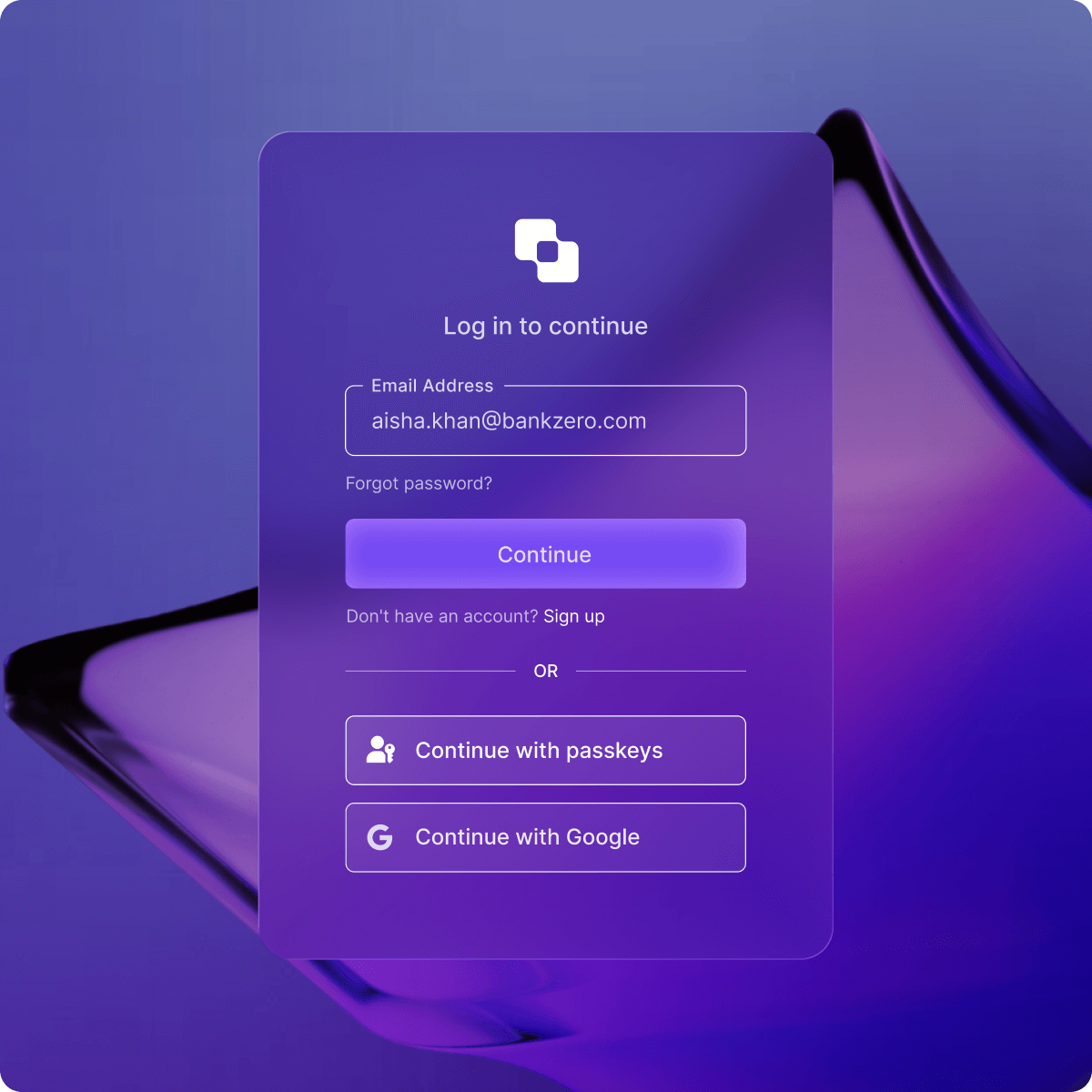
More secure and scalable User Authentication enables security, protects data, and controls access to features, while giving your agent secure access to first-party APIs. An example use case is a customer support AI agent working with a customer. Once the user logs in, user authentication enables the agent to identify the user and their order history.
@router.get("/protected")
def protected_route(auth_session=Depends(auth0_client.require_session)):
    user = auth_session.get("user")
    if not user:
        return {"error": "User not authenticated"}
    return {
        "message": f"Hello {user.get('email')}!",
        "user_id": user.get("sub")
    }
export default async function Home() {
  const session = await auth0.getSession();

  if (!session) {
    return (
      <main>
        <a href="/auth/login?screen_hint=signup">Sign up</a>
        <a href="/auth/login">Log in</a>
      </main>
    );
  }

  return (
    <main>Welcome, {session.user.name}!</main>
  );
}
Token Vault: More Securely Connect to 3rd-Party APIs
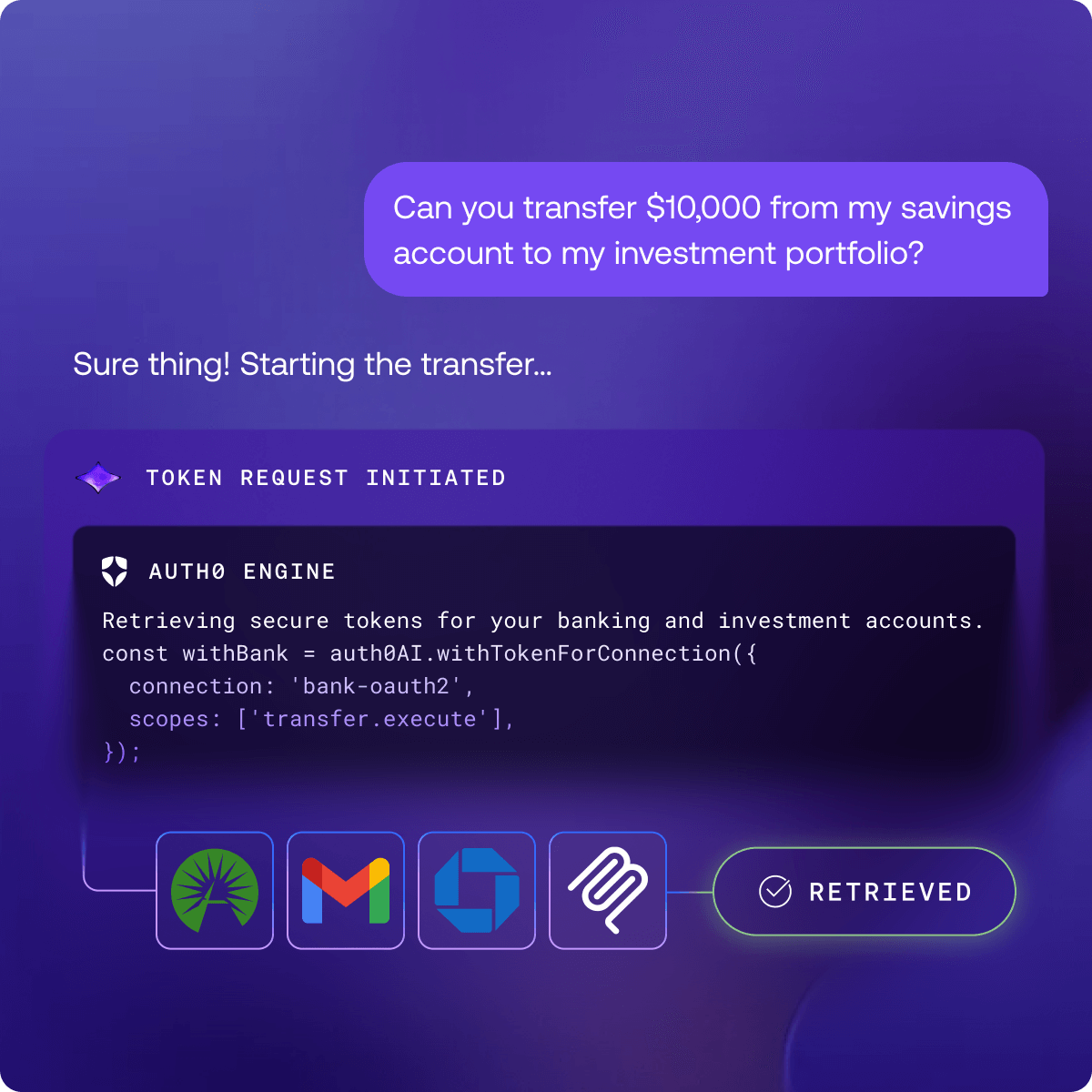
Token Vault is a secure, centralized authorization layer that integrates your AI agents with third-party APIs and external systems, such as Google Drive, Jira, or Slack. Auth0 helps secure credentials to these external systems by automatically storing, managing, and refreshing OAuth tokens, ensuring sensitive data and credentials are never at risk or stored within your agent’s logic. At the same time, you can control which agents can access which third-party systems. Token Vault allows AI agents to act seamlessly on behalf of the end-user, who provides consent only once, making it a secure and simple solution for connecting integrated apps and any OAuth service.
An example internal use case is building a productivity AI agent that requires access to GitHub and Slack. Empower your AI agent to take actions with 35+ supported app integrations and connect to any other app via standard OAuth support.

with_slack_connection = auth0_ai.with_token_vault(
    connection="sign-in-with-slack",
    scopes=["channels:read"],
)

@tool
def list_channels_tool_function(date: datetime):
    # Get the access token from Auth0 AI
    access_token = get_access_token_from_token_vault()

    # Call Slack SDK
    client = WebClient(token=access_token)
    response = client.conversations_list(
        exclude_archived=True,
        types="public_channel,private_channel",
        limit=10
    )
    channels = response['channels']
    channel_names = [channel['name'] for channel in channels]
    return channel_names

list_slack_channels_tool = with_slack_connection(StructuredTool(
    name="list_slack_channels",
    description="List channels for the current user on Slack",
    args_schema=EmptySchema,
    func=list_channels_tool_function,
))
export const withSlackConnection = auth0AI.withTokenVault({
  connection: 'sign-in-with-slack',
  scopes: ['channels:read'],
});

export const listChannels = withSlackConnection(
  tool({
    description: "List channels for the current user on Slack",
    parameters: z.object({}),
    execute: async () => {
      // Get the access token from Auth0 AI
      const accessToken = getAccessTokenFromTokenVault();

      // Call Slack SDK
      const web = new WebClient(accessToken);

      const result = await web.conversations.list({
        exclude_archived: true,
        types: "public_channel,private_channel",
        limit: 10,
      });

      return result.channels?.map((channel) => channel.name);
    },
  })
);
Asynchronous Authorization: Enable Human-in-the-Loop Approval for Critical Actions
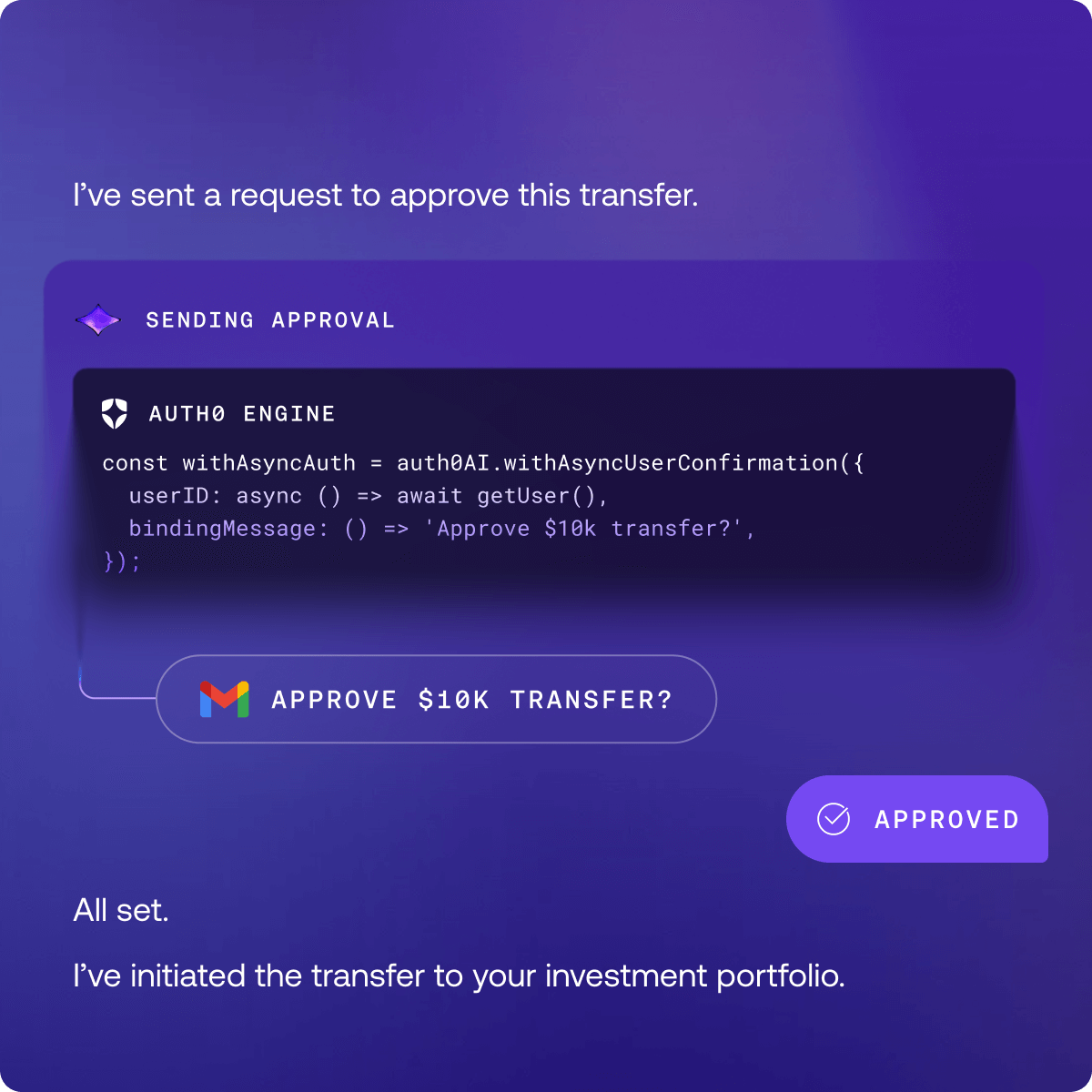
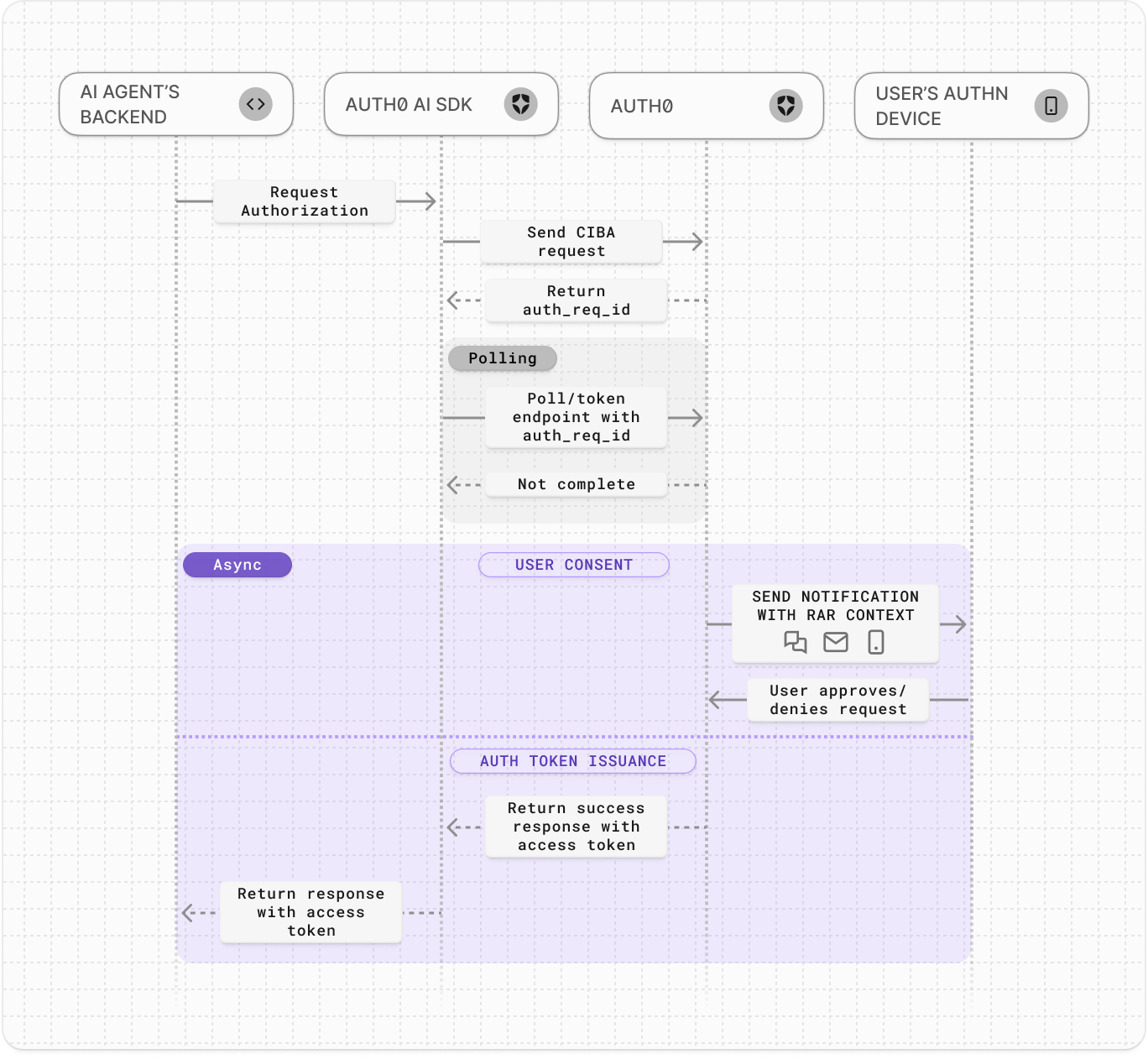
Auth0 for AI Agents enables AI agents to asynchronously authorize users using the Client-Initiated Backchannel Authentication Flow (CIBA). AI agents can work in the background, only notifying the user when needed for critical actions.
When you add more secure human-in-the-loop approvals to your AI agent workflows, you can use Auth0 to request the user’s permission to complete an authorization request. The AI agent can render rich authorization data in the consent prompt so the user knows exactly what they’re authorizing.
An example use case is a user requesting that your AI agent make a purchase online, but the agent requires confirmation to complete the transaction. Even if the AI agent wanted to purchase the product, it does not have permission to do so on its own, because it doesn’t have user authorization. We only issue the token to the agent to perform an action on the user’s behalf when the user approves the transaction. This means that your users remain fully in control.
with_async_user_confirmation = auth0_ai.with_async_authorization(
    audience=settings.SHOP_API_AUDIENCE,
    binding_message=lambda product: f"Do you want to buy {product}",
    user_id=get_user_id(config),
)

@tool
async def shop_online_fn(product: str):
    """Tool to buy products online."""

    credentials = get_async_authorization_credentials()

    async with httpx.AsyncClient() as client:
        response = await client.post(
            API_URL,
            headers={
                "Authorization": f"Bearer {credentials['access_token']}",
            },
            json={ "product": product },
        )

    return response.json()
export const withAsyncAuthorization = auth0AI.withAsyncAuthorization({
  userID: async () => await getUser(),
  bindingMessage: async ({ product }) => `Do you want to buy ${product}`,
  audience: process.env['API_AUDIENCE']!,
});

export const shopOnlineTool = withAsyncAuthorization(tool({
    description: 'Tool to buy products online',
    parameters: z.object({ product: z.string() }),
    execute: async (params) => {
      const credentials = getAsyncAuthorizationCredentials();

      const response = await fetch(API_URL, {
        headers: {
          Authorization: `Bearer ${credentials?.accessToken}`,
        },
        body: JSON.stringify(params),
      });
      const result = await response.json();
      return result;
    },
  }));
Push notifications with Guardian are available now. Email and SMS channels are coming soon.
Fine-Grained Authorization for Retrieval Augmented Generation (FGA for RAG): Safeguard User Data and Prevent Leaks
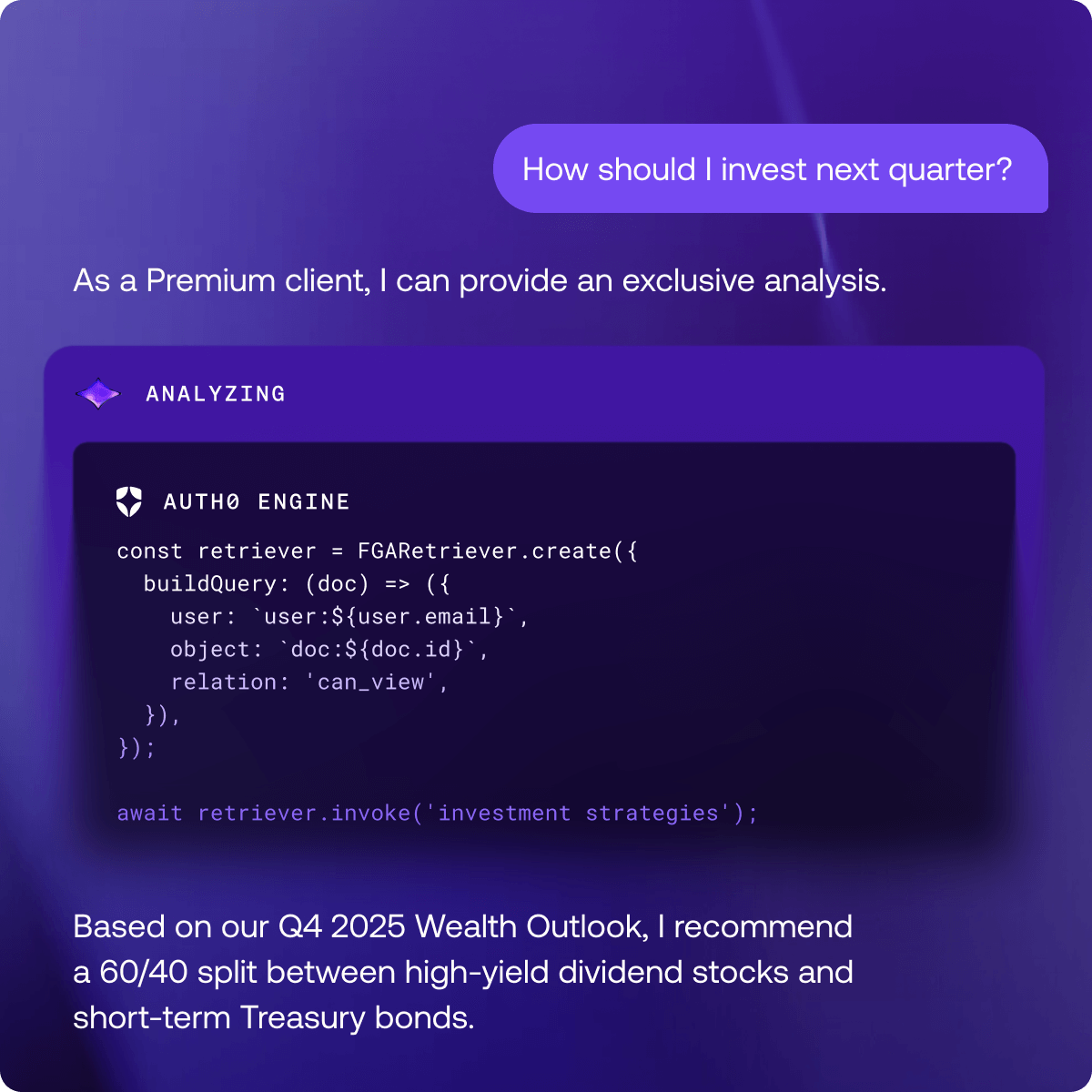
Auth0 for AI Agents enables AI agents to implement fine-grained authorization for Retrieval Augmented Generation (RAG), also known as FGA for RAG. When AI agents use RAG to deliver sophisticated, relevant responses to user queries, they only have access to authorized data.
An example is a GTM sales AI agent that searches company documents for competitor intel and analysis on how to pitch. The AI agent quickly searches all documents and gives your sales team direct, immediate answers. While it’s a great capability, you need to ensure that users only receive answers from documents they have access to, rather than all company documents. Looking under the hood at the code:
- Query the Vector DB to find the most semantically relevant document embeddings to the question. The source documents will already be indexed and stored in the Vector DB.
- Filter the results using FGA, where the raw results from the Vector DB are checked against FGA database for permissions, and only the documents that are permitted for the user are returned back to the agent.
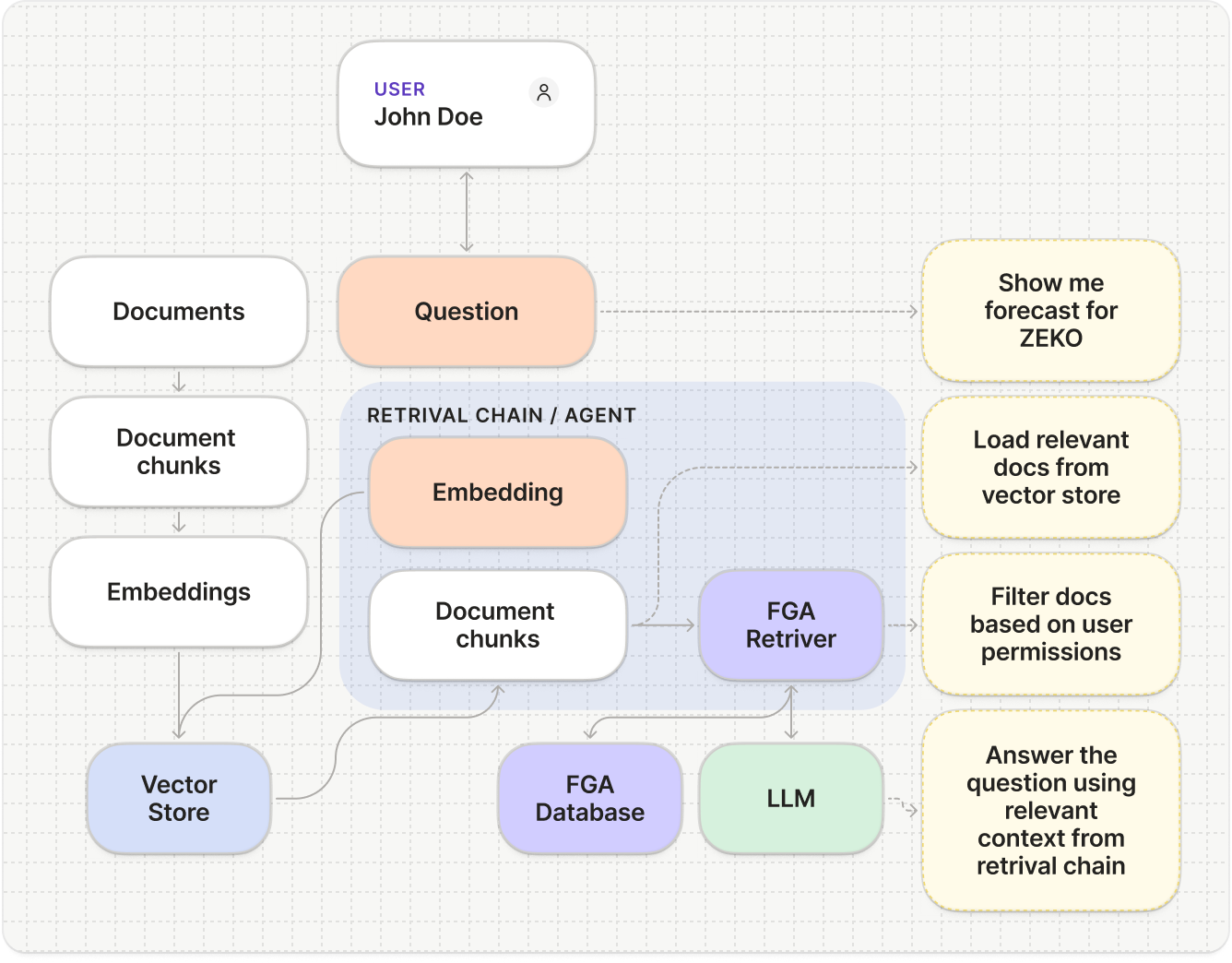
Fine-Grained Authorization enables you to model complex permission structures, such as those involving document access, where users have various permission levels (view, comment, edit, or share). Additionally, users can belong to multiple groups, from which they inherit permissions. Fine-Grained Authorization is scalable and performant in complex permission situations with large amounts of documents. Use FGA for RAG as the security layer with knowledge assistant-type AI agents to enforce document permissions during searches.
@tool
def get_context_documents_tool(query: str):
    """Use the tool when user asks for documents"""
    retriever = FGARetriever(
        retriever=vector_store.as_retriever(),
        build_query=lambda doc: ClientBatchCheckItem(
            user=f"user:{user_email}",
            object=f"doc:{doc.metadata.get('documentId')}",
            relation="can_view",
        ),
    )
    documents = retriever.invoke(query)
    return "\n\n".join([document.page_content for document in documents])
export const getContextDocumentsTool = tool(
  async ({ question }) => {
    const user = await auth0.getUser();
    const retriever = FGARetriever.create({
      retriever: vectorStore.asRetriever(),
      buildQuery: (doc) => ({
        user: `user:${user?.email}`,
        object: `doc:${doc.metadata.documentId}`,
        relation: 'can_view',
      }),
    });

    const documents = await retriever.invoke(question);
    return documents.map((doc) => doc.pageContent).join('\n\n');
  },
  {
    name: 'get_context_documents',
    description: 'Use the tool when user asks for documents',
    schema: z.object({ question: z.string() }),
  },
);
Start building with your favorite frameworks

These SDKs make it fast and easy to integrate Auth0 with your AI agents using frameworks such as LangChain, LlamaIndex, and Cloudflare Agents, and others.
Our SDKs detect when your tool calls require the user to authenticate and will interrupt the tool call flow, displaying a message to the user indicating they need to authenticate. Once the user authenticates, the tool call automatically resumes. The SDKs use Auth0’s Token Vault, which stores the user’s access token to the external API. This means that on subsequent tool calls, the user will not need to authenticate again because Token Vault will automatically provide the access token.
Check out, Assistant0: An AI Personal Assistant Secured with Auth0. It’s an AI personal assistant that consolidates your digital life by dynamically accessing multiple tools to help you stay organized and efficient.
Auth0 AI for LangChain: Auth0 for AI Agents, LangChain, and LangGraph SDKs enable you to easily integrate with and secure AI agent workflows using LangChain and LangGraph. Get started >>
npm install @auth0/ai-langchain
pip install auth0-ai-langchain
Auth0 AI for LlamaIndex: Auth0 for AI Agents and LlamaIndex SDKs enable you to easily integrate with and secure AI agent workflows using LlamaIndex. Get started >>
npm install @auth0/ai-llamaindex
pip install auth0-ai-llamaindex
Auth0 AI for Vercel AI SDK: Auth0 for AI Agents and Vercel AI SDKs enable you to easily integrate with and secure AI agent workflows using Vercel AI. Get started >>
npm install @auth0/ai-vercel
What’s Coming Soon at Auth0
- Auth for MCP is currently available in Early Access. Request to join the program here >>. Auth for MCP will allow you to leverage Auth0’s features within your MCP-powered workflows. Authenticate users before they or their AI Agents connect to MCP Servers, register MCP clients and servers so AI Agents can safely connect to your resources using OAuth 2.0, and connect to your internal APIs securely with Custom Token Exchange.
- Cross App Access (XAA) is an open protocol that extends OAuth to support secure agent-to-app and app-to-app communication by shifting consent and policy enforcement to the Identity Provider (IdP). Auth0 will soon implement this natively, allowing your app to operate as a requesting app (exchanging ID-JAG tokens for access) or a resource app (validating and issuing scoped tokens). When your customers use a participating IdP that supports the protocol (such as Okta), they gain centralized control, visibility, and governance of all app and agent connections. Sign up for the beta.
Build Powerful AI Agents with Auth0
Start building today:
Get started now:
- Our free plan includes two connected apps in our Token Vault and more. As you scale, we offer self-service plans with added upgrades. Start building >>
- Existing Auth0 users can get started for free, regardless of their current Auth0 plan. Get started>>
- We offer one year of Auth0 free for eligible startups. Apply today >>
- We provide eligible nonprofits with 50% off self-service and enterprise plans. Apply today >>
Questions? Join us for our Community AMA on January 14 and post your questions here, or join us for our Reddit AMA on Dec 11th.
With Auth0 for AI Agents, you can move fast, build responsibly, and remain in control.
About the author

Gareth Davies
Chief Product Officer, Auth0