
We'll build Daily Wellbeing, an app that reads your Fitbit activity and sleep data and uses Fireworks to suggest a few things to try today. You can compare the latest completed day with your recent averages and review the measurements behind the suggestions.
Fitbit exposes these readings through the Google Health API v4. Access requires Google Cloud OAuth credentials and a custom Auth0 OAuth2 connection.
Auth0 handles login, and Token Vault stores the Fitbit authorization credentials. After connecting Fitbit, you choose whether to share the summary with Fireworks. You can view your readings without running inference.
What we'll build
Sign users in with Auth0 and connect Fitbit after login.
Retrieve a Fitbit token through Token Vault on the server.
Calculate a daily report from activity, sleep, and resting heart-rate readings.
Use a Fireworks model with a tool that returns the signed-in user's summary.
Stream suggestions after the user chooses to share that summary.
Suggestions cover general wellbeing, such as comfortable movement breaks and a consistent bedtime. The model prompt excludes diagnosis and treatment recommendations.
Technology stack
We'll use Next.js 16 with TypeScript, the Auth0 Next.js SDK 4, and AI SDK 7 with its Fireworks provider. Zod validates requests and Fitbit responses. Dependency versions are pinned in the lockfile.
The Auth0 Next.js SDK includes the Connected Accounts and Token Vault methods used here.
Prerequisites
You'll need:
Node.js 22 or newer and npm. Use Node.js 24 LTS for a new setup.
An Auth0 tenant with Token Vault, Connected Accounts, and the My Account API available.
A personal Google account linked to a profile in the Google Health mobile app, recent health readings, and a Google Cloud Web OAuth client with Google Health API enabled. Google Workspace accounts cannot own the health profile.
A Fireworks account, API key, credit, and a model that supports streaming and function calling.
Get the sample application on GitHub.
Set up the app with an AI coding agent
Give your coding agent this prompt to clone the sample, configure the integrations, and run its checks. Auth0 provides login and Token Vault; the Fireworks provider comes from Vercel's AI SDK.
"Create a working Daily Wellbeing app using this repository as the starter:
https://github.com/deepu105/fireworks-fitbit-coach
Clone it into a new project directory. Preserve its tested server routes and
pinned dependencies.
Use @auth0/nextjs-auth0 4 for Auth0 login, Connected Accounts, and Token Vault.
Use Vercel AI SDK 7 (the ai and @ai-sdk/react packages) with @ai-sdk/fireworks
for Fireworks inference. The Fireworks provider is part of the AI SDK.
Read README.md, AGENTS.md, package.json, and .env.example in the sample.
Install with npm ci. Copy .env.example to .env. Keep credentials out of
source control, browser code, model messages, terminal output, and chat.
Ask me to enter secrets in the environment file or provider console.Follow the README's Auth0 CLI setup. Use a tenant with Token Vault,
Connected Accounts, and the My Account API available. Inspect existing
resources before creating any. Configure a Regular Web Application with
Authorization Code, Refresh Token, and Token Vault grants. Match the
sample's expiring non-rotating refresh tokens and My Account MRRT policy.
Authorize user access with read:me:connectedaccounts,
create:me:connectedaccounts, and delete:me:connected_accounts. Enable a
login connection and bind the separate google-health connection to the app.Follow https://developers.google.com/health/setup for Google Cloud setup.
I need a personal Google account linked in the Google Health mobile app,
Google Health API enabled, a Web OAuth client, and consent-screen test users
when in Testing mode. Register https://YOURAUTH0DOMAIN/login/callback
with Google. Register http://localhost:3000/auth/callback with Auth0.
Configure the custom google-health OAuth2 connection with the Google client
credentials and scripts/google-health-profile.js. Enable its Connected
Accounts purpose and request these three read scopes:
https://www.googleapis.com/auth/googlehealth.activity_and_fitness.readonly
https://www.googleapis.com/auth/googlehealth.sleep.readonly
https://www.googleapis.com/auth/googlehealth.health_metrics_and_measurements.readonlyComplete AUTH0DOMAIN, AUTH0CLIENTID, AUTH0CLIENTSECRET, AUTH0SECRET,
APPBASEURL, AUTH0FITBITCONNECTION, REPORTTIMEZONE, FIREWORKSAPIKEY,
and FIREWORKSMODEL. Generate AUTH0SECRET with openssl rand -hex 32.
Keep the Fireworks key on the backend and Google OAuth credentials in Auth0.
The sample uses accounts/fireworks/models/kimi-k3 with thinking disabled.
Confirm model access and available credit for my account.Preserve the flow: sign in with Auth0, connect Google Health, retrieve the
current user's token through Token Vault, and show daily readings with
seven-day personal comparisons. Keep missing values as unknown. Require
an explicit sharing choice before calling Fireworks. Use the server-fetched
report in getDailyFitbitSummary, then stream general wellbeing suggestions.
Render Markdown without raw HTML or remote model-generated images.
Keep identity, credentials, and API URLs outside model-controlled input.Start npm run dev and leave development mode and live reload enabled.
Help me sign in, connect my Google Health account, and view the report.
Explain any missing setup or permissions. A new health account can have
no readings; use synced data for a completed date. Let me review the
readings and choose to share the summary before generating suggestions.Make external account or tenant changes only with the permissions I provide.
Don't deploy or publish the app as part of this setup."
Configure Google Health and Auth0
Configure two OAuth callbacks: Google sends its authorization result to Auth0, and Auth0 redirects back to the Next.js app.
| Provider configuration | Local development value |
|---|---|
| Google Web OAuth client's redirect URI | https://YOUR_AUTH0_DOMAIN/login/callback |
| Auth0 application's Allowed Callback URLs | http://localhost:3000/auth/callback |
| Auth0 application's Allowed Logout URLs | http://localhost:3000 |
| Auth0 application's Allowed Web Origins | http://localhost:3000 |
Use the same Auth0 domain throughout, including your custom domain if you have one.
Configure the Google account and OAuth client
Follow the Google Health setup guide:
Open the Google Health mobile app on your phone, sign in with a personal Google account, and finish creating or linking its health profile.
Enable Google Health API in your Google Cloud project. Configure the OAuth consent screen and create a Web application OAuth client.
Set its redirect URI to the Auth0
/login/callbackURL above. Replace the guide's examplehttps://www.google.comredirect with this callback.For an External/Testing OAuth app, add the personal Google account under Audience > Test users.
Add the three read scopes in the next section under Data Access.
Keep the Google OAuth client ID and secret for the Auth0 connection. Google Workspace accounts can sign into the app through Auth0, but Google requires a personal account for the health profile. You can use different accounts for these steps.
Google provides no prefilled health-data sandbox. Sync your tracker or add a sleep log for yesterday in the mobile app. Google OAuth can authenticate an account without a linked health profile. The connection's profile script checks for that profile through the Health API.
Configure the Auth0 application
In the Auth0 Dashboard, create a Regular Web Application and set the callback, logout, and origin values above. Enable a database or social connection for login. Users connect Fitbit after signing in.
Under Advanced Settings > Grant Types, enable Authorization Code, Refresh Token, and Token Vault. Our tested setup uses non-rotating, expiring refresh tokens. Disable Allow Refresh Token Rotation to match it. The CLI payload sets a 30-day lifetime and seven-day idle lifetime. See Configure Token Vault for the grant configuration.
Configure the My Account API using the third-party API quickstart:
Under Applications > APIs, activate Auth0 My Account API if it isn't active.
Under Application Access, authorize the application for user access with
read:me:connected_accounts,create:me:connected_accounts, anddelete:me:connected_accounts.Enable Allow Skipping User Consent for this first-party application as described in the quickstart.
In the application's Multi-Resource Refresh Token settings, enable the policy for the My Account API and those Connected Accounts scopes.
To configure the tenant from your terminal, follow the full Auth0 CLI setup in the sample README. It includes app creation, My Account API settings, the user grant, MRRT policy, connection creation, and application bindings. Dashboard labels can vary with tenant availability.
Add the Google Health connection
Create a Custom OAuth2 connection named google-health, using these values:
| Setting | Value |
|---|---|
| Client ID and Secret | The Google Cloud Web OAuth credentials |
| Authorization URL | https://accounts.google.com/o/oauth2/v2/auth?access_type=offline&prompt=consent |
| Token URL | https://oauth2.googleapis.com/token |
| Purpose | Connected Accounts for Token Vault |
Use these Google Health read scopes, separated by spaces:
https://www.googleapis.com/auth/googlehealth.activity_and_fitness.readonlyhttps://www.googleapis.com/auth/googlehealth.sleep.readonlyhttps://www.googleapis.com/auth/googlehealth.health_metrics_and_measurements.readonly
These scopes grant read access to activity, sleep, and health measurements. Users can grant some of them; the report includes the measurements they permit.
Paste this Fetch User Profile Script into the connection:
// Paste this function into the custom OAuth2 connection's profile script.
function fetchUserProfile(accessToken, ctx, cb) {
  request.get({
    url: 'https://health.googleapis.com/v4/users/me/identity',
    headers: { Authorization: 'Bearer ' + accessToken },
    json: true,
    timeout: 10000
  }, function (err, response, body) {
    if (err || !response || response.statusCode !== 200 || !body || !body.healthUserId) {
      return cb(new Error('Google Health profile unavailable. Finish linking the personal Google account in the Google Health mobile app and check API permissions.'));
    }
    // Keep the provider identifier in Auth0, outside model messages.
    cb(null, { user_id: String(body.healthUserId) });
  });
}
Enable the connection for the web app. You can disable its authentication purpose because users connect health data after signing in through another connection. With the Management API, set connected_accounts: {"active": true} at the top level of the connection object.
The profile script returns healthUserId as Auth0's connected-account identifier. The app excludes it from model messages. access_type=offline requests a Google refresh token, and prompt=consent lets users review access when connecting. Auth0 stores these upstream credentials in Token Vault. Google refresh tokens from a Testing-mode OAuth app expire after seven days, so users must reconnect when they expire.
Configure Fireworks and run the sample
Create an inference key in the Fireworks console. Set FIREWORKS_MODEL to accounts/fireworks/models/kimi-k3. Confirm model access in your Fireworks account, or select another compatible model.
For BYOK, the application developer supplies the backend's Fireworks key. End users authorize their Fitbit accounts; they don't enter inference keys.
Clone the sample and install its dependencies:
git clone https://github.com/deepu105/fireworks-fitbit-coach.git
cd fireworks-fitbit-coach
npm ci # or bun install
test -f .env || cp .env.example .env
openssl rand -hex 32
Set the values in .env, using the generated value for AUTH0_SECRET:
# .env
AUTH0_DOMAIN=your-tenant.eu.auth0.com
AUTH0_CLIENT_ID=your-client-id
AUTH0_CLIENT_SECRET=your-client-secret
AUTH0_SECRET=your-generated-64-character-hex-secret
APP_BASE_URL=http://localhost:3000
AUTH0_FITBIT_CONNECTION=google-health
REPORT_TIME_ZONE=Europe/Amsterdam
FIREWORKS_API_KEY=your-fireworks-key
FIREWORKS_MODEL=accounts/fireworks/models/kimi-k3
Keep these credentials on the backend. Don't add a NEXT_PUBLIC_ prefix or commit your environment file.
npm run dev
Open http://localhost:3000, sign in, and select Connect Fitbit. Choose the personal Google account linked to your health profile and grant the read scopes you want to use. The dashboard should load your report after the callback. Use Review permissions to add access later.
Review the readings, select the sharing checkbox, and choose Generate suggestions. The backend fetches fresh Fitbit data before inference and updates the cards with the summary sent to the model. You need to select the checkbox again for another request.
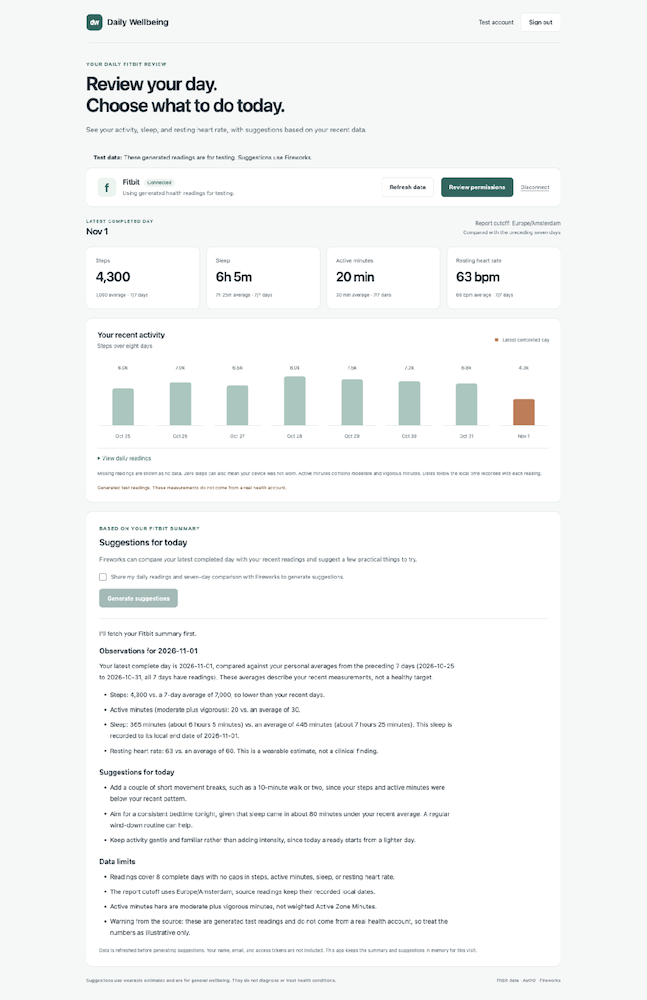
Connected dashboard with test readings and a real Fireworks response. We hid the test account email.
Checkpoint
Sign in, connect Fitbit, and check the report. Confirm that viewing data doesn't trigger inference, then select the sharing checkbox and generate suggestions. Use the troubleshooting table if a step fails.
Sign in and connect Fitbit
Use the Auth0 session to identify the user, Token Vault to retrieve their Fitbit token, and the backend's Fireworks key for inference.
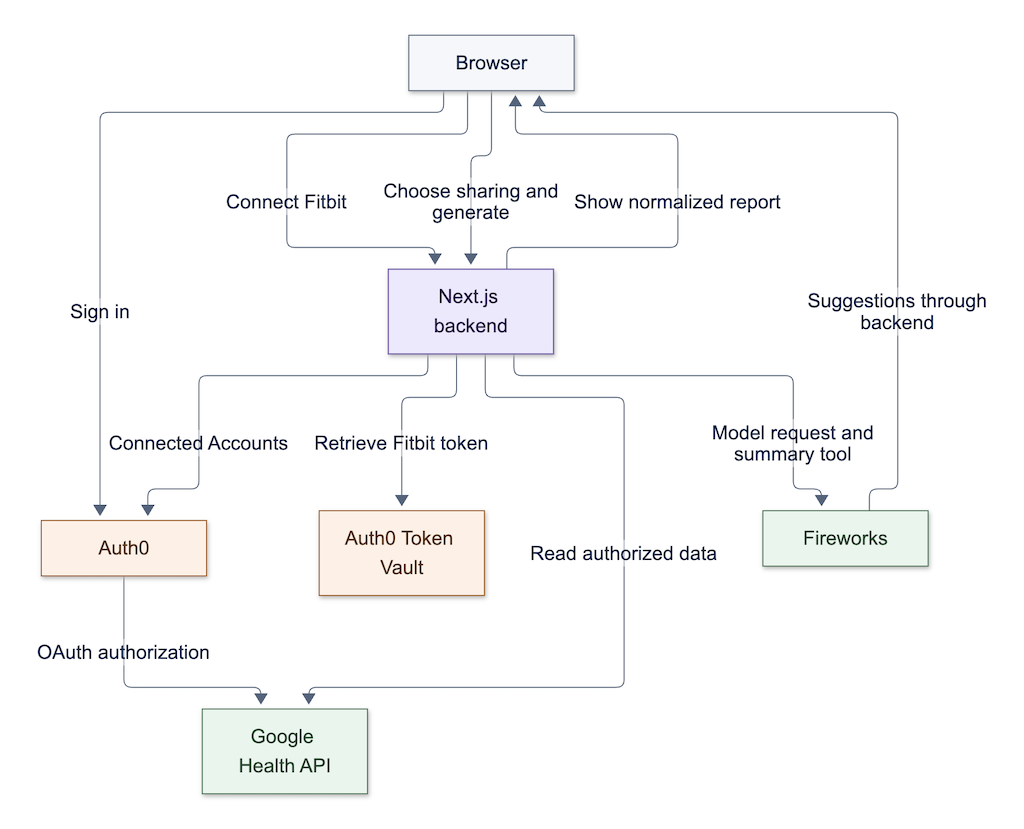
The Auth0 client requests offline access and the My Account API scopes:
// src/lib/auth0.ts
import "server-only";
import { Auth0Client } from "@auth0/nextjs-auth0/server";
import { NextResponse } from "next/server";
import { getAuth0Config } from "./config";

let client: Auth0Client | undefined;

export function getAuth0() {
  const { tenantOrigin, appOrigin } = getAuth0Config();
  client ??= new Auth0Client({
    domain: tenantOrigin,
    appBaseUrl: appOrigin,
    authorizationParameters: {
      audience: `${tenantOrigin}/me/`,
      scope: "openid profile email offline_access read:me:connected_accounts create:me:connected_accounts delete:me:connected_accounts",
    },
    enableAccessTokenEndpoint: false,
    // The application uses a same-origin POST with a fixed Fitbit connection.
    enableConnectAccountEndpoint: false,
    onCallback: async (error) => NextResponse.redirect(new URL(error ? "/?auth_error=1" : "/", appOrigin)),
  });
  return client;
}
Request offline_access to receive the Auth0 refresh token for Token Vault exchange. The configuration disables the browser access-token endpoint and returns a generic callback error indicator to keep provider diagnostics out of the browser.
The Connect Fitbit button submits to /api/fitbit/connect. The server verifies the session and request origin, then invokes the SDK with a fixed connection and scopes:
// src/lib/server-api.ts
connect: (request) => getAuth0().connectAccount({
  connection: getFitbitConnection(), scopes: FITBIT_SCOPES, returnTo: "/",
}, request),
The connection endpoint converts the SDK's redirect to HTTP 303, preserving its transaction cookies. This makes the browser follow the initial POST with a GET to the authorization page.
Retrieve a Fitbit token through Token Vault
The Fitbit service binds account listing and token retrieval to the current request's Auth0 session:
// src/lib/services.ts
import "server-only";
import { getAuth0 } from "./auth0";
import { createFitbitService } from "./fitbit/service";
import { healthApiOrigin } from "./fitbit/environment";
import { getFitbitConnection } from "./fitbit/scopes";

export function getFitbitService() {
  const auth0 = getAuth0();
  const connection = getFitbitConnection();
  return createFitbitService({
    connection, apiOrigin: healthApiOrigin(),
    getAccounts: () => auth0.getConnectedAccounts(),
    // The SDK performs Token Vault exchange using this request's session.
    getToken: async () => (await auth0.getAccessTokenForConnection({ connection })).token,
  });
}
Before calling getToken, check for one Fitbit account with at least one health read scope. Skip ungranted data streams and ask the user to reconnect if no health permissions remain. Multiple connected accounts produce an error because the app requires one account per user.
Call getAccessTokenForConnection() from Route Handlers so the SDK can perform the Token Vault exchange and save its encrypted connection-token cookie. Limit the page's Server Component to reading the login session.
| Credential | Used by the backend for |
|---|---|
| Auth0 refresh token | Token Vault exchange for the signed-in user |
| Google access token | Google Health requests for that connected account |
| Fireworks API key | Model inference |
Keep these credentials out of model messages.
Build a daily Fitbit report
REPORT_TIME_ZONE sets the cutoff for the latest completed date and defaults to UTC. Set it for your report calendar. Google Health's civil-date aggregation preserves the local date recorded with each measurement, including travel and daylight saving changes. The report retains those source dates without converting readings into the cutoff timezone.
Fetch data from the Google Health v4 endpoints under https://health.googleapis.com/v4/users/me/ with the current user's token:
| Endpoint suffix | Purpose |
|---|---|
identity | Check for a linked health profile |
dataTypes/steps/dataPoints:dailyRollUp | Daily step totals |
dataTypes/active-minutes/dataPoints:dailyRollUp | Active minutes grouped by activity level |
dataTypes/sleep/dataPoints:reconcile | Non-overlapping sleep sessions |
dataTypes/daily-resting-heart-rate/dataPoints:reconcile | Daily resting heart rate |
API paths stay fixed on the server; neither the browser nor the model supplies an account ID or URL. Requests disable caching and redirects and use timeouts.
Request a civil-date range from the first comparison date to midnight after the report date. Include the start date and exclude the end date:
// src/lib/fitbit/report.ts
const range = { start: asCivilTime(dates[0]), end: asCivilTime(end) };
  function rollup(type: string) {
    return pages(`dataTypes/${type}/dataPoints:dailyRollUp`, "rollupDataPoints", { range, windowSizeDays: 1, pageSize: 8 });
  }
  function reconcile(type: string, field: string) {
    const query = new URLSearchParams({ filter: `${field} >= "${dates[0]}" AND ${field} < "${end}"`, pageSize: "25" });
    return pages(`dataTypes/${type}/dataPoints:reconcile?${query}`, "dataPoints");
  }
Follow pagination before calculating totals, then map records by date because Google returns rollups in reverse order. Validate response fields, including protobuf integers represented as decimal strings.
For active minutes, sum MODERATE and VIGOROUS entries without weighting vigorous minutes. Some devices record only Active Zone Minutes, so this measurement can be missing. Sleep totals include non-overlapping sessions grouped by their recorded local end date, with the recorded end UTC offset as a fallback when civil end time is absent. Exclude overlapping or invalid totals.
Keep missing measurements as null and explicit zeros as zero. Each personal comparison uses available readings from the preceding seven dates:
// src/lib/fitbit/report.ts
function average(metric: Exclude<keyof Day, "date">): Average {
    const values = days.slice(0, 7).map((day) => day[metric]).filter((value): value is number => value !== null);
    return { value: values.length ? Math.round(values.reduce((sum, value) => sum + value, 0) / values.length * 10) / 10 : null, days: values.length };
  }
Each comparison includes a reading count so users can distinguish a two-day average from a seven-day average. These averages describe the person's recent history; they aren't health targets.
With full permissions, a report requires five initial Google Health requests plus any extra pages. The report skips data streams for ungranted scopes and shows a permission notice. If the report date has no supported measurements, users need to sync or add data before generating suggestions. Expired authorization and rate limits produce errors with reconnect or retry controls.
Generate suggestions with Fireworks
Configure the provider on the server with the application developer's key:
// src/lib/fireworks.ts
import "server-only";
import { createFireworks } from "@ai-sdk/fireworks";
import { ConfigurationError } from "./config";

export function getFireworksModel() {
  const apiKey = process.env.FIREWORKS_API_KEY?.trim();
  const model = process.env.FIREWORKS_MODEL?.trim();
  if (!apiKey || !model) {
    throw new ConfigurationError("Set FIREWORKS_API_KEY and FIREWORKS_MODEL in .env.local.");
  }
  const fireworks = createFireworks({ apiKey });
  return fireworks(model);
}
The /api/advice route requires a valid session, an exact matching request origin, and this body:
{"shareWithFireworks": true}
The route rejects extra fields, including client-supplied readings, prompts, account identifiers, and tokens. Fetch the report before starting the stream so the Auth0 SDK can save cookie changes.
After validation and report retrieval, call the model with the summary tool:
// src/lib/api.ts
const report = await dependencies.report(signal);
const result = streamText({
  model: dependencies.getModel(),
  system: WELLBEING_PROMPT,
  prompt: `Use my Fitbit summary to suggest a few practical things I can do today. The report covers ${report.date}; its cutoff uses ${report.timeZone}. Readings retain their recorded local dates.`,
  tools: {
    getDailyFitbitSummary: tool({
      description: "Read the signed-in user's normalized Fitbit summary for the latest complete day and seven prior days.",
      inputSchema: z.object({}).strict(),
      execute: async () => report,
    }),
  },
  prepareStep: ({ stepNumber }) => ({
    toolChoice: stepNumber === 0 ? { type: "tool", toolName: "getDailyFitbitSummary" } : "none",
  }),
  stopWhen: stepCountIs(2),
  maxOutputTokens: 1_536,
  providerOptions: { fireworks: { thinking: { type: "disabled" } } },
  maxRetries: 0,
  abortSignal: signal,
  onError: () => { /* Raw provider errors may contain health data or secrets. */ },
});
return result.toUIMessageStreamResponse({
  headers: privateHeaders,
  sendReasoning: false,
  onError: () => "Fireworks could not generate your suggestions. Check model access and account credit, then try again.",
});
We force getDailyFitbitSummary on the first step to return the current user's fetched report. On the second step, request suggestions with tools disabled. Disabling thinking keeps reasoning from consuming the short response budget. A live check with the default model completed both steps and streamed a full answer.
WELLBEING_PROMPT instructs the model to compare available measurements, give two or three gentle suggestions, and state data limits. It prohibits diagnosis, disease prediction, treatment changes, weight-loss targets, and intense exercise recommendations. Review live responses for accuracy and suitability; prompt instructions don't guarantee those results.
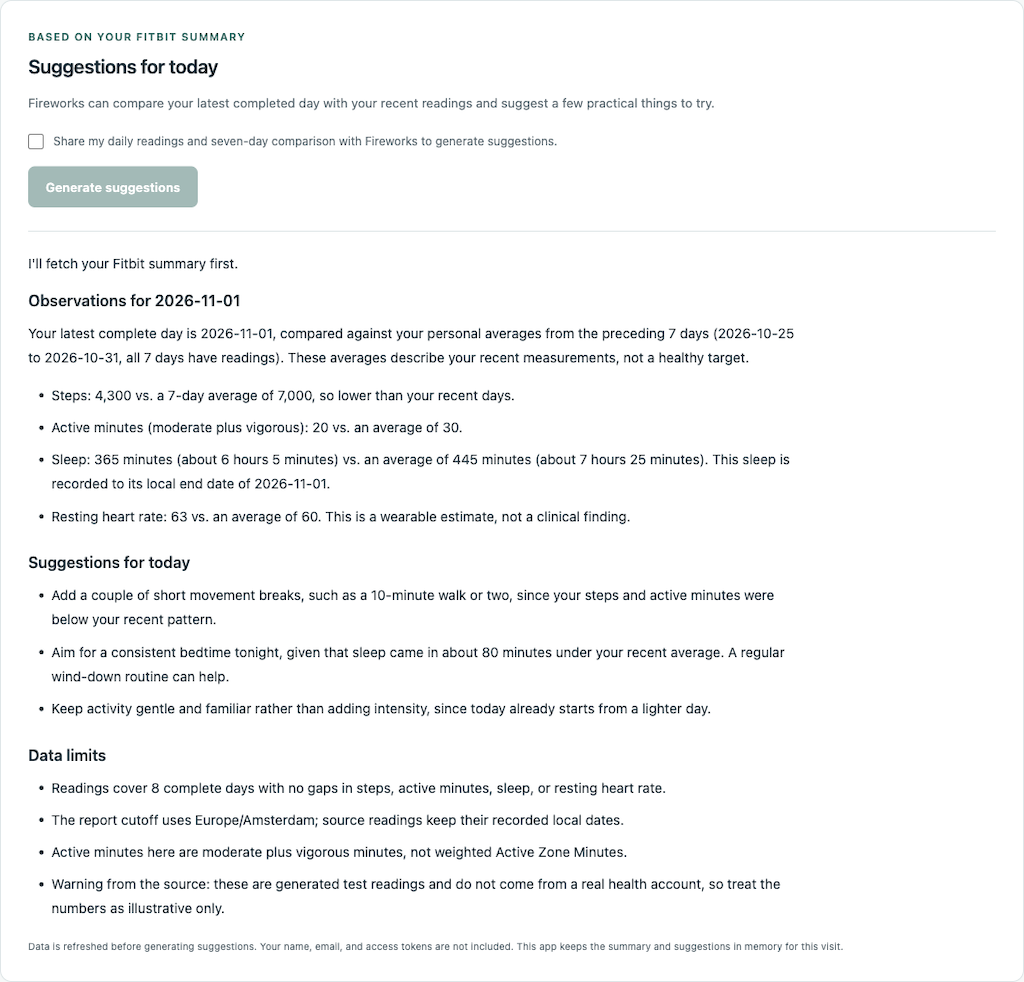
An actual Fireworks response to the test report. Wording varies between requests.
The tool returns normalized dates, timezone, measurements, comparison counts, and constructed data warnings. Its output excludes Fitbit names, profile identifiers, weight, activity descriptions, sleep stages, and log IDs.
AI SDK's React integration streams the response and displays the tool's summary. Render headings, lists, and emphasis with react-markdown, with raw HTML and remote images disabled and links limited to HTTP or HTTPS URLs. After a provider failure, select the sharing checkbox again to retry.
Wrapping Up
You now have an app that uses Auth0 for login, Token Vault for access to Fitbit data, and Fireworks for suggestions based on a daily summary. You can review the readings before choosing to share them with the model. To connect another user-authorized API, replace the Fitbit service and adapt the summary tool and model prompt to its data.
About the author

Deepu K Sasidharan
Principal Developer Advocate