
Authorization is one of the most important problems to take care of in your application, and chances are you will always have to deal with it in some form or another. From authentication, to roles, attributes or relationships, there are many ways you can define who can do what but there are some identified patterns that allow us to have the same capabilities regardless of the implementation or model we chose, and one way is by implementing AuthZEN’s Authorization API. In this blog post, you’ll get an introduction to the Authorization API, why it is important and how to use it.
What is the AuthZEN Authorization API 1.0?
The Authorization API 1.0 is a standard specification developed by the OpenID Foundation's AuthZEN Working Group. The primary goal of this API is interoperability. It allows applications to offload authorization logic to a dedicated engine without being tightly coupled to a specific implementation or policy language.
The Authorization API enables communication between Policy Decision Points (PDPs) and Policy Enforcement Points (PEPs) without requiring either component to know the internal details of the other, but what exactly are PDPs and PEPs?
A PDP is a specialized engine where security policies are defined, stored, and evaluated. The PEP is typically a component within your application, API gateway, or service mesh. The PEP intercepts an access request but does not know the specific security rules. Its sole job is to translate the request into a standard format and ask the PDP for a verdict. Upon receiving a query from the PEP, the PDP processes the inputs against its active policies to calculate a "Permit" or "Deny" decision, which it sends back to the PEP for enforcement.
How Does the Authorization API 1.0 Work?
The Authorization API 1.0 works by operating on a request-response model over HTTPS. It has two APIs: the Access Evaluation API and the Search API.
The Access Evaluation API allows you to consist of a request, an evaluation and a decision:
Request: Your application constructs a JSON payload and sends the Subject (who), Action (operation), Resource (target), and Context (environmental data).
Evaluation: You send this payload to the PDP. The PDP evaluates the request against its configured policies (for example, OpenFGA, OPA, etc).
Decision: The PDP returns a JSON response containing a boolean decision (allow or deny) and optional advice (context regarding the denial).
For example, let’s say a user, Alice, wants to view the document “123”. The sequence diagram for such request would look like as follows:
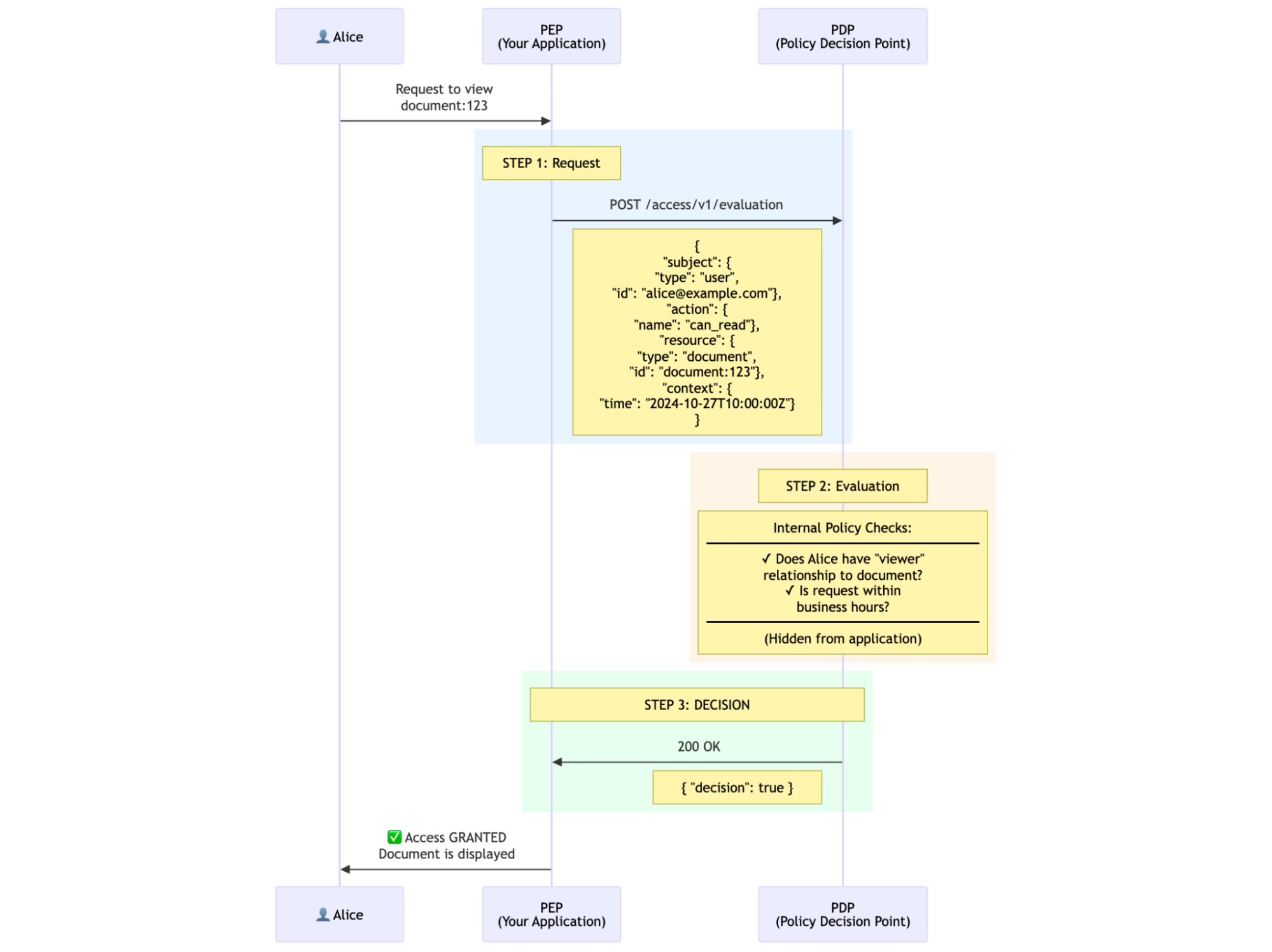
In the diagram Alice is requesting to view document:123, your application (the PEP in this context) will start a POST request to the PDP using the Evaluation endpoint, the PDP will then decide if Alice is a viewer of the documents and if the the request is within business hours and return a decision with true or false, note the logic of how the PDP makes this decision is completely hidden from the PEP, all that it matters to it is whether the decision is true or false.
The Search API allows a Policy Enforcement Point (PEP) to query the Policy Decision Point (PDP) for lists of authorized entities, rather than a simple "allow/deny" boolean for a specific request. To use it, you construct a JSON payload similar to a standard evaluation request, but you omit the unique identifier for the entity you are searching for (Subject, Action, or Resource).
For example, let’s say you want to list all the reports that user Alice is allowed to read, such request would look like:
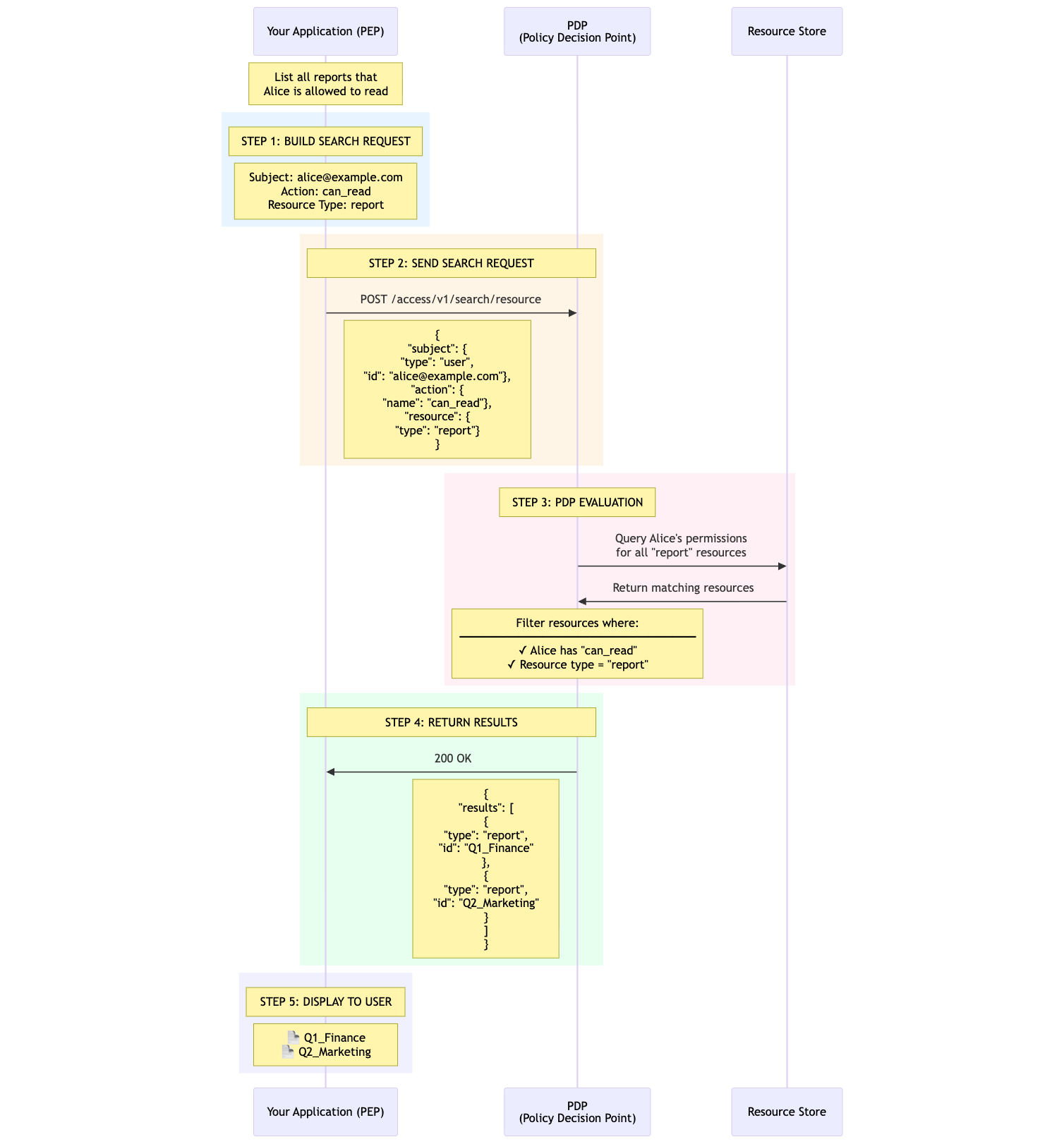
In the diagram if you want to see all the documents Alice can read, your app or the Policy Enforcement Point (PEP) needs to build a request and send it over to the Policy Decision Point's (PDP) Search API. The PDP checks the request and sends back a list of the resources (documents) Alice is allowed to read, and then you can show those to her.
How to Implement the Authorization API?
Let’s translate the specification into a practical example. Let’s say you have a Python API built in FastAPI and want to implement authorization using the new standard.
You can clone the code sample from this GitHub repository
Building the PDP in Python
The authorization use case we want to solve is to answer the question “Is user X allowed to view a document Y” and at this point we can already match some concepts to the specification:
- Subject: user X
- Action: view
- Resource: document Y
The PDP in our case is going to live in the pdp folder of the project, the policy_decision_point.py class it where we’ll define the rules of who can view a document:
- The owner of a document can always view their documents
- Public documents are accessible by everyone
- Internal documents require the user to have the role “employee”
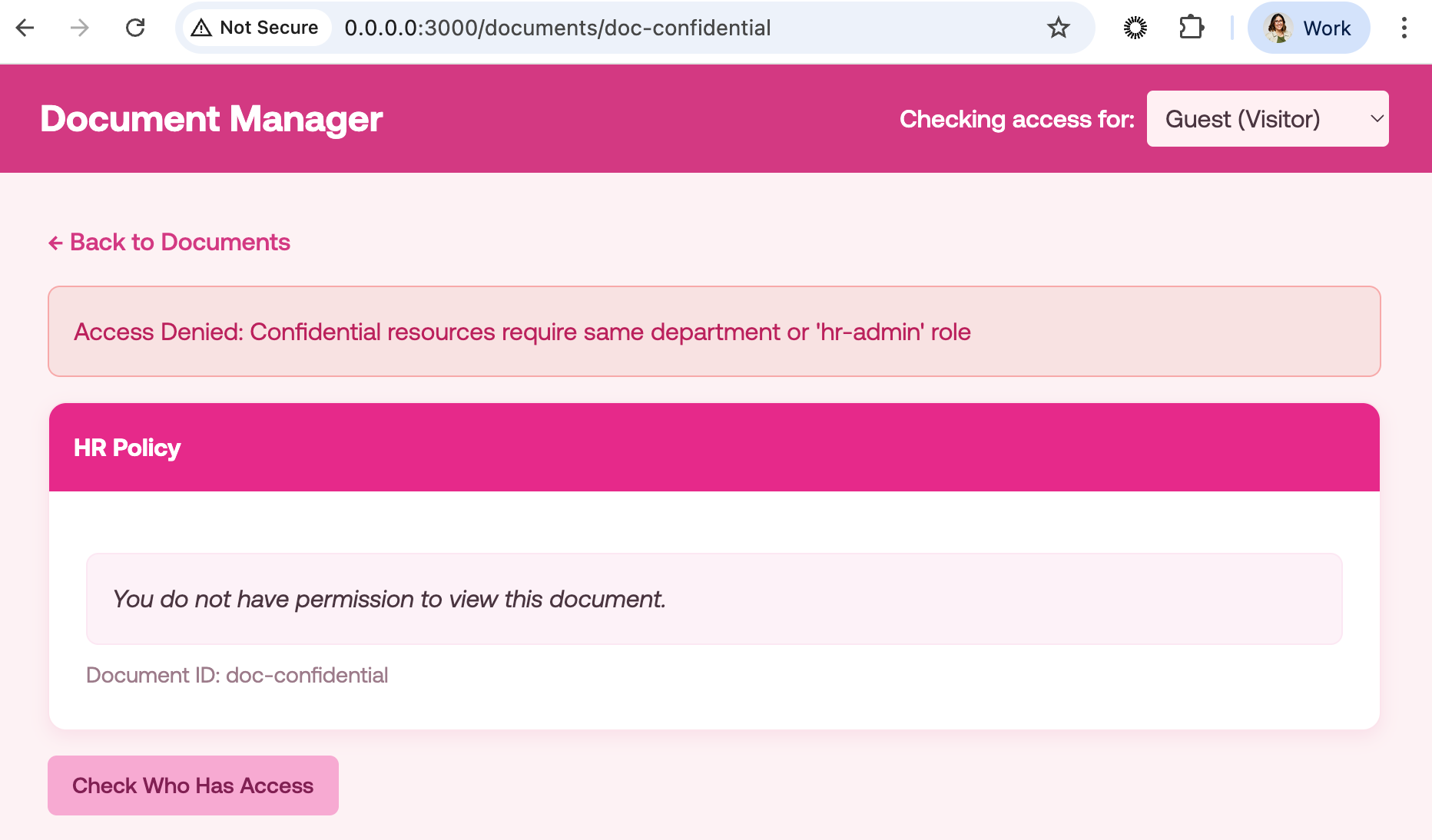
- Confidential documents require that the user’s department is the same as the document’s department or the user to have an “hr-admin” role.
The PEP, meaning the application that will communicate with the PDP, is going to live in the pep folder and it consists of a documents service where users can:
- List documents a user has access to
- Get document details
- Check access to a document
Let’s focus on the PDP, specifically where we evaluate the policies we defined above:
from dataclasses import dataclass

from database import get_connection
from models import Subject

class PolicyDecisionPoint:
    """
    PDP - Makes authorization decisions
    """

    def get_user(self, user_id: str) -> dict | None:
        # ...
    def get_document(self, document_id: str) -> dict | None:
        # ...

    def get_all_user_ids(self) -> list[str]:
        # ...

    def evaluate(
        self,
        subject_id: str,
        action_name: str,
        resource_id: str
    ) -> Decision:
        """
        Evaluate an authorization request.

        Args:
            subject_id: Who is requesting access (e.g., "alice")
            action_name: What they want to do (e.g., "view")
            resource_id: What they want to access (e.g., "doc-public")

        Returns:
            Decision with allowed=True/False and a reason
        """

        # Step 1: Fetch user from database
        user = self.get_user(subject_id)
        if not user:
            return Decision(allowed=False, reason="Subject not found")

        # Step 2: Fetch document from database
        document = self.get_document(resource_id)
        if not document:
            return Decision(allowed=False, reason="Resource not found")

        # Step 3: Check if action is supported
        if action_name != "view":
            return Decision(
                allowed=False,
                reason=f"Action '{action_name}' is not supported"
            )

        # Step 4: Evaluate policies
        return self._evaluate_policies(subject_id, user, document)

    def _evaluate_policies(
        self,
        subject_id: str,
        user: dict,
        document: dict
    ) -> Decision:
        """
        Evaluate authorization policies.

        Policy logic remains the same - only data source changed.
        """

        # POLICY 1: Owner can always access their documents
        if document["owner"] == subject_id:
            return Decision(
                allowed=True,
                reason="Subject is the resource owner"
            )

        # POLICY 2: Public documents are accessible to everyone
        if document["classification"] == "public":
            return Decision(
                allowed=True,
                reason="Resource is public"
            )

        # POLICY 3: Internal documents require "employee" role
        if document["classification"] == "internal":
            if "employee" in user["roles"]:
                return Decision(
                    allowed=True,
                    reason="Subject has 'employee' role for internal resource"
                )
            return Decision(
                allowed=False,
                reason="Internal resources require 'employee' role"
            )

        # POLICY 4: Confidential documents require same department or hr-admin
        if document["classification"] == "confidential":
            if user["department"] == document["department"]:
                return Decision(
                    allowed=True,
                    reason="Subject is in the same department"
                )
            if "hr-admin" in user["roles"]:
                return Decision(
                    allowed=True,
                    reason="Subject has 'hr-admin' role"
                )
            return Decision(
                allowed=False,
                reason="Confidential resources require same department or 'hr-admin' role"
            )

        # Default: deny access
        return Decision(
            allowed=False,
            reason="No policy matched - access denied by default"
        )
First we fetch the user and document from the database, check that the action is supported, in this case the action is “view” and then we proceed to evaluate each of the policies. Note that this is how we decided our PDP to behave internally, the way you evaluate whether a decision returns true or false is up to you and the technology you use. For example, you could use OpenFGA to define if a document can view a document instead of this very long list of if-statements that serve me solely for the purpose of illustrating this example.
Next, let’s focus on the search part:
   def search(self, action_name: str, resource_id: str) -> list[Subject]:
        """
        Find all subjects that can access a resource.
        """
        subjects_with_access = []

        # Get all users from database
        for user_id in self.get_all_user_ids():
            decision = self.evaluate(user_id, action_name, resource_id)
            if decision.allowed:
                subjects_with_access.append(
                    Subject(type="user", id=user_id)
                )

        return subjects_with_access
In this case, we want to see all the subjects that can access a resource so we evaluate each user_id and filter based on the decision.
Next, we are going to implement the Evaluation API as follows:
authzen-python-sample/pdp/routers/evaluation.py
"""
Single Evaluation Endpoint (Section 3 of Authorization API 1.0 spec)

POST /access/v1/evaluation

This is the main endpoint for checking authorization.
Your application (the PEP) calls this to ask: "Can user X do action Y on resource Z?"
"""

from fastapi import APIRouter

from models import EvaluationRequest, EvaluationResponse
from pdp_core import pdp

router = APIRouter(tags=["Authorization"])

@router.post(
    "/access/v1/evaluation",
    response_model=EvaluationResponse,
    summary="Access Evaluation")

async def evaluation(request: EvaluationRequest) -> EvaluationResponse:
  """
  Evaluate a single authorization request.
  """

  # Call the PDP to make the decision
  decision = pdp.evaluate(
    subject_id=request.subject.id,
    action_name=request.action.name,
    resource_id=request.resource.id
  )

  return EvaluationResponse(
    decision=decision.allowed,
    context={"reason": decision.reason}
  )
Here we are exposing the endpoint /access/v1/evaluation and calling the evaluate method from the policy_decision_point.py class.
Similarly for the search API:
authzen-python-sample/pdp/routers/search.py
"""
Search Endpoint (Section 4 of Authorization API 1.0 spec)

POST /access/v1/search

Find all subjects that can perform an action on a resource.
Answers: "WHO can access this resource?"
"""

from fastapi import APIRouter

from models import SearchRequest, SearchResponse
from pdp_core import pdp

router = APIRouter(tags=["Authorization"])


@router.post(
    "/access/v1/search",
    response_model=SearchResponse,
    summary="Access Search",
    description="""
    **Find all subjects that can access a resource.**

    Use cases:
    - "Who can view this document?"
    - Access audits
    - Compliance reporting

    **Example:** Who can view doc-public?


    {
      "action": {"name": "view"},
      "resource": {"type": "document", "id": "doc-public"}
    }

"""
)
async def search(request: SearchRequest) -> SearchResponse:
  """
  Find all subjects with access to a resource.
  """

  subjects = pdp.search(
  action_name=request.action.name,
  resource_id=request.resource.id
  )

  return SearchResponse(subjects=subjects)
In this case we expose the endpoint access/v1/search and call the search method that we defined in the policy_decision_point.py class.
At this point, we have implemented the evaluation and search endpoints as explained in the specification, but now an application needs to communicate with our PDP. Here’s where the PEP comes into play.
Integrating the PEP with FastAPI
The PEP is the application that communicates with the PDP. In this case, we’ve built a simple Document Manager web application using HTML where you can filter by users and you’ll see the different documents they have access to:
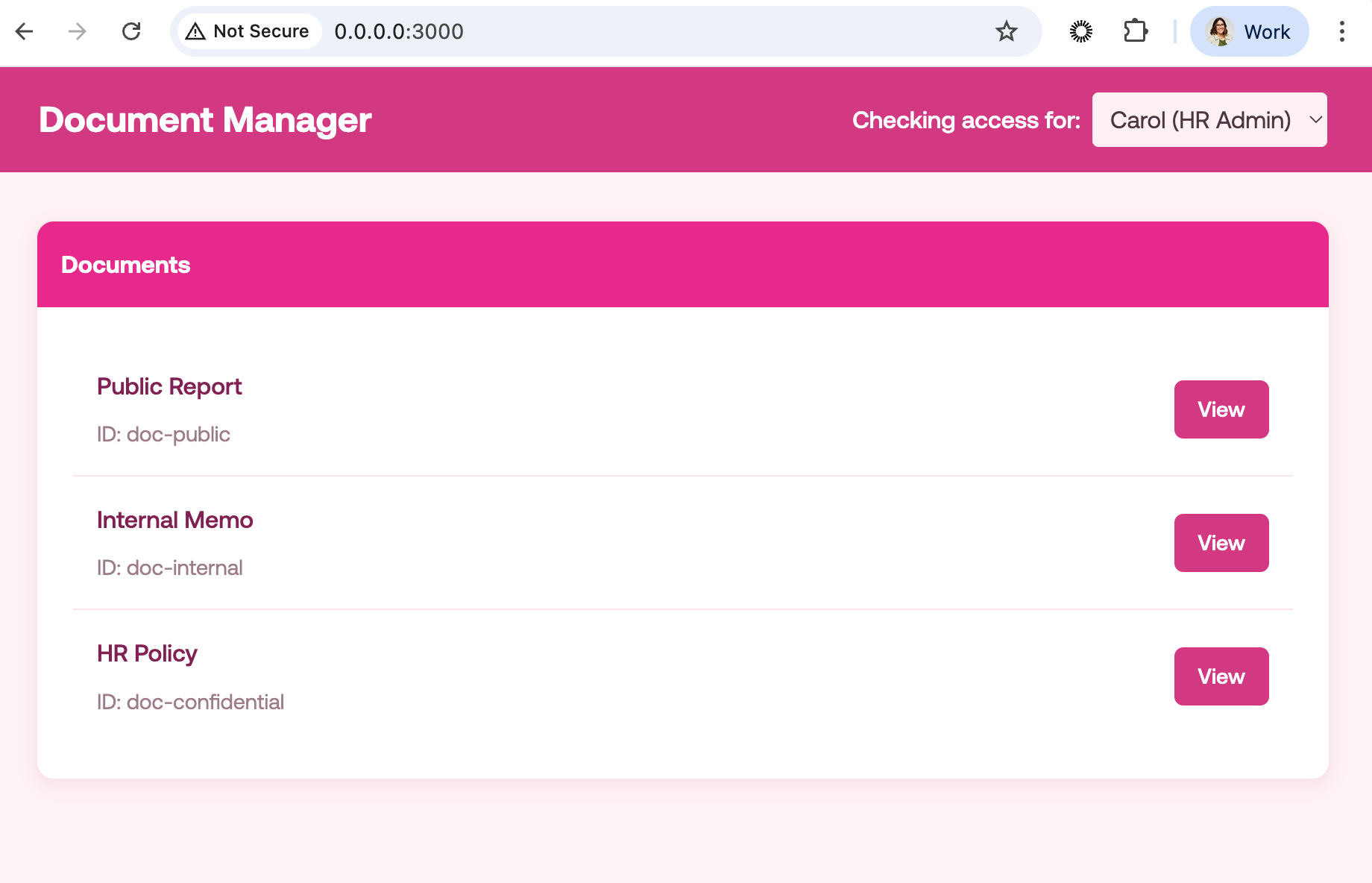
The HTML code can be found in the template folder. Let’s focus on the functionality, let’s remember we want to:
- List documents a user has access to
- Get document details
- Check access to a document
In the pep/pep.py file let’s add the methods to fulfill these use cases and also communicate with the PDP. First let’s implement the get document details feature, which in other words means calling the evaluation endpoint with the current user and the document id:
pep.py
"""
Authorization Client

Communicates with the PDP (Authorization API).
"""

import requests

class AuthorizationClient:

    def __init__(self, base_url: str = "http://localhost:8080"):
        self.base_url = base_url

    def can_view(self, user_id: str, document_id: str) -> dict:
        """
        Ask the PDP: Can this user view this document?
        """
        try:
            response = requests.post(
                f"{self.base_url}/access/v1/evaluation",
                json={
                    "subject": {"type": "user", "id": user_id},
                    "action": {"name": "view"},
                    "resource": {"type": "document", "id": document_id}
                },
                timeout=5
            )

            result = response.json()

            return {
                "allowed": result.get("decision", False),
                "reason": result.get("context", {}).get("reason", "Unknown")
            }

        except requests.RequestException as e:
            return {
                "allowed": False,
                "reason": f"PDP unavailable: {e}"
            }
    # ...
Note we are calling the PDP running in http://localhost:8080 and passing the user_id, the view action and the document id, then in the pep/main.py you can call this method as follows:
"""
Document Manager - PEP Web Application
"""

from contextlib import asynccontextmanager

from fastapi import FastAPI, Request, Cookie
from fastapi.responses import HTMLResponse
from fastapi.templating import Jinja2Templates

from database import init_database, get_document, get_all_documents
from pep import authz

app = FastAPI(title="My Document Manager", lifespan=lifespan)
templates = Jinja2Templates(directory="templates")

def get_current_user(request: Request) -> str:
    return request.cookies.get("user_id", "guest")

@app.get("/documents/{document_id}", response_class=HTMLResponse)
async def view_document(request: Request, document_id: str):
    """View a document."""
    current_user = get_current_user(request)
    document = get_document(document_id)

    if not document:
        return HTMLResponse(content="Document not found", status_code=404)

    access = authz.can_view(current_user, document_id)

    return templates.TemplateResponse(
        "document.html",
        {
            "request": request,
            "document": document,
            "access": access,
            "current_user": current_user
        }
    )
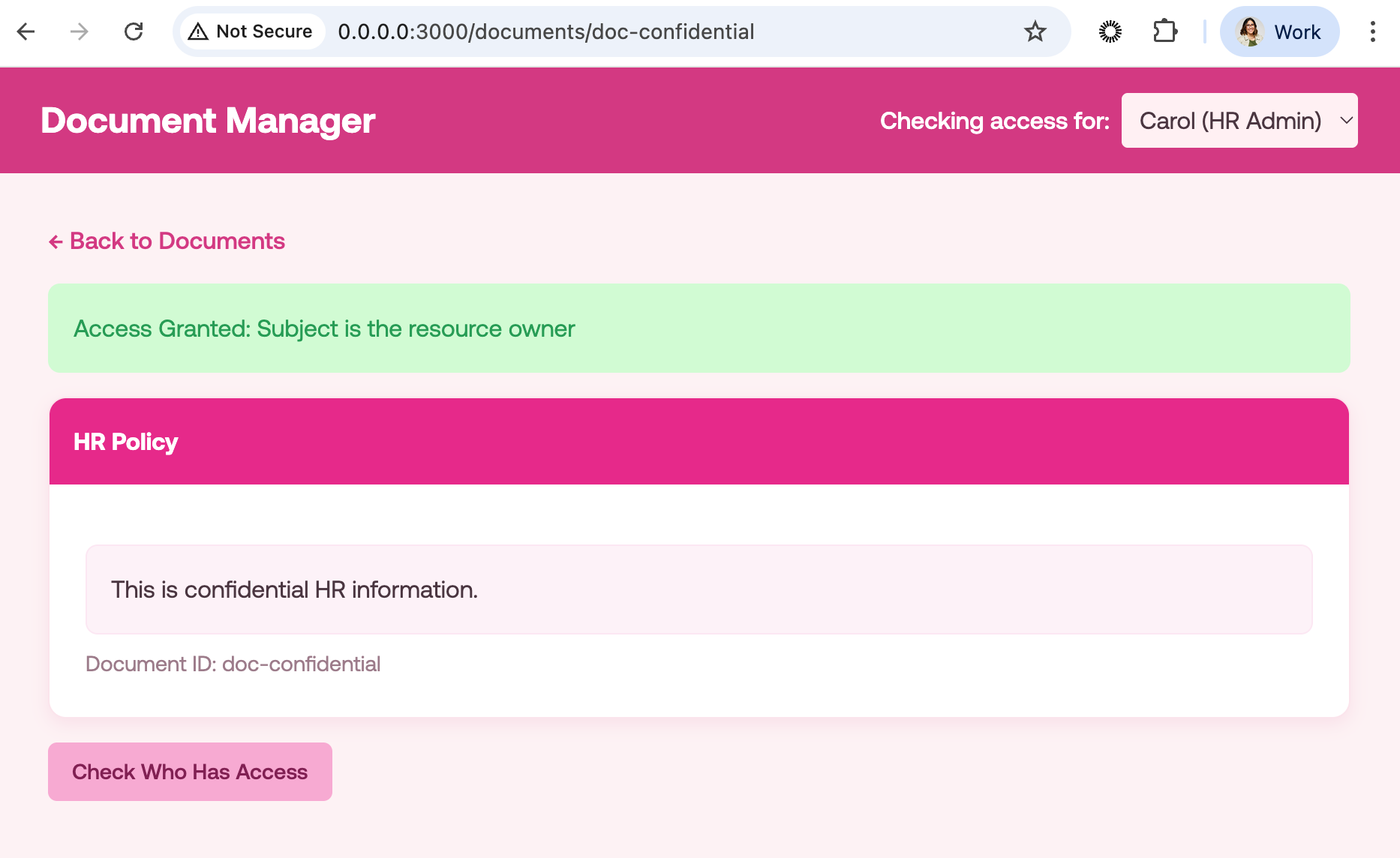
The web application will then look as follows for example for user Carol, who is in HR and has access to all documents:
But if we check for a user like Guest, who is a visitor:
Now for the Search API, we can implement the functionality to check who has access to a certain document. For that, you need to add the call in the pep.py file as follows:
def who_can_access(self, document_id: str) -> list[str]:
        """
        Ask the PDP: Who can view this document?
        """
        try:
            response = requests.post(
                f"{self.base_url}/access/v1/search",
                json={
                    "action": {"name": "view"},
                    "resource": {"type": "document", "id": document_id}
                },
                timeout=5
            )

            result = response.json()

            return [s["id"] for s in result.get("subjects", [])]

        except requests.RequestException:
            return []
Here we are passing the action “view” and the document id in order to get the list of users who have access to this particular document. Next, adding this functionality to the web application:
pep/main.py
@app.get("/documents/{document_id}/access", response_class=HTMLResponse)
async def check_access(request: Request, document_id: str):
    """Check who has access to a document."""
    current_user = get_current_user(request)
    document = get_document(document_id)

    if not document:
        return HTMLResponse(content="Document not found", status_code=404)

    users = authz.who_can_access(document_id)
    your_access = authz.can_view(current_user, document_id)

    return templates.TemplateResponse(
        "access.html",
        {
            "request": request,
            "document": document,
            "users": users,
            "your_access": your_access,
            "current_user": current_user
        }
    )
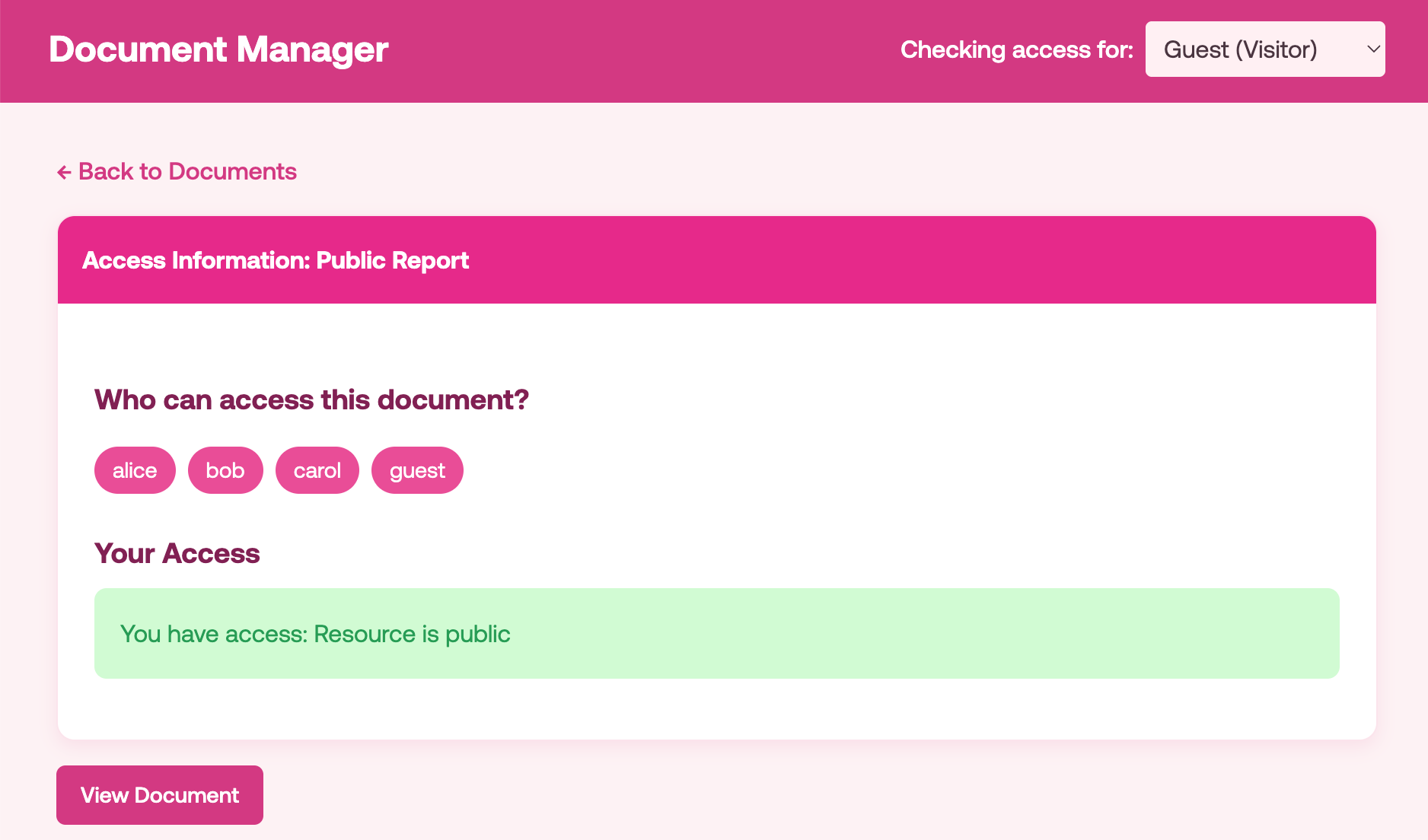
When clicking on the “Check who has access” button in a document such as a public document, we’ll see the following:
Finally, to list the documents that a user has access to we are going to use the evaluations endpoint, this endpoint allows us to make a batch request to check access on multiple resources at once. So let’s add the code in the pep/pep.py and pep/main.py respectively as follows:
pep/pep.py
def can_view_batch(self, user_id: str, document_ids: list[str]) -> dict[str, dict]:
        """
        Check if user can view multiple documents at once.

        Returns a dict mapping document_id to access result.
        """
        if not document_ids:
            return {}

        try:
            evaluations = [
                {
                    "subject": {"type": "user", "id": user_id},
                    "action": {"name": "view"},
                    "resource": {"type": "document", "id": doc_id}
                }
                for doc_id in document_ids
            ]

            response = requests.post(
                f"{self.base_url}/access/v1/evaluations",
                json={"evaluations": evaluations},
                timeout=5
            )

            result = response.json()
            results = {}

            for i, doc_id in enumerate(document_ids):
                eval_result = result.get("evaluations", [])[i]
                results[doc_id] = {
                    "allowed": eval_result.get("decision", False),
                    "reason": eval_result.get("context", {}).get("reason", "Unknown")
                }

            return results

        except requests.RequestException as e:
            return {
                doc_id: {"allowed": False, "reason": f"Authorization service unavailable: {e}"}
                for doc_id in document_ids
            }
pep/main.py
@app.get("/", response_class=HTMLResponse)
async def index(request: Request):
    """List documents the user can access."""
    current_user = get_current_user(request)
    all_documents = get_all_documents()

    # Get document IDs
    document_ids = [doc["id"] for doc in all_documents]

    # Batch check access for all documents
    access_results = authz.can_view_batch(current_user, document_ids)

    # Filter to only accessible documents
    accessible_documents = [
        doc for doc in all_documents
        if access_results.get(doc["id"], {}).get("allowed", False)
    ]

    return templates.TemplateResponse(
        "index.html",
        {
            "request": request,
            "documents": accessible_documents,
            "current_user": current_user
        }
    )
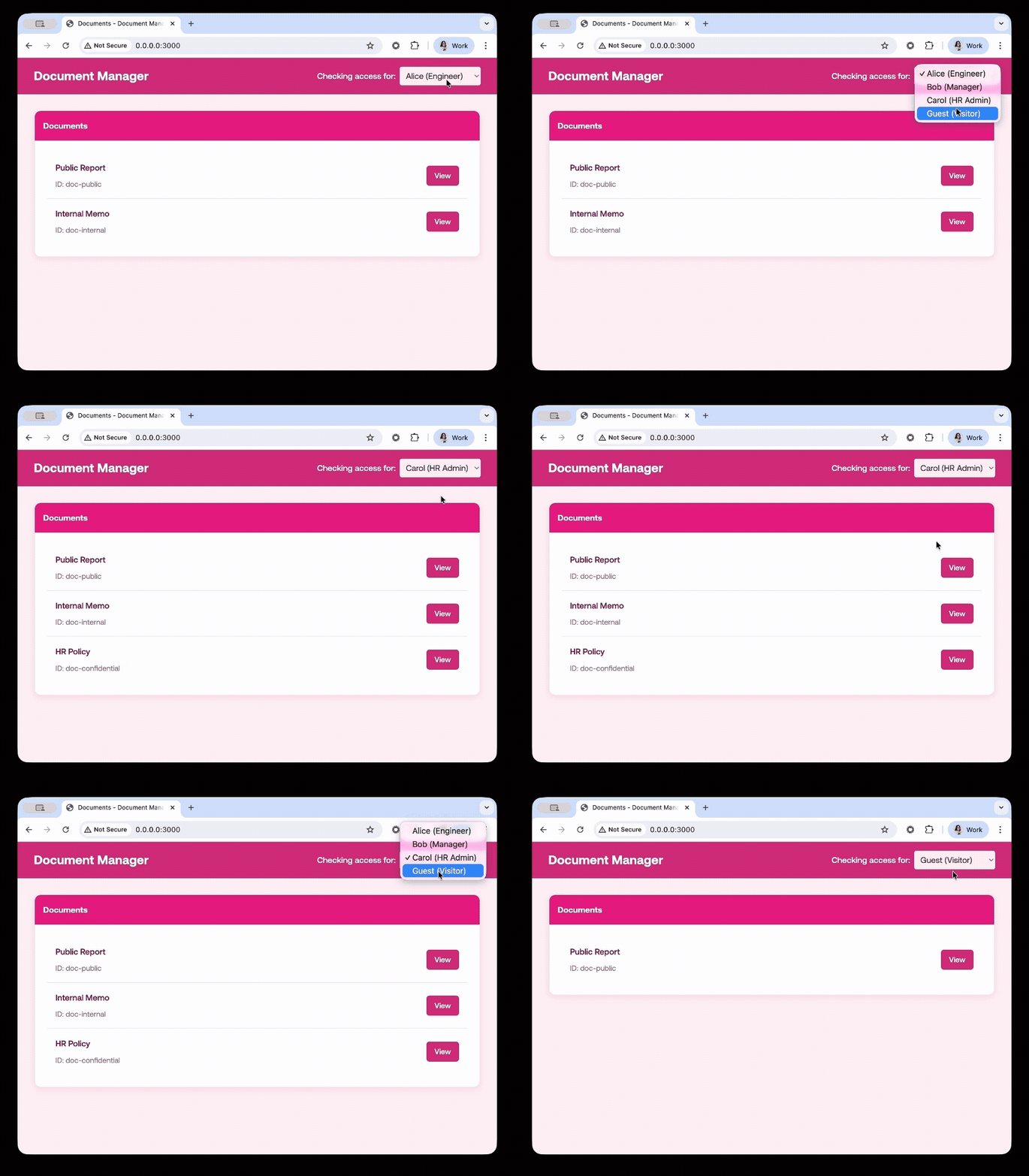
Now, when you go to the homepage, and switch between users, you will only see the documents the user is allowed to see.
Future-Proofing With Standardized Authorization
By adopting the Authorization API 1.0, you leverage a robust framework designed for modern security. This specification provides a clean, interoperable way to handle complex authorization needs without relying on proprietary logic. By implementing the decoupled architecture of PEPs and PDPs, your applications gain the flexibility to handle granular permission requests while maintaining a high standard of security. As you integrate this API, you ensure that your authorization workflows are not only consistent and scalable but also aligned with the latest industry standards from the OpenID Foundation.
About the author

Carla Urrea Stabile
Staff Developer Advocate
I've been working as a software engineer since 2014, particularly as a backend engineer and doing system design. I consider myself a language-agnostic developer but if I had to choose, I like to work with Ruby and Python.
After realizing how fun it was to create content and share experiences with the developer community I made the switch to Developer Advocacy. I like to learn and work with new technologies.
When I'm not coding or creating content you could probably find me going on a bike ride, hiking, or just hanging out with my dog, Dasha.