

Meet FlowGrid, a fictional fast-growing, cloud-native project management SaaS platform. Like many modern startups, FlowGrid’s early success was driven by Product-Led Growth (PLG). Individual users and small teams signed up with personal or work emails using basic password or social logins. Life was simple, and the user base was growing.
But then, FlowGrid hit the tipping point. Their sales team just landed their first major Fortune 500 prospect with Acme Corp (another fictional company). Acme's CISO handed FlowGrid an ultimatum:
“”
FlowGrid’s lead architect realized their custom, home-grown users table was about to crumble under the weight of enterprise Single Sign-On (SSO), domain routing, and multi-tenant authorization.
FlowGrid will be used as our fictional company across this B2B series of blog posts. The series will cover all things related to securing your B2B SaaS Experiences using Auth0. This will include things like Enterprise Onboarding, SaaS Multi-Tenant Architecture and Authorization.
Auth0 Organizations is the solution for exactly this problem. In this first post of a five-part series, we will cover:
- What are Auth0 Organizations?
- How login flows work across B2C and B2B use cases.
- How to route users to the right identity provider.
- How to model authorization at the org level.
What Are Auth0 Organizations and When to Use Them
To win enterprise deals, you need to prove data and access isolation. Auth0 Organizations represent a tenant, an isolated workspace within your SaaS product. It might be a company, a workspace, or a customer account.
Each Organization has its own:
- Members: Users who belong to that specific Organization.
- Connections: The identity providers that Organization uses (for example, Google Workspace, Okta, Microsoft Entra ID, or Auth0's own database).
- Metadata: An arbitrary key-value store for tenant configuration.
- Roles and permissions: Access controls scoped exclusively to Organization membership.
When to use Auth0 Organizations
If your users log in as part of a company and you need to isolate them by that company’s context, you want Organizations. Classic indicators include:
- You have enterprise customers who want SSO with their own IdP.
- Users can belong to multiple tenants (for example, a contractor working for two different clients).
- You need tenant-level access control separate from global user roles.
Since Auth0 Organizations provide all the necessary capabilities to implement proper B2B Identity, Product Teams can skip long implementation cycles and get proper Enterprise readiness out of the Box.
When not to use Auth0 Organizations
You might not need Organizations for pure B2C apps where every user is an individual with no tenant context. A consumer fitness app does not need organizations, but a project management tool sold to teams does.
Supporting Self-Service and Enterprise Customers at Once
FlowGrid needs to support both their self-serve users and their enterprise tiers seamlessly in one codebase. The organization parameter on the authorization request is the fork in the road between B2C and B2B login behaviors.
B2C with no organization parameter
The user goes through Universal Login without any organization context. This works perfectly for FlowGrid's freemium tiers, individual sign-ups, and trials before a company account is provisioned.
B2B with an organization parameter
When you pass organization, Auth0 scopes the entire login experience to that Organization:
- Only connections enabled for that Organization are available.
- Branding (logo, colors) reflects the Organization if configured.
- The resulting tokens carry the
org_idandorg_nameclaim.
You can also pass organization as the organization's name slug instead of the opaque ID — useful when constructing login URLs from your app's routing (for example, acme.yourapp.com → organization=acme).
Inviting a user into the Organization
When you invite a user to an Organization, Auth0 generates an invitation ticket. The recipient clicks the link, completes signup or login, and lands in the organization automatically. The invitation carries the organization parameter throughout the flow. Later in the series, we will focus on enterprise grade protocols like System for Cross-domain Identity Management (SCIM).
How Does Auth0 handle Home Realm Discovery?
Imagine an employee at Acme Corp navigating to FlowGrid. Acme’s IT policy strictly forbids passwords. When a user types their email on your login page, you need to figure out which IdP to send them to. That is Home Realm Discovery (HRD).
Auth0 handles HRD at the connection level. When a connection is enabled for an organization, Auth0 uses the email domain to match the user to that connection automatically. To use this feature you need to have the Authentication Profile set to Identifier First.
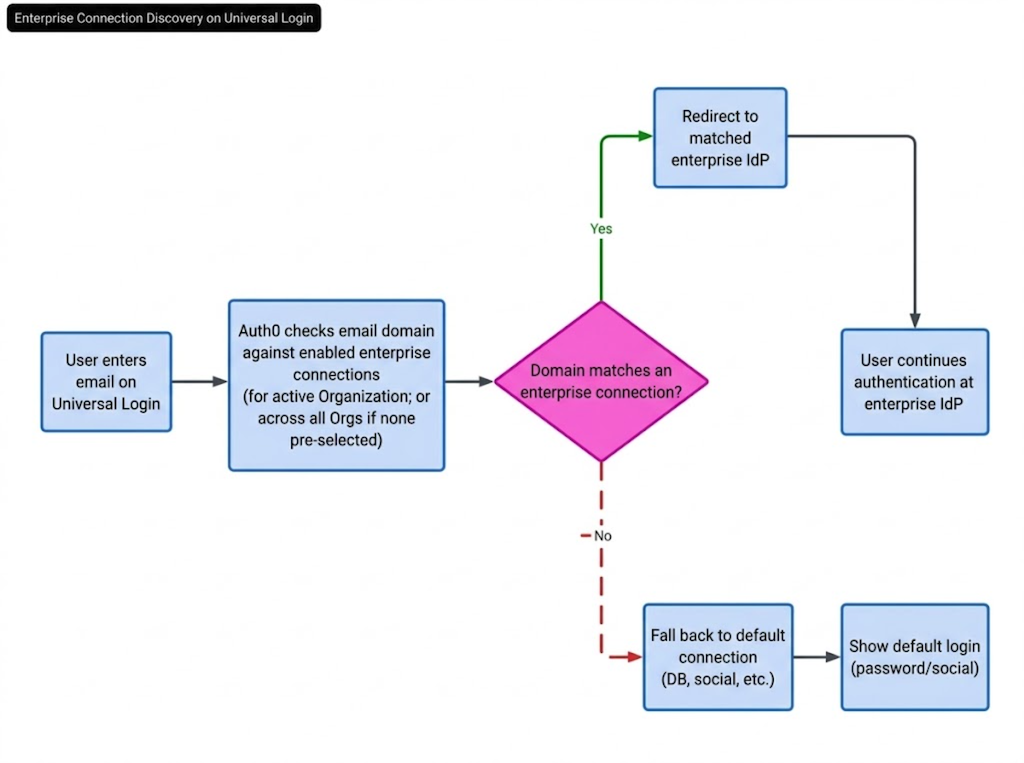
The Flow:
- User enters email on Universal Login.
- Auth0 checks if the domain matches a connection enabled for the active organization (or across all orgs if no organization is pre-selected).
- If a match is found, Auth0 redirects to the enterprise IdP directly — skipping the password screen.
- If no enterprise matches, fall back to the default connection (database, social, etc.).
Many B2B apps use tenant-specific URLs (for example, acme.yourapp.com) to pre-populate the organization parameter before the user even sees the login screen. This makes HRD reliable because Auth0 already knows which organization to check.
HRD eliminates "How do I log in?" support tickets and deliver an enterprise-grade, login experience that keeps CISOs happy.
Tenant Context Switching Pattern
FlowGrid has agency consultants who manage projects for both Acme Corp and Globex. Users who belong to multiple organizations need a way to switch context without logging out.
Auth0 issues tokens scoped to a specific organization. The org_id claim in the access token tells your API which tenant context is active. To switch tenants, the user needs a new token with a different org_id.
To mint a new token containing a different org_id use the organization parameter as already explained in the B2B with an organization parameter section.
If silent authentication fails (for example, session expired), fall back to a visible redirect. The user lands at the login screen pre-scoped to the target organization.
Mapping Tenants to Data
You have two broad patterns for mapping Auth0 Organizations to your application's data model.
One Auth0 Organization per app tenant (recommended for B2B)
Each customer company gets exactly one Auth0 Organization. Your application database stores org_id as a foreign key on all tenant-scoped data.
Example:
App Tenant: Acme Corp
└── Auth0 Org: orgpageviews_abc123
├── Members: [alice@acme.com](mailto:alice@acme.com), [bob@acme.com](mailto:bob@acme.com)
├── Connection: Acme's Okta (SAML)
└── Metadata: { plan: "enterprise", region: "us-east" }
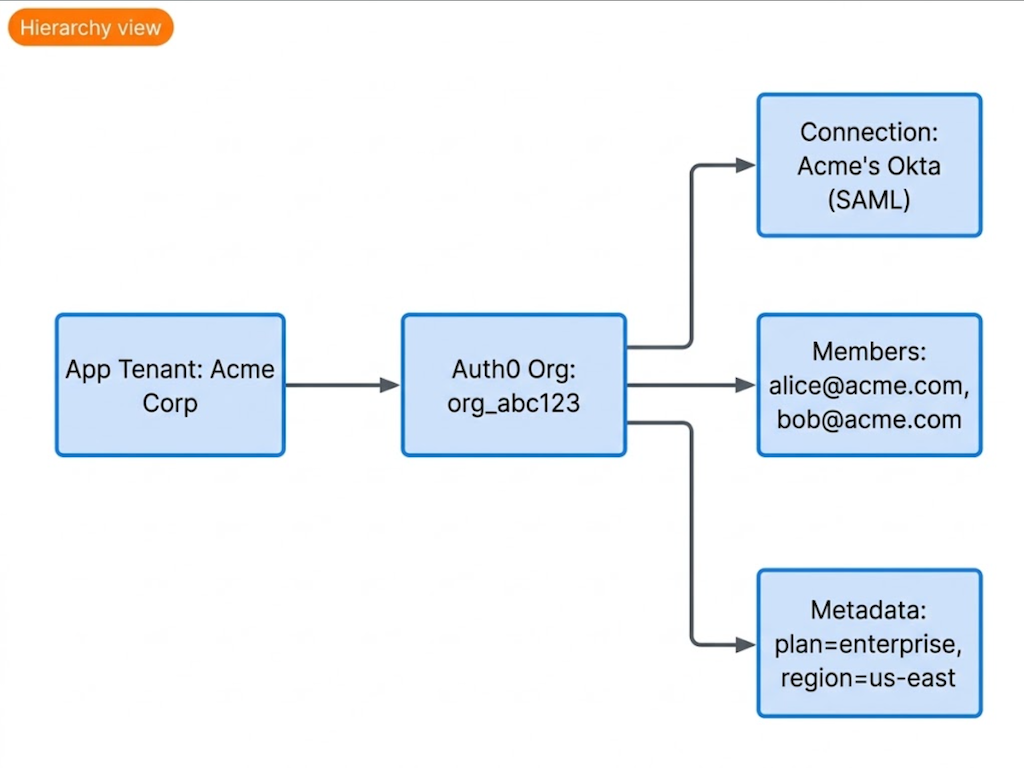
This gives you lean isolation, straightforward authorization, and easy to query all data for a given org.
Shared Auth0 Organization with custom claims (not recommended)
Some platforms encode tenant context in custom claims via Actions rather than using Organizations. This works but pushes complexity into your application layer — you are reinventing what Organizations already give you. Avoid this unless you have a specific reason.
Tokens, Scopes, Roles, and Claims
Once a user is authenticated within an Organization, authorization is where things get interesting. FlowGrid needs to guarantee that a user is an Admin at Acme, but merely a Viewer at Globex.
Organization-level roles
Auth0 lets you assign roles to users within an organization — separate from any global roles the user might have. These roles resolve to permissions, and permissions surface as claims in the access token — but only when the token is issued in the context of that organization.
Organization claims in tokens
By default, org-authenticated tokens include org_id and permissions claims if Role-Based Access Control (RBAC) is activated on the API. Your API uses org_id to scope data queries and validates permissions to gate operations.
Auth0 Actions for custom claims
Use Auth0 Actions (Post-Login flow) to enrich tokens with organization-specific metadata (plan tier, region, or feature flags) directly from event.organization.metadata. This avoids extra round-trips to the Management API at request time.
What Is Next?
This post covered the core mechanics: what are Organizations, how the login flows work, HRD, tenant architecture, and organization-scoped authorization. That is your foundation.
In Part two, we go deeper into the operational side:
- Self-Service SSO
- My Organization API
- How to let your enterprise customers manage their own users and connections through your product's admin interface — without you having to build a Management API wrapper from scratch.
Ready to Level Up Your SaaS Architecture?
Stop building and start experiencing pageviews! Head over to SaaStart for an interactive, hands-on masterclass in B2B identity. It lets you provision your first organization, enable enterprise connections, and issue real tokens in minutes. Experience an Auth0 powered SaaS Application before we dive into the operational deep-end in Part two.
If you do not already have an Auth0 account yet, create one for free.