Teams that build business-to-business (B2B) software-as-a-service (SaaS) on Auth0 often need the same identity foundation:
- An application and an API
- Roles and permissions
- A machine-to-machine (M2M) client
- Multi-factor authentication (MFA)
- Attack protection
- Branding
- A custom login domain
- Organizations with enterprise Single Sign-On (SSO).
Over the years, many teams built this foundation with the Auth0 Terraform Provider. Each team writes and maintains its own version of the same configuration.
Terraform Auth0 Modules package that foundation into ready-made modules built on top of the provider. The first module, b2b-saas-starter, is now available on the Terraform Registry.
If you are a developer or platform engineer who manages B2B applications on Auth0, this post is for you. You will learn how to:
- Create a complete identity setup with one module block.
- Use the security defaults that the module applies for you.
- Add roles, permissions, and enterprise SSO for your customers.
- Activate a custom login domain step by step.
- Run several applications on one tenant.
Prerequisites
To follow along, you need:
- Terraform 1.3.0 or later
- An Auth0 tenant. A new development tenant is the best choice, because the module manages tenant-wide settings such as MFA and attack protection.
- An M2M application that is authorized for the Auth0 Management API, with its domain, client ID, and client secret
If you do not have an Auth0 account yet? Sign up for free and create a development tenant to try the module.
Get Started with One Module Block
Create a new, empty directory and add the following configuration. It creates an application client and an API protected with role-based access control (RBAC), and then, it applies tenant-wide security settings for MFA and attack protection.
# main.tf
module "b2b_saas" {
  source  = "auth0/modules/auth0//modules/b2b-saas-starter"
  version = "~> 1.0"

  app_name        = "Acme"
  app_callbacks   = ["https://app.acme.com/callback"]
  app_logout_urls = ["https://app.acme.com"]
  app_origins     = ["https://app.acme.com"]

  api_name       = "Acme API"
  api_identifier = "https://api.acme.com"
}
Next, set the provider credentials from your M2M application and preview the changes:
# terminal
export AUTH0_DOMAIN="your-tenant.auth0.com"
export AUTH0_CLIENT_ID="..."
export AUTH0_CLIENT_SECRET="..."

terraform init
terraform plan
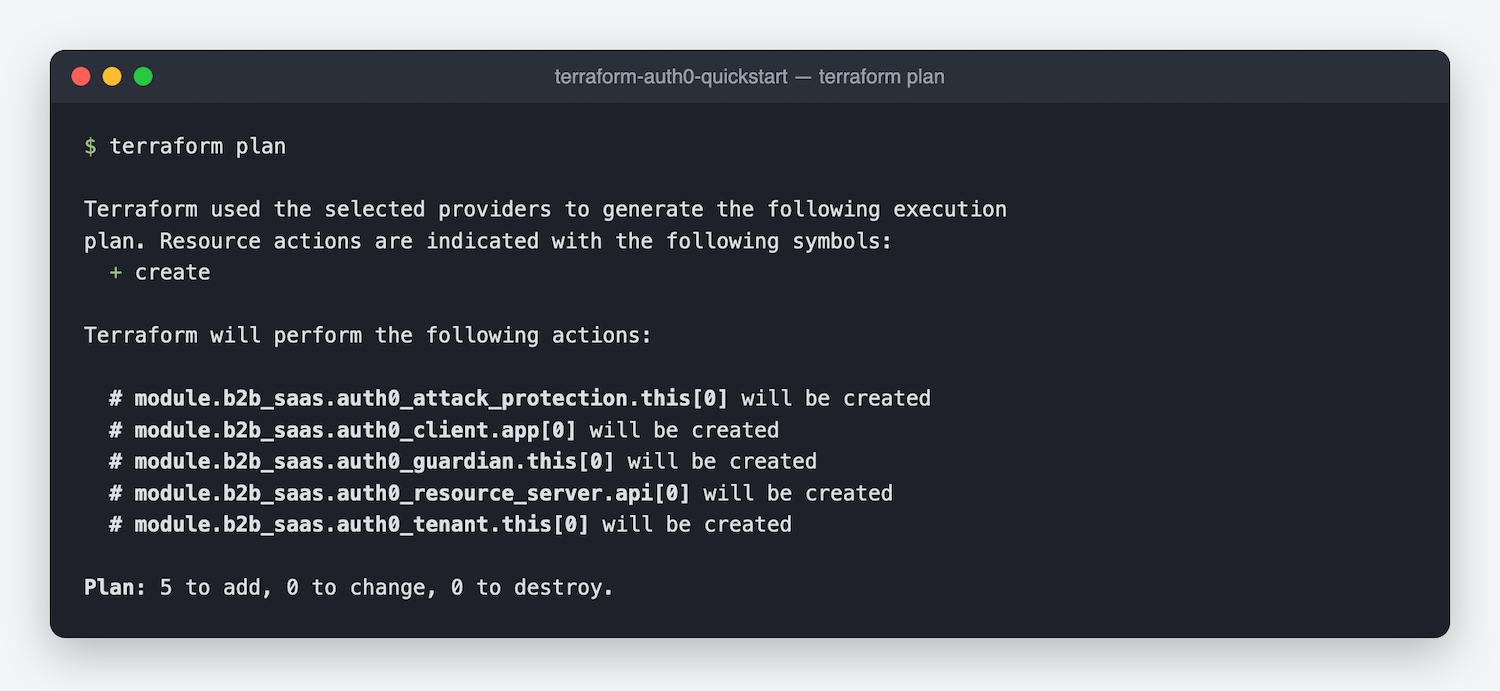
The plan lists five resources:
- The application client
- The API
- The tenant settings
- Attack protection
- MFA
The Auth0 Terraform Provider names the MFA resource auth0_guardian. Review the plan, then run terraform apply to create the resources.
Security Defaults You Do Not Have to Configure
Some important identity settings are also easy to miss. The module turns them on for you:
- RBAC enforcement on your API. Without RBAC enforcement, Auth0 issues access tokens that carry no roles or permissions, so your API cannot check what a user is allowed to do. The module enables enforcement and includes permissions in the access token.
- Proof Key for Code Exchange (PKCE) and rotating refresh tokens for your application, with a three-second grace period so that parallel refresh requests from a single-page application (SPA) do not fail
- Attack protection with brute-force protection, suspicious IP throttling, and breached password detection, each with configurable thresholds
- MFA with time-based one-time passwords (TOTP) turned on, and email and recovery codes available as options
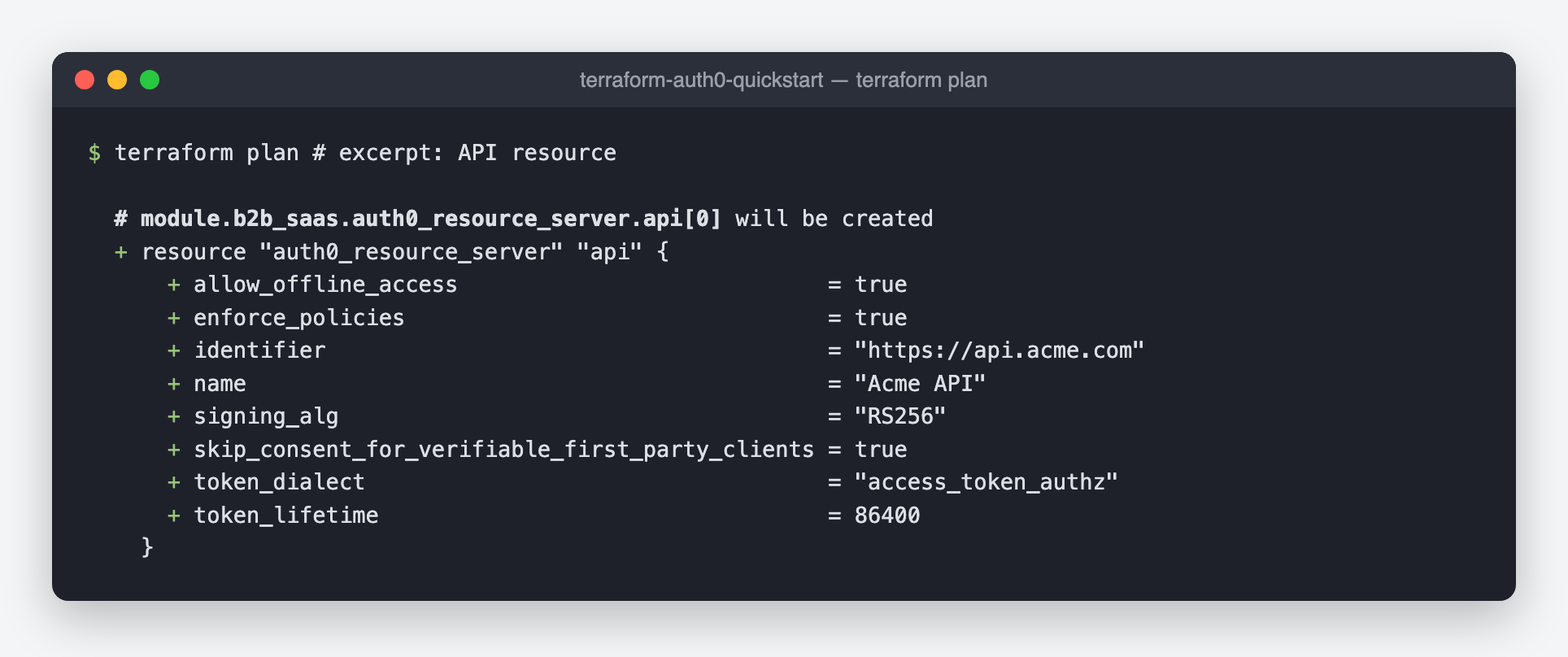
In the plan output, the API resource shows enforce_policies = true and token_dialect = "access_token_authz". These two settings turn on RBAC and add permissions to the access token.
You can override every default with a module input.
Roles and Permissions as Plain Data
In a B2B application, roles and permissions are often the first addition after the API. With the module, you describe them as data inside the module block:
# main.tf (inside the module block)
  roles = ["admin", "member"]
  permissions = {
    admin  = ["read:projects", "write:projects", "manage:members"]
    member = ["read:projects"]
  }
The module creates each role, registers each permission on the API, and assigns the permissions to the roles. It also checks your input. If a permission refers to a role that you did not declare, terraform plan stops with an error before anything changes in Auth0.
Enterprise SSO for Each Customer Organization
Your business customers often want to log in with their own identity provider. With Auth0 Organizations, each customer gets a separate organization, and the module can create the SSO connection for it:
# main.tf (inside the module block)
  organizations = [
    {
      name         = "globex-corp"
      display_name = "Globex Corp"
      connection = {`
        type             = "samlp"
        domain_aliases   = ["globex.com"]
        sign_in_endpoint = "https://idp.globex.com/sso"
        signing_cert     = file("globex-cert.pem")
      }
    }
  ]
In this example, users with a globex.com email address log in through the Globex identity provider. The value samlp selects a Security Assertion Markup Language (SAML) connection. For OpenID Connect (OIDC), set type = "oidc" and add the client ID, client secret, and discovery URL of the identity provider. Each organization can also have its own logo and colors on the login page.
To onboard a new customer, add an entry to the list and apply the change.
A Custom Domain in Clear Steps
A custom login domain, such as login.acme.com, keeps your users on your brand. Auth0 can only verify a domain after its Domain Name System (DNS) record is live, so the module splits the setup into steps instead of failing during an apply:
- Set
custom_domain. The first apply creates the domain and returns the DNS record to add in thedns_verification_recordoutput. - Add the record with your DNS provider. Use the command in the
dns_verification_commandoutput to check that the record resolves. - Set
enable_custom_domain_verification = trueand apply again to verify and activate the domain.
At each step, the custom_domain_next_step output describes what to do next.
If you manage your DNS records with Terraform, the module can verify the domain in a single apply. The custom domain example shows you how.
Several Applications on One Tenant
As your product grows, you might add an admin portal or a second application on the same tenant. Each tenant has only one set of tenant settings, MFA settings, and attack protection settings, so only one module instance should manage them. Use the manage_* inputs on every other instance:
# admin.tf
module "admin_portal" {
  source  = "auth0/modules/auth0//modules/b2b-saas-starter"
  version = "~> 1.0"

  app_name        = "Acme Admin"
  app_callbacks   = ["https://admin.acme.com/callback"]
  app_logout_urls = ["https://admin.acme.com"]
  app_origins     = ["https://admin.acme.com"]

  manage_tenant            = false
  manage_attack_protection = false
  manage_mfa               = false
}
The first module instance keeps ownership of the tenant-wide settings. This instance adds only the resources for the admin portal.
You also keep full control of your configuration. Add other provider resources, such as Actions or extra client grants, next to the module, and turn off any part of the module that you want to manage yourself.
Explore the Examples
The repository includes 12 ready-to-run examples. Each example adds one capability, so you can learn the module step by step or start from the setup that is closest to yours:
- Minimal: an SPA client for local development.
- APIs and RBAC: a protected API with roles and scoped permissions.
- Enterprise SSO: SAML, OIDC, and several organizations with mixed SSO on one tenant.
- Several applications: two applications and two module instances on one tenant.
- Full: every feature of the module.
Establish Your B2B Identity with Modules
Terraform Auth0 Modules give you a tested starting point for B2B identity on Auth0:
- One module block creates a complete identity foundation, from the application to enterprise SSO
- Security defaults for RBAC, tokens, MFA, and attack protection are on from the first apply
- The module grows with your product, from one application to several applications and many customer organizations
This is the first module, and it is open source. Your feedback decides what comes next, whether that is a setting you need, a pattern you keep rebuilding, or an idea for a new module.
- Start with the b2b-saas-starter module on the Terraform Registry
- Explore the ready-to-run examples on GitHub
- Request a feature or report a bug in the repository
If the module is useful to you, a star on the repository helps other developers find it.
Further Reading
About the author

Rajat Bajaj
Staff Software Engineer
Rajat is a Staff Engineer at Okta focused on building developer experiences for Auth0. He's passionate about identity, security, and infrastructure and believes good architecture should feel invisible.
Outside work, he enjoys art, great design, and the quiet genius of cats.