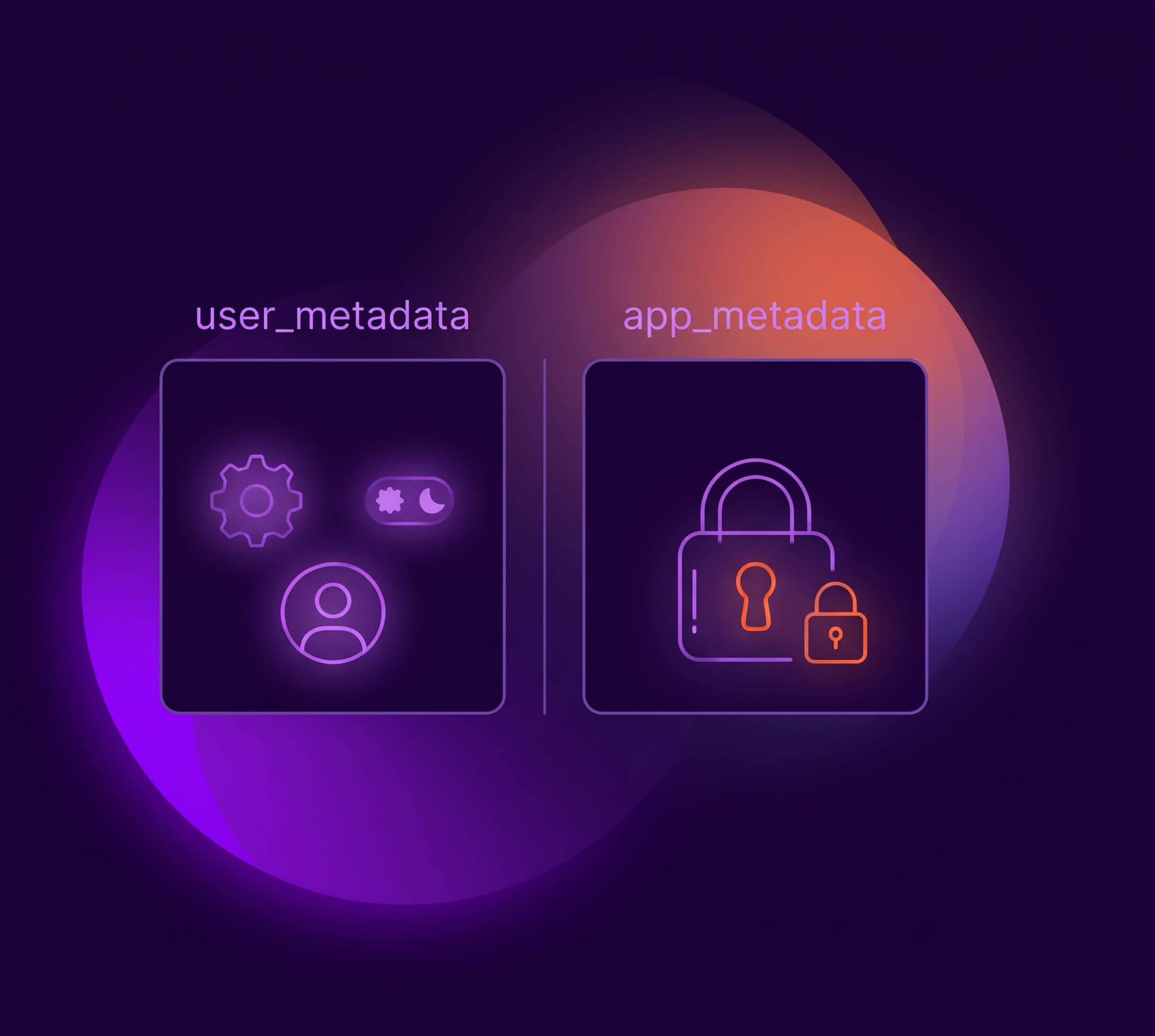
Most developers treat the choice between user_metadata and app_metadata as a naming convention. Put user preferences in one, app-specific data in the other, and move on. That framing misses the actual difference.
I have seen this in a number of Auth0 integrations: a subscription plan or feature flags sitting in user_metadata, and you would never know a user could change them. The difference between the two fields is a security boundary. user_metadata can be edited by users. app_metadata cannot. If your access control logic reads from user_metadata, users can modify their own plan, entitlements, and feature flags through the Management API, without any need to exploit anything.
The Write-Access Distinction
The two fields exist for different jobs. user_metadata holds user attributes like preferences, things that do not affect core functionality, and users can edit it. app_metadata holds data that impacts access:plans, feature flags, external IDs, and users should not directly edit them.
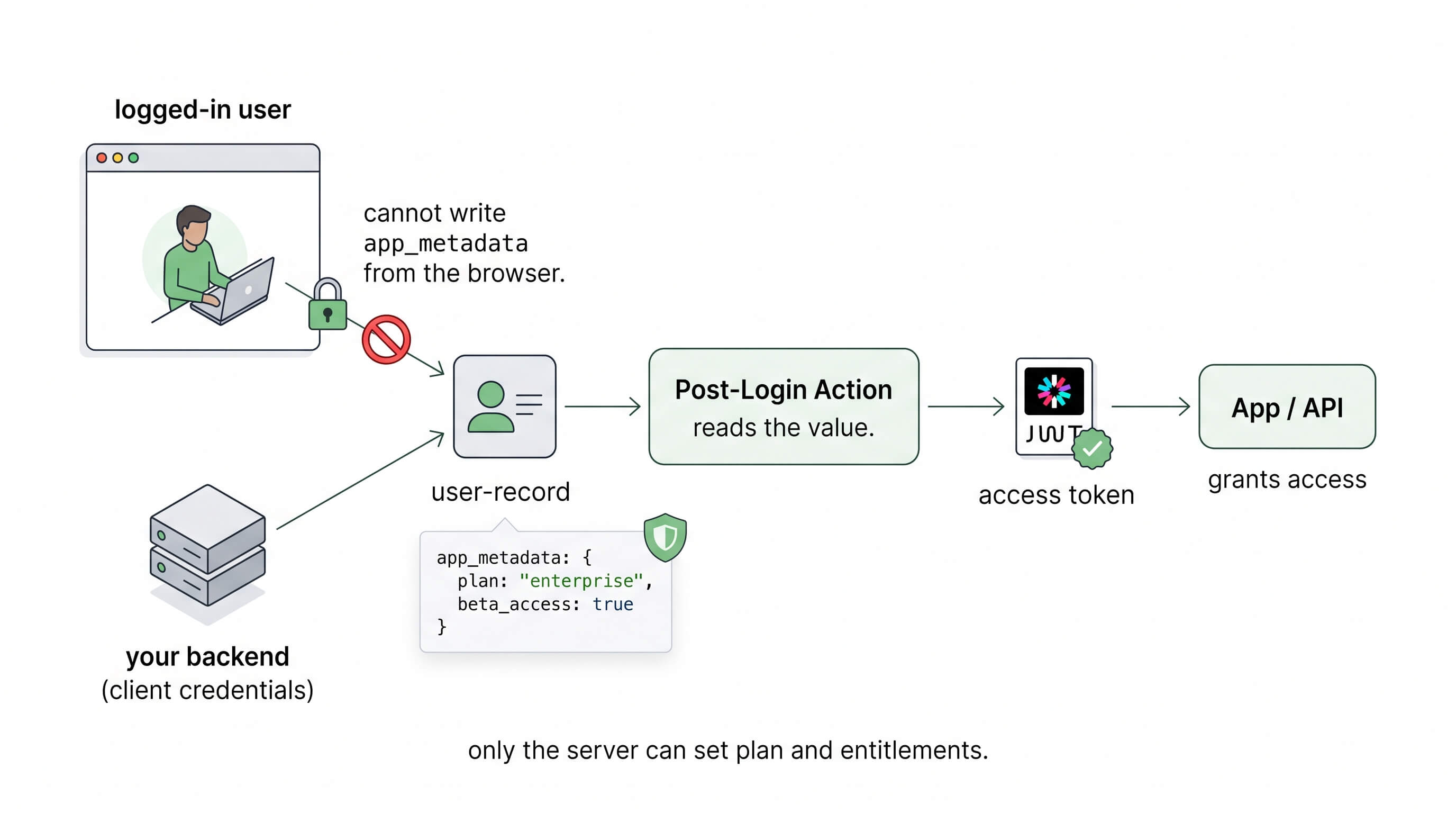
The difference is not an arbitrary rule Auth0 decided to enforce, it actually depends on how each kind of token gets issued. Updating app_metadata requires either update:users or update:users_app_metadata scopes which cannot be issued on user tokens. In most production designs, a backend service obtains such a token through the client credentials grant using an machine-to-machine (M2M) application.
In order to get any of these two scopes to modify app_metadata, you need the Client Credentials grant. That grant cannot be used by a browser client or a mobile app, both are public clients, meaning they cannot hold a secret. Their code ships to the user: anyone can open browser dev tools or decompile the app binary and read whatever is bundled inside, so any "secret" you embed there is not secret anymore. A regular web app with a server-side backend can hold a secret, and that is what lets it act on its own behalf through the client credentials grant, the only flow that carries the privileged update:users scope.
What actually decides whether you can get the update:users scope is the role the application is playing. update:users only comes on a token an app requests on its own behalf, through the client credentials grant. When the app acts on behalf of a logged-in user instead, through a delegated flow like authorization code, it never gets that scope. Client credentials flow is only available to confidential clients, so a public client like a SPA or mobile app cannot reach that flow at all. The same application can play both roles, and it is on you to make sure a user never uses a scope it should not.
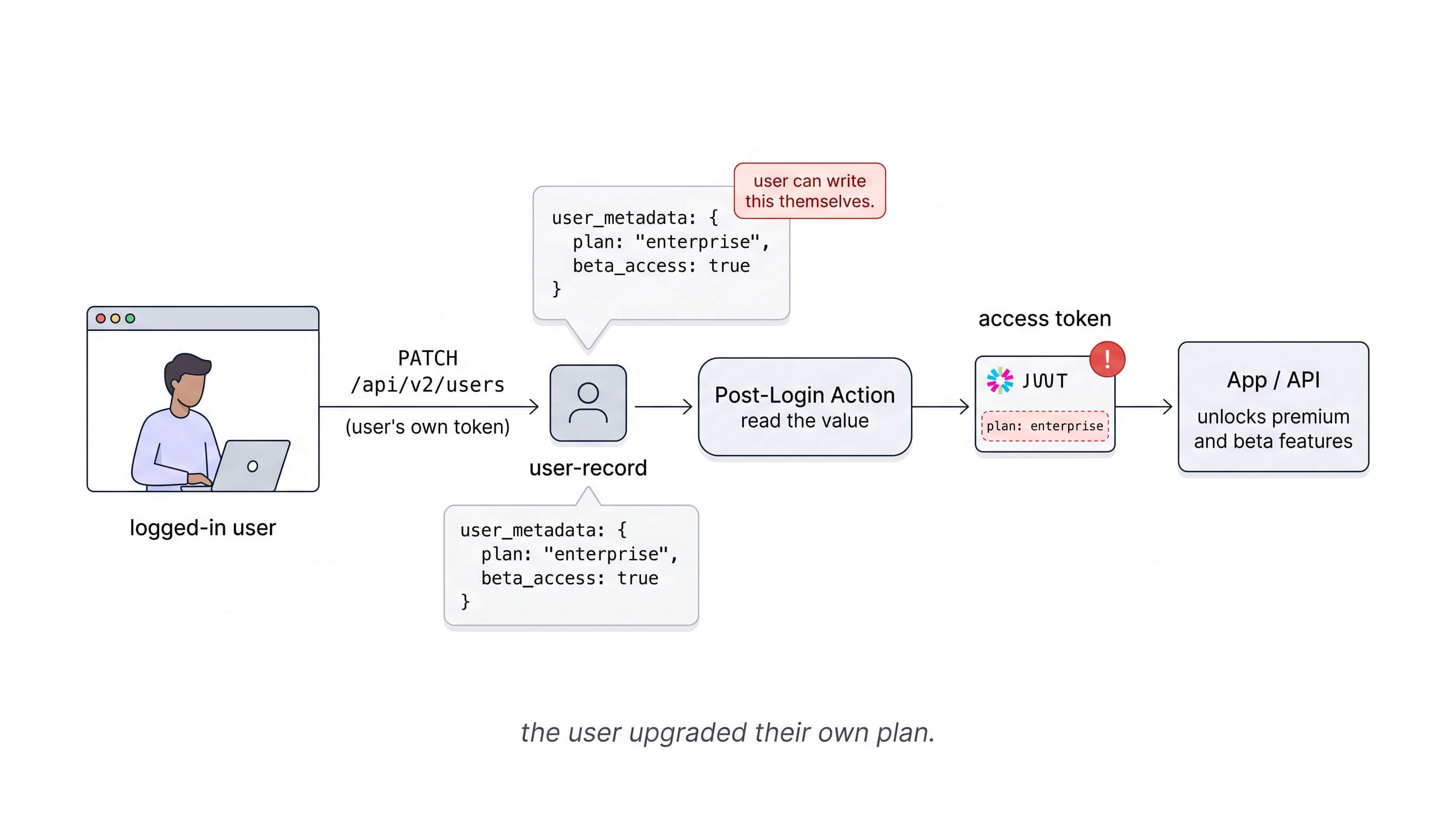
user_metadata is the opposite case, its write scope is one Auth0 will hand to a public client acting on the user's own behalf, and this is where the risk comes in. Auth0 exposes a set of "current user" scopes that public clients can request, including update:current_user_metadata. This is a legitimate feature. It is how you build profile-editing UIs. But it also means any user who obtains a Management API token with that scope can write arbitrary key-value pairs to their own user_metadata.
How a User Edits Their Own user_metadata
If you have authorization data in user_metadata, a user with update:current_user_metadata in their Management API token could make the following call:
PATCH https://{yourDomain}/api/v2/users/{user_id}
Authorization: Bearer <user's Management API token>
Content-Type: application/json

{
  "user_metadata": {
    "plan": "enterprise",
    "beta_access": true
  }
}
Auth0 processes this like any other metadata update, without an error or a flag, and the new values land in the user record, which can be dangerous, as you do not want your users changing their plan or the feature flag they are under.
This is why Auth0 recommends against putting Management API tokens that can change user metadata on the frontend at all, since it lets users manipulate their own metadata in ways that can break your app. That caution is in the SPA token docs.
That is a real concern if you are storing {"plan": "enterprise"} in user_metadata, and a non-issue if all you keep there is {"theme": "dark", "language": "en"}.
When a User Upgrades Their Own Plan
Here is a post-login Action reading a plan and feature flag from the wrong field:
exports.onExecutePostLogin = async (event, api) => {
  const plan = event.user.user_metadata?.plan;
  const betaAccess = event.user.user_metadata?.beta_access;

  if (plan === 'enterprise') {
    api.accessToken.setCustomClaim('https://myapp.com/plan', 'enterprise');
  }
 api.accessToken.setCustomClaim('https://myapp.com/beta_access', betaAccess);
};
This Action runs server-side in Auth0's pipeline. The custom claims end up in the access token your API validates. The code itself looks fine, but the problem is what it reads from.A user modifies user_metadata.plan to "enterprise" and user_metadata.beta_access to true. The next login triggers this Action, which reads the modified values and issues an access token that unlocks paid features and beta functionality they never paid for.
The same pattern creates risk wherever authorization data ends up in user_metadata:
- IP allowlists:
{"allowed_ip": "10.0.0.1"}checked in Actions or middleware - Subscription tier:
{"plan": "enterprise"}read to gate premium features - Feature flags:
{"beta_access": false}controlling visibility - Delegation rules:
{"delegate_for": null}storing another user's ID for impersonation flows
Read Authorization Data from app_metadata
Let’s take the same Action from above, but now let’s read the plan and beta_access feature flag from the right field, that cannot be updated by users:
exports.onExecutePostLogin = async (event, api) => {
  const plan = event.user.app_metadata?.plan;
  const bestaAccess = event.user.app_metadata?.beta_access;

  if (plan === 'enterprise') {
    api.accessToken.setCustomClaim('https://myapp.com/plan', 'enterprise');
  }
  api.accessToken.setCustomClaim('https://myapp.com/beta_access', betaAccess);
};
The values now come from a field that cannot be modified by any token a user can obtain from the browser. The update:current_user_metadata scope is architecturally restricted to user_metadata. Even a valid Management API user token cannot write to app_metadata.
For this to work, your backend is responsible for writing to app_metadata using client credentials, let’s look at this example:
const { ManagementClient } = require('auth0');

const management = new ManagementClient({
  domain: process.env.AUTH0_DOMAIN,
  clientId: process.env.AUTH0_CLIENT_ID,
  clientSecret: process.env.AUTH0_CLIENT_SECRET,
});

await management.users.update(
  { id: userId },
  {
    app_metadata: {
      plan: 'enterprise',
      beta_access: true,
    },
  }
);
This call runs on your server. The ManagementClient uses client credentials, not a user token, so the scopes it has access to are determined by what your M2M application has been granted, not what the user can request. Users cannot replicate it from the browser.
What Goes Where
Use app_metadata for data that could determine what a user can do:
- Roles and permissions
- Tenant membership
- Subscription tier or plan
- Feature flags controlling access to features or resources
- IP allowlists
- External IDs used in authorization queries (CRM IDs, internal user IDs)
Use user_metadata for data the user could be able to change themselves:
- Display preferences (theme, language, timezone)
- Notification settings
- Non-sensitive profile fields (bio, avatar URL)
- Custom fields from signup forms that do not affect access
A quick check: if a user editing the value would let them see or do something they should not, it belongs in app_metadata.
Special Guest: client_metadata
There is a third field that tends to surprise people the first time they hit it in an Action: client_metadata. It does not live on the user at all, it lives on the Auth0 client (the application itself), and you read it in a post-login Action through event.client.metadata.
Picture a tenant with several first-party apps: a customer-facing web app, a mobile app, and an internal admin dashboard, all running the same post-login Action. The admin dashboard should stamp an extra claim on its tokens so your API knows the login came from an internal tool, but the public apps should not. That setting is a property of the application, not of any user who signs in. You store internal_tool: true as client_metadata on the admin dashboard's client, then read event.client.metadata.internal_tool in the shared Action to decide whether to add the claim. Writing to it requires the update:clients scope, which requires a privileged Management API token so a user has no path to edit it at all.
The line between this and app_metadata comes down to what the data describes. If it is about what this user can do, it belongs in app_metadata. If it is about what this application is configured to offer, client_metadata is the right place.
Where to Start
If you already have an Auth0 tenant running, this is worth an audit. Open your post-login Actions and look at what they read before setting custom claims. Anything reading plan, or feature flags from event.user.user_metadata is a field a user can write to themselves. Move that data to app_metadata, point your Actions and your server-side writes at the new field, and the same login flow that used to be exploitable stops being one.
If you do not already have an Auth0 account yet, create one for free.
About the author

Carla Urrea Stabile
Staff Developer Advocate
I've been working as a software engineer since 2014, particularly as a backend engineer and doing system design. I consider myself a language-agnostic developer but if I had to choose, I like to work with Ruby and Python.
After realizing how fun it was to create content and share experiences with the developer community I made the switch to Developer Advocacy. I like to learn and work with new technologies.
When I'm not coding or creating content you could probably find me going on a bike ride, hiking, or just hanging out with my dog, Dasha.