

Benefits
- Extend the capabilities of Auth0’s Universal Login to support multiple brands in one tenant.
- Take advantage of Auth0’s features, such as Passkeys, Bot Detection, and MFA, without rebuilding your authentication logic.
- Integrate advanced analytics and A/B testing to optimize the user journey.
- Use the ACUL SDKs to build with your own tech stack. You can:
- Use any third-party CSS, JS, or component library
- Integrate your preferred analytics platform, such as Heap, Mixpanel, and so on
- Build with your preferred frontend framework, such as Vue or React
Use cases
You want to use ACUL with your Universal Login implementation if:- You need to apply specific brand standards to your authentication flows.
- You need to provide a multi-branding experience.
- You need to provide UI-level A/B testing or detailed analytics.
- You need to provide a localized Universal Login in languages that Auth0 does not currently support.
- You need to add complex or custom logic to your authentication flows.
How it works
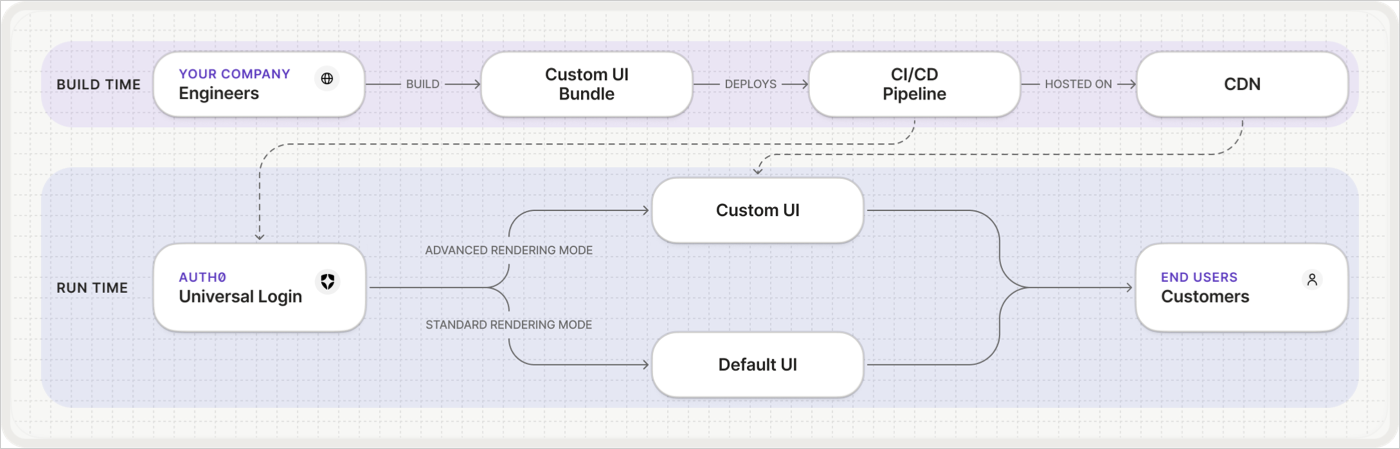
 Build time begins when you build your customized authentication screens in your own environment.
Use the ACUL SDKs to submit your custom code to define prompts and screens with your preferred frontend tech stack, like React or Angular. When you push commits, your CI/CD pipeline runs the build process, compiles your application into static JavaScript and CSS assets, and uploads these assets to your private cloud storage, which serves as your own content delivery network (CDN).
Run time begins when your application redirects end users to your Auth0 login page.
Auth0 recognizes the authentication screens you configured to use ACUL and serves a minimal host page. The user’s browser loads this page, which contains HTML tags pointing to your asset URLs on your CDN. The browser downloads your JavaScript and CSS, verifies their integrity using the Subresource Integrity (SRI) hashes, and renders your custom UI. From here, your application code and the ACUL SDK manage the rest of the user’s interaction.
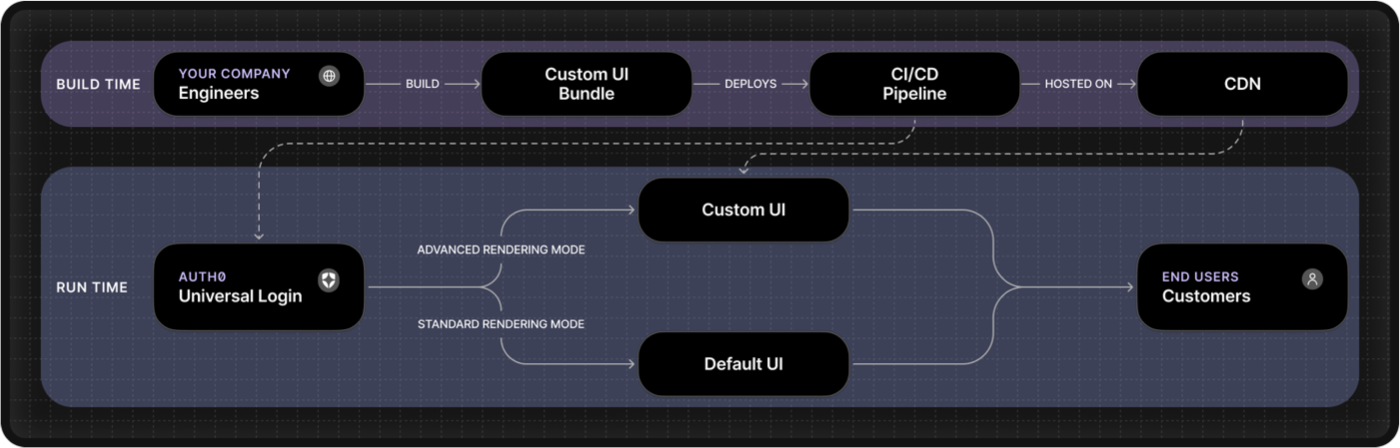
Build time begins when you build your customized authentication screens in your own environment.
Use the ACUL SDKs to submit your custom code to define prompts and screens with your preferred frontend tech stack, like React or Angular. When you push commits, your CI/CD pipeline runs the build process, compiles your application into static JavaScript and CSS assets, and uploads these assets to your private cloud storage, which serves as your own content delivery network (CDN).
Run time begins when your application redirects end users to your Auth0 login page.
Auth0 recognizes the authentication screens you configured to use ACUL and serves a minimal host page. The user’s browser loads this page, which contains HTML tags pointing to your asset URLs on your CDN. The browser downloads your JavaScript and CSS, verifies their integrity using the Subresource Integrity (SRI) hashes, and renders your custom UI. From here, your application code and the ACUL SDK manage the rest of the user’s interaction.
Requirements
To start with Advanced Customizations for Universal Login, you must have:- An Auth0 development tenant configured with Universal Login and a custom domain.
We recommend you create a tenant for testing, development, and production with appropriate environment tags.
- An Auth0 First Party Application
- A CDN with an included CI/CD pipeline, such as GitHub, to host assets.