
Documentation Index

Fetch the complete documentation index at: https://auth0.com/llms.txt

Use this file to discover all available pages before exploring further.

Prerequisites: Before you begin, ensure you have the following installed:
  • Go 1.25 or newer
  • Git for version control
Verify installation: go version

Get Started

This quickstart demonstrates how to add Auth0 authentication to a Go web application. You’ll build a server-side app with login, logout, and user profile features using the go-auth0 SDK and Go’s standard net/http library.
1

Create a new project

Create a new directory for your Go application and initialize a module.
mkdir myapp && cd myapp
go mod init myapp
Install the required dependencies:
go get github.com/auth0/go-auth0/v2
go get github.com/gorilla/sessions
go get github.com/joho/godotenv
Create the project structure:
mkdir templates
touch .env auth.go handlers.go main.go templates/home.html templates/user.html
go.mod
module myapp

go 1.25

require (
    github.com/auth0/go-auth0/v2 v2.10.0
    github.com/gorilla/sessions v1.4.0
    github.com/joho/godotenv v1.5.1
)
2

Setup your Auth0 application

To use Auth0 services, you need an application set up in the Auth0 Dashboard. The Auth0 application is where you configure authentication for your project.You need the following information from your application’s Settings tab:
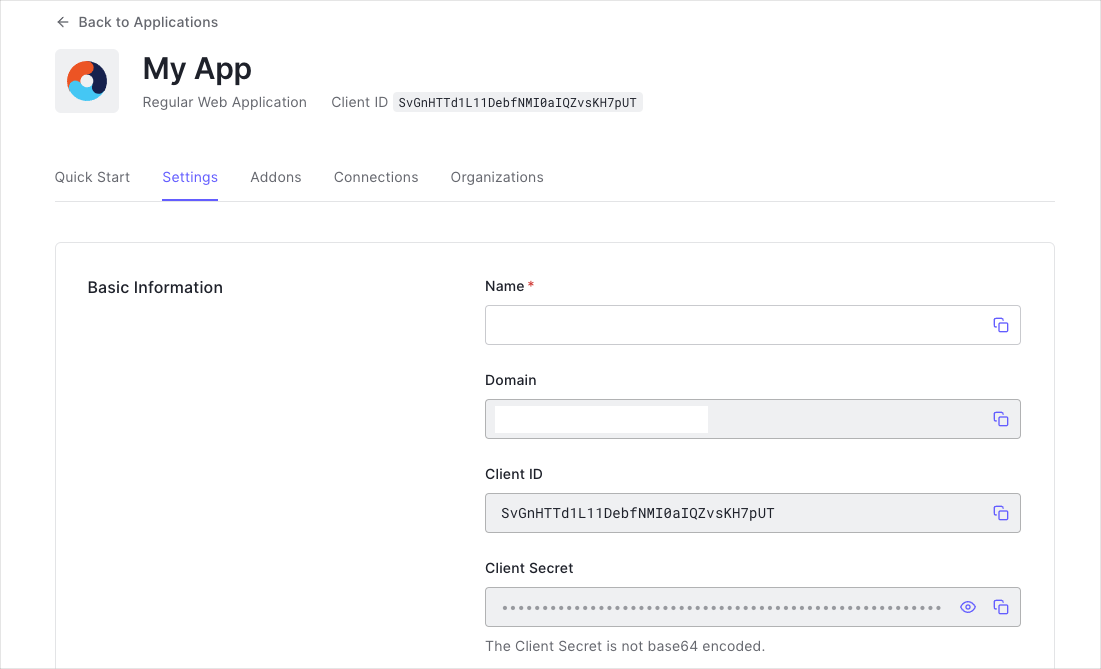
  • Domain
  • Client ID
  • Client Secret
App Dashboard
You have three options to set up your Auth0 application: use the Quick Setup tool (recommended), run a CLI command, or configure manually via the Dashboard:
Verify your .env file exists: cat .env (Mac/Linux) or type .env (Windows)
3

Create the Auth0 client

Create the auth.go file. This wraps the go-auth0 authentication client and provides a helper to build the authorization URL.
auth.go
package main

import (
    "context"
    "fmt"
    "net/url"
    "os"

    "github.com/auth0/go-auth0/v2/authentication"
)

// Authenticator wraps the go-auth0 authentication client.
type Authenticator struct {
    *authentication.Authentication
    Domain      string
    ClientID    string
    CallbackURL string
}

// NewAuthenticator creates and configures a new Authenticator.
func NewAuthenticator() (*Authenticator, error) {
    domain := os.Getenv("AUTH0_DOMAIN")
    clientID := os.Getenv("AUTH0_CLIENT_ID")
    clientSecret := os.Getenv("AUTH0_CLIENT_SECRET")
    callbackURL := os.Getenv("AUTH0_CALLBACK_URL")

    authClient, err := authentication.New(
        context.Background(),
        domain,
        authentication.WithClientID(clientID),
        authentication.WithClientSecret(clientSecret),
    )
    if err != nil {
        return nil, fmt.Errorf("failed to initialize authentication client: %w", err)
    }

    return &Authenticator{
        Authentication: authClient,
        Domain:         domain,
        ClientID:       clientID,
        CallbackURL:    callbackURL,
    }, nil
}

// AuthorizationURL builds the /authorize URL to redirect users
// to Auth0's Universal Login page.
func (a *Authenticator) AuthorizationURL(state string) string {
    u, _ := url.Parse("https://" + a.Domain + "/authorize")
    params := url.Values{
        "response_type": {"code"},
        "client_id":     {a.ClientID},
        "redirect_uri":  {a.CallbackURL},
        "scope":         {"openid profile email"},
        "state":         {state},
    }
    u.RawQuery = params.Encode()
    return u.String()
}
What this does:
  • Initializes the go-auth0 authentication client with your tenant’s domain, client ID, and client secret
  • Provides an AuthorizationURL helper that builds the /authorize redirect URL with the required OAuth2 parameters
4

Create route handlers

Create the handlers.go file with handlers for login, callback, user profile, and logout.
handlers.go
package main

import (
    "crypto/rand"
    "encoding/base64"
    "encoding/gob"
    "net/http"
    "net/url"
    "os"

    "github.com/auth0/go-auth0/v2/authentication/oauth"
    "github.com/gorilla/sessions"
)

var store *sessions.CookieStore

func init() {
    gob.Register(map[string]interface{}{})
}

func initSessionStore() {
    store = sessions.NewCookieStore([]byte(os.Getenv("SESSION_SECRET")))
    store.Options = &sessions.Options{
        Path:     "/",
        MaxAge:   86400,
        HttpOnly: true,
        Secure:   false, // Set to true in production (requires HTTPS)
        SameSite: http.SameSiteLaxMode,
    }
}

// HomeHandler renders the home page or redirects to /user if already logged in.
func HomeHandler(w http.ResponseWriter, r *http.Request) {
    session, _ := store.Get(r, "auth-session")
    if session.Values["profile"] != nil {
        http.Redirect(w, r, "/user", http.StatusSeeOther)
        return
    }
    if err := templates.ExecuteTemplate(w, "home.html", nil); err != nil {
        http.Error(w, "Internal error", http.StatusInternalServerError)
    }
}

// LoginHandler redirects the user to Auth0's Universal Login page.
func LoginHandler(auth *Authenticator) http.HandlerFunc {
    return func(w http.ResponseWriter, r *http.Request) {
        state, err := generateRandomState()
        if err != nil {
            http.Error(w, "Internal error", http.StatusInternalServerError)
            return
        }

        session, _ := store.Get(r, "auth-session")
        session.Values["state"] = state
        if err := session.Save(r, w); err != nil {
            http.Error(w, "Internal error", http.StatusInternalServerError)
            return
        }

        http.Redirect(w, r, auth.AuthorizationURL(state), http.StatusTemporaryRedirect)
    }
}

// CallbackHandler handles the callback from Auth0 after authentication.
func CallbackHandler(auth *Authenticator) http.HandlerFunc {
    return func(w http.ResponseWriter, r *http.Request) {
        session, _ := store.Get(r, "auth-session")

        // Verify the state parameter to prevent CSRF attacks.
        if r.URL.Query().Get("state") != session.Values["state"] {
            http.Error(w, "Invalid state parameter", http.StatusBadRequest)
            return
        }

        // Exchange the authorization code for tokens.
        tokenSet, err := auth.OAuth.LoginWithAuthCode(r.Context(), oauth.LoginWithAuthCodeRequest{
            Code:        r.URL.Query().Get("code"),
            RedirectURI: auth.CallbackURL,
        }, oauth.IDTokenValidationOptions{})
        if err != nil {
            http.Error(w, "Failed to exchange authorization code for token", http.StatusUnauthorized)
            return
        }

        // Retrieve the user's profile information.
        userInfo, err := auth.UserInfo(r.Context(), tokenSet.AccessToken)
        if err != nil {
            http.Error(w, "Failed to get user info", http.StatusInternalServerError)
            return
        }

        session.Values["access_token"] = tokenSet.AccessToken
        session.Values["profile"] = map[string]interface{}{
            "nickname": userInfo.Nickname,
            "name":     userInfo.Name,
            "picture":  userInfo.Picture,
            "email":    userInfo.Email,
        }
        if err := session.Save(r, w); err != nil {
            http.Error(w, "Internal error", http.StatusInternalServerError)
            return
        }

        http.Redirect(w, r, "/user", http.StatusTemporaryRedirect)
    }
}

// UserHandler displays the authenticated user's profile.
func UserHandler(w http.ResponseWriter, r *http.Request) {
    session, _ := store.Get(r, "auth-session")
    profile, ok := session.Values["profile"].(map[string]interface{})
    if !ok {
        http.Redirect(w, r, "/", http.StatusSeeOther)
        return
    }

    if err := templates.ExecuteTemplate(w, "user.html", profile); err != nil {
        http.Error(w, "Internal error", http.StatusInternalServerError)
    }
}

// LogoutHandler clears the session and redirects to Auth0's logout endpoint.
func LogoutHandler(auth *Authenticator) http.HandlerFunc {
    return func(w http.ResponseWriter, r *http.Request) {
        session, _ := store.Get(r, "auth-session")
        session.Options.MaxAge = -1
        session.Save(r, w)

        logoutURL, _ := url.Parse("https://" + auth.Domain + "/v2/logout")
        scheme := "http"
        if r.TLS != nil {
            scheme = "https"
        }

        returnTo, _ := url.Parse(scheme + "://" + r.Host)
        params := url.Values{}
        params.Add("returnTo", returnTo.String())
        params.Add("client_id", auth.ClientID)
        logoutURL.RawQuery = params.Encode()

        http.Redirect(w, r, logoutURL.String(), http.StatusTemporaryRedirect)
    }
}

func generateRandomState() (string, error) {
    b := make([]byte, 32)
    _, err := rand.Read(b)
    if err != nil {
        return "", err
    }
    return base64.RawURLEncoding.EncodeToString(b), nil
}
Key points:
  • LoginHandler generates a random state parameter for CSRF protection and redirects to Auth0’s Universal Login
  • CallbackHandler exchanges the authorization code for tokens using go-auth0, then calls UserInfo to get the user’s profile
  • LogoutHandler clears the session and redirects to Auth0’s /v2/logout endpoint
  • UserHandler retrieves the profile from the session and renders the template
5

Create HTML templates

templates/home.html
<!DOCTYPE html>
<html>
<head>
    <meta charset="UTF-8">
    <meta name="viewport" content="width=device-width, initial-scale=1.0">
    <title>Auth0 Go Web App</title>
    <style>
        * { margin: 0; padding: 0; box-sizing: border-box; }
        body {
            font-family: -apple-system, BlinkMacSystemFont, 'Segoe UI', Roboto, sans-serif;
            background: #0a0a0a;
            color: #e2e8f0;
            min-height: 100vh;
            display: flex;
            align-items: center;
            justify-content: center;
        }
        .container {
            text-align: center;
            padding: 3rem;
            background: #1a1a2e;
            border-radius: 16px;
            box-shadow: 0 20px 60px rgba(0, 0, 0, 0.5);
            max-width: 440px;
            width: 90%;
        }
        .logo {
            width: 48px;
            height: 48px;
            margin: 0 auto 1.5rem;
            background: linear-gradient(135deg, #635bff, #00d4aa);
            border-radius: 12px;
        }
        h1 {
            font-size: 2rem;
            font-weight: 700;
            margin-bottom: 0.5rem;
            color: #f8fafc;
        }
        p {
            color: #94a3b8;
            font-size: 1.05rem;
            margin-bottom: 2rem;
            line-height: 1.6;
        }
        .btn {
            display: inline-block;
            padding: 0.85rem 2.5rem;
            background: linear-gradient(135deg, #635bff, #4f46e5);
            color: #fff;
            text-decoration: none;
            border-radius: 8px;
            font-size: 1rem;
            font-weight: 600;
            transition: transform 0.2s, box-shadow 0.2s;
            box-shadow: 0 4px 14px rgba(99, 91, 255, 0.4);
        }
        .btn:hover {
            transform: translateY(-2px);
            box-shadow: 0 6px 20px rgba(99, 91, 255, 0.6);
        }
        .footer {
            margin-top: 2rem;
            font-size: 0.85rem;
            color: #475569;
        }
        .footer a { color: #635bff; text-decoration: none; }
    </style>
</head>
<body>
    <div class="container">
        <div class="logo"></div>
        <h1>Go + Auth0</h1>
        <p>Secure authentication for your Go web application, powered by Auth0.</p>
        <a href="/login" class="btn">Sign In</a>
        <div class="footer">
            Protected by <a href="https://auth0.com">Auth0</a>
        </div>
    </div>
</body>
</html>
6

Create the main server

Wire everything together in main.go:
main.go
package main

import (
    "html/template"
    "log"
    "net/http"

    "github.com/joho/godotenv"
)

var templates *template.Template

func main() {
    // .env file is optional; in Docker, env vars come from --env-file flag.
    godotenv.Load()

    initSessionStore()

    auth, err := NewAuthenticator()
    if err != nil {
        log.Fatalf("Failed to initialize the authenticator: %v", err)
    }

    templates = template.Must(template.ParseGlob("templates/*.html"))

    mux := http.NewServeMux()
    mux.HandleFunc("/", HomeHandler)
    mux.HandleFunc("/login", LoginHandler(auth))
    mux.HandleFunc("/callback", CallbackHandler(auth))
    mux.HandleFunc("/user", UserHandler)
    mux.HandleFunc("/logout", LogoutHandler(auth))

    log.Print("Server listening on http://localhost:3000/")
    if err := http.ListenAndServe("0.0.0.0:3000", mux); err != nil {
        log.Fatalf("There was an error with the http server: %v", err)
    }
}
myapp/
├── main.go          # Application entry point and routes
├── auth.go          # Auth0 client setup and authorization URL
├── handlers.go      # HTTP handlers (login, callback, logout, profile)
├── templates/
│   ├── home.html    # Home page with sign-in link
│   └── user.html    # User profile page
├── .env             # Environment variables (not committed)
├── go.mod
└── go.sum
7

Run and test your application

Start the development server:
go run .
You should see: Server listening on http://localhost:3000/Open http://localhost:3000 in your browser. Click Sign In to be redirected to Auth0’s Universal Login page. After authenticating, you’ll be redirected back to your app and see your profile information.
If port 3000 is already in use, update the AUTH0_CALLBACK_URL in your .env file and the Allowed Callback URLs and Allowed Logout URLs in your Auth0 Application Settings to use the new port.
CheckpointYou should now have a fully functional Go web application with Auth0 authentication running on your localhost. Your app:
  1. Redirects users to Auth0’s Universal Login for authentication
  2. Exchanges the authorization code for tokens using the go-auth0 SDK
  3. Retrieves and displays user profile information
  4. Supports logout with session cleanup

Advanced Usage

Create an IsAuthenticated middleware to protect routes that require authentication. Add this to your handlers.go:
handlers.go
// IsAuthenticated is a middleware that checks if
// the user has been authenticated.
func IsAuthenticated(next http.Handler) http.Handler {
    return http.HandlerFunc(func(w http.ResponseWriter, r *http.Request) {
        session, _ := store.Get(r, "auth-session")
        if session.Values["profile"] == nil {
            http.Redirect(w, r, "/", http.StatusSeeOther)
            return
        }
        next.ServeHTTP(w, r)
    })
}
Apply the middleware to protected routes in main.go:
main.go
mux.Handle("/user", IsAuthenticated(http.HandlerFunc(UserHandler)))
After authentication, the access token stored in the session can be used to call a protected API:
func ApiHandler(w http.ResponseWriter, r *http.Request) {
    session, _ := store.Get(r, "auth-session")
    accessToken, ok := session.Values["access_token"].(string)
    if !ok {
        http.Error(w, "Unauthorized", http.StatusUnauthorized)
        return
    }

    req, _ := http.NewRequest("GET", "https://your-api.example.com/api/private", nil)
    req.Header.Add("Authorization", "Bearer "+accessToken)

    res, err := http.DefaultClient.Do(req)
    if err != nil {
        http.Error(w, "API request failed", http.StatusInternalServerError)
        return
    }
    defer res.Body.Close()

    w.Header().Set("Content-Type", "application/json")
    io.Copy(w, res.Body)
}
To request an access token scoped to your API, add the audience parameter to the authorization URL in auth.go:
params := url.Values{
    "response_type": {"code"},
    "client_id":     {a.ClientID},
    "redirect_uri":  {a.CallbackURL},
    "scope":         {"openid profile email"},
    "audience":      {"https://your-api.example.com"},
    "state":         {state},
}
If your application uses refresh tokens, you can exchange a refresh token for a new set of tokens using the go-auth0 SDK:
newTokenSet, err := auth.OAuth.RefreshToken(r.Context(), oauth.RefreshTokenRequest{
    RefreshToken: storedRefreshToken,
})
To receive a refresh token, add offline_access to the scopes in your authorization URL:
"scope": {"openid profile email offline_access"},

Troubleshooting

”Failed to exchange authorization code for token”

Problem: The callback handler cannot exchange the authorization code.Solutions:
  1. Verify AUTH0_CLIENT_SECRET is correct in your .env file
  2. Ensure the AUTH0_CALLBACK_URL exactly matches the Allowed Callback URLs in your Auth0 Application Settings
  3. Check that the authorization code hasn’t expired (codes are single-use and short-lived)

“Failed to get user info”

Problem: The /userinfo endpoint returns an error.Solutions:
  1. Ensure the openid scope is included in the authorization URL
  2. Verify the access token is valid and not expired
  3. Check network connectivity to your Auth0 domain

”Invalid state parameter”

Problem: The state parameter in the callback doesn’t match the session.Solutions:
  1. Ensure cookies are enabled in your browser
  2. Check that the session store secret hasn’t changed between requests
  3. Verify you’re not using multiple browser tabs during the login flow

Users can’t log out

Problem: After clicking logout, users see an Auth0 error page.Solutions:
  1. Verify http://localhost:3000 is in the Allowed Logout URLs in your Auth0 Application Settings
  2. Ensure the client_id parameter matches your application’s Client ID
  3. Check that the returnTo URL exactly matches one of the allowed logout URLs

Session data not persisting

Problem: User profile data disappears between requests.Solutions:
  1. Ensure gob.Register(map[string]interface{}{}) is called before storing data
  2. Check that session.Save(r, w) is called after modifying session values
  3. Verify cookies are not being blocked by browser settings

Next Steps

Now that you have authentication working, consider exploring:

Resources