

The Model Context Protocol (MCP) has become the standard way AI agents like ChatGPT and Claude connect to external tools and services. It gives agents a clean interface to call APIs, read data, and take actions. But what it does not do is check if the agent should be allowed to do any of that.
That is a real problem. Without proper authentication, any agent that finds your MCP server can use it. No identity check, no permission check, no questions asked. And the stakes keep climbing. These are not read-only integrations. Agents are executing transactions, accessing customer records, and modifying production systems.
Today we are announcing the General Availability of Auth for MCP, the identity layer that helps you ship more secure, production-ready MCP servers.
Introducing Auth for MCP
Auth for MCP gives you a straightforward way to add authentication and authorization to any MCP server, so you control exactly who gets access, and what they get access to.
This works across three patterns we see teams building right now.
Your platform, your customers' agents
If you expose your capabilities through MCP so that your customers can access them from their AI agents, you need to know the end user and what they are allowed to do. For example, if a customer wants to pull inventory data or trigger a workflow in your system, and you need that interaction locked down with real credentials and scoped permissions.
Your product, your end users' agents
Your customers are starting to interact with your product through AI agents like ChatGPT and Claude instead of your app's UI. A shopper asks their agent to reorder running shoes from your store. That agent needs to authenticate as the user, confirm it has permission, and act within clear boundaries. This enables consumer-facing agent interactions, and it needs to feel seamless without being reckless.
Your tools, your employees' agents
Internal agents that help employees get work done faster are everywhere now. They query dashboards, update tickets, and draft documents. Your employees need to access Slack, Google Drive, or Confluence, through MCP. Without proper authentication, an intern's agent has the same access as the CFO's. That means your current AI setup has a massive security flaw that you are accidentally treating as standard behavior.
What Is in the GA Release
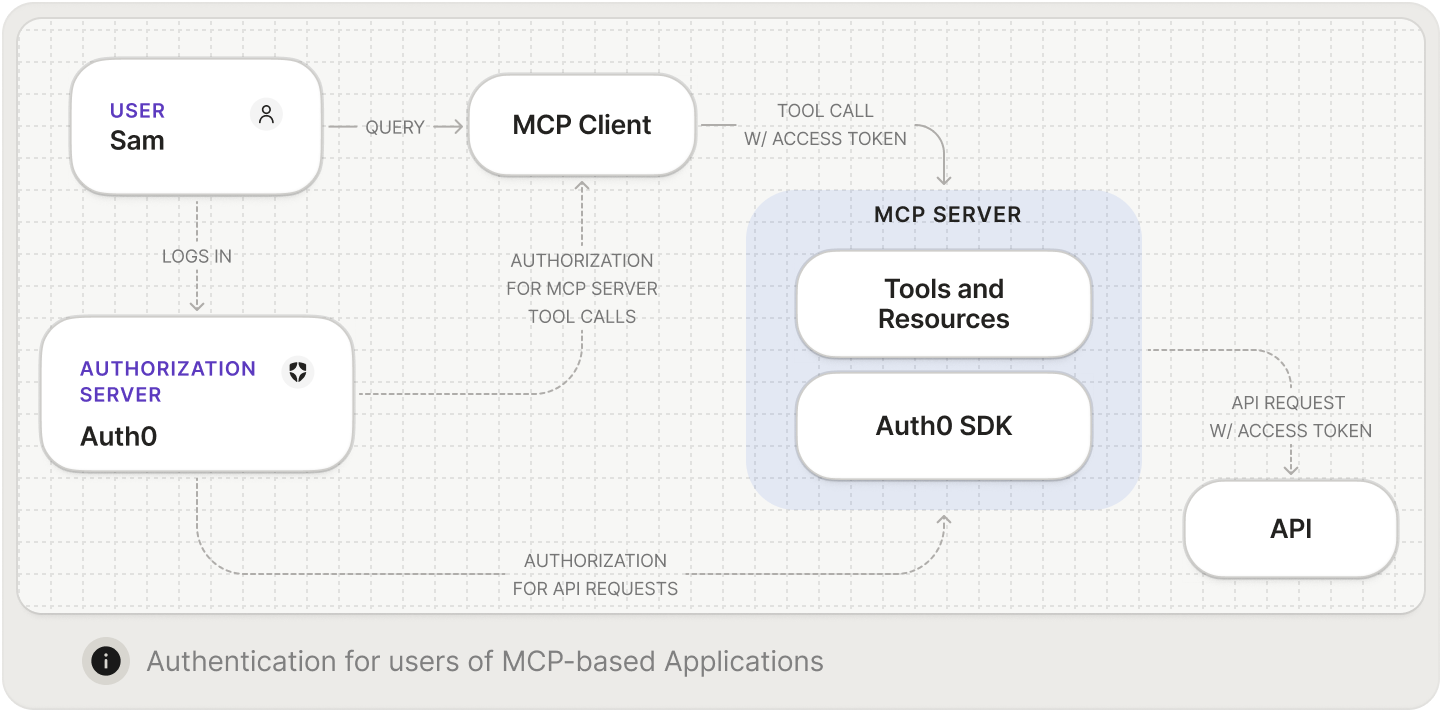
See how Auth for MCP works.
Add authentication and authorization to help secure your MCP Server
Auth0 handles both authentication and authorization for your MCP server. On the authentication side, users log in through any method you already support, whether that is through username and password, social login, or enterprise SSO. Nothing new to set up if you are already using Auth0.
Authorization is where it gets interesting. You define which of your internal APIs the MCP server is allowed to reach. When a user's agent triggers an action that requires calling one of those APIs, Auth0 checks that the specific user has permission before the call goes through. The agent only gets to do what the user behind it is allowed to do.
Support for Client ID Metadata Document (CIMD) Client Registration
For MCP clients to connect to your MCP server, they need to identify themselves. But how does your server trust a new client it's never seen? How do you get its name and logo for the consent screen? This is a key challenge for open ecosystems like MCP, where any client can connect to any server.
While the MCP spec originally relied on the traditional OAuth solution of Dynamic Client Registration (DCR), that was never really built for the speed of AI. It has now evolved to use CIMD. This shift replaces complex, one-off registrations with a streamlined, automated process, allowing you to deploy and help secure a fleet of agents in minutes rather than weeks.
With CIMD, each client hosts a document containing its metadata at a URL that identifies the client. In Auth0, your tenant admin provides that URL, and Auth0 fetches the metadata, validates it, and shows it to the admin for confirmation before creating the client. You get control over which clients can access your MCP server ensuring no surprise registrations. For more details about the benefits of using CIMD over DCR, we wrote a detailed comparison.
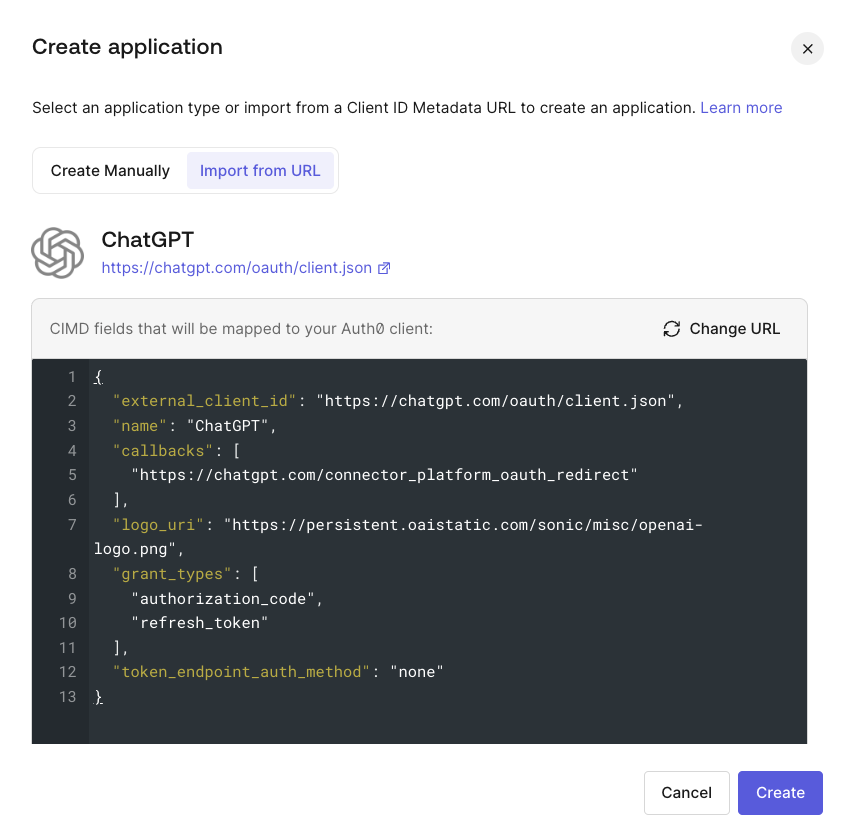
Learn how to register applications with the CIMD. Read Register Applications with CIMD.
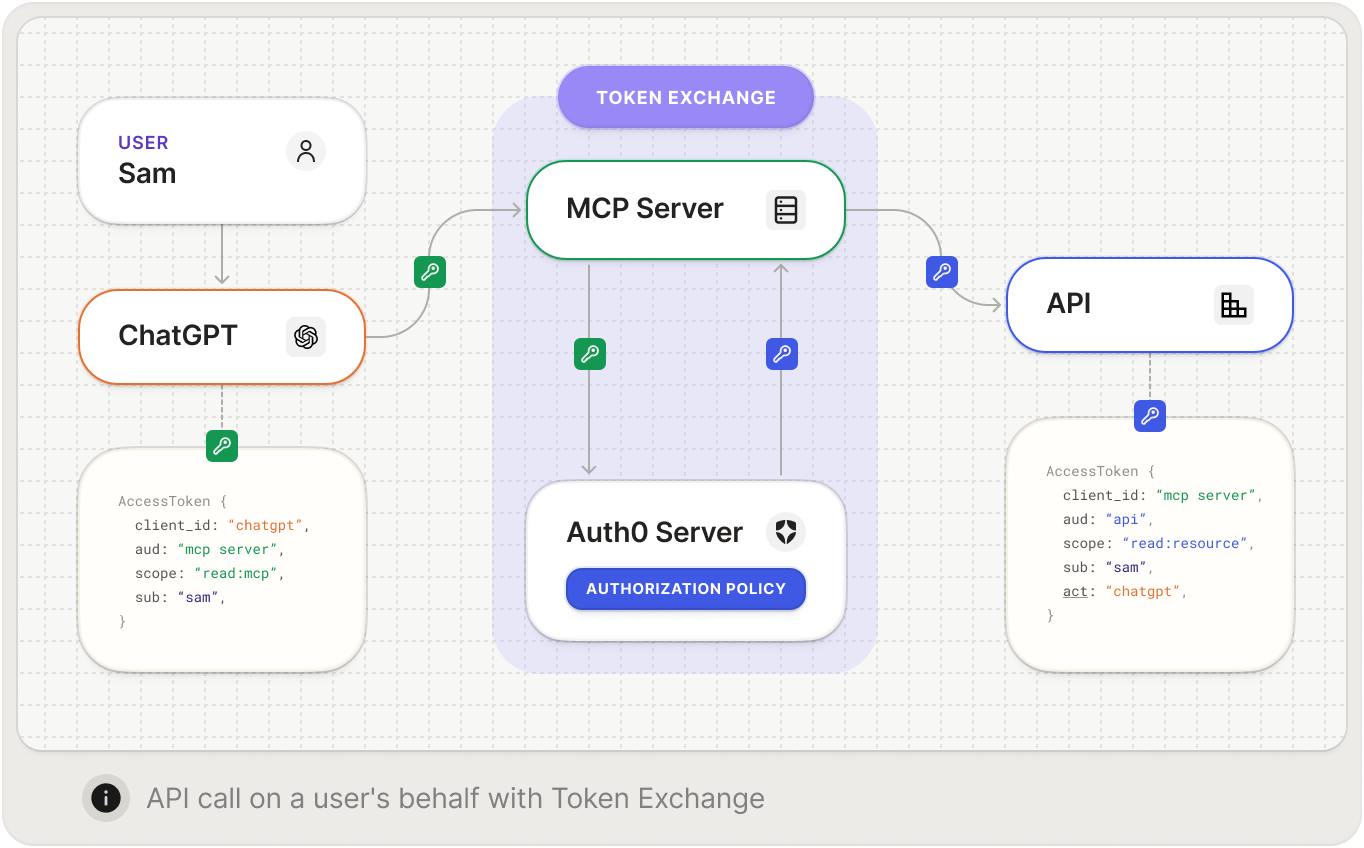
On-Behalf-Of (OBO) Token Exchange
Here is a scenario that comes up fast. A user's agent authenticates with your MCP server, then your server needs to call another API like a Salesforce instance or HR system to finish the job. The question is: How does that second API know the request is legitimate and who it's actually for? OBO Token Exchange lets your MCP server trade the user’s access token for one that works with the downstream API, scoped correctly and still tied to the original user. No shared secrets, no service accounts with too much power. And full auditing and visibility into every action.
const obo = await apiClient.getTokenOnBehalfOf(incomingAccessToken, {
  audience: "https://calendar-api.acme.com",
  scope: "calendar:read calendar:write",
});
Learn how to use the On-Behalf-Of (OBO) token exchange. Read On-Behalf-Of Token Exchange.
Support for resource identifiers
The MCP spec uses resource identifiers to indicate which server an agent wants to talk to, rather than the audience parameter that OAuth has traditionally used. Auth0 now supports this natively. Your MCP implementation stays spec-compliant without workarounds or translation layers.
Get Started Today
Just last year, MCP was a curiosity. Today, major platforms support it and teams are building on it in production. The gap between cool demo and real deployment is almost entirely about trust. Can you prove who is calling? Can you limit what they do? Can you audit it later?
Those are not new questions. But the agent-shaped context makes them urgent in a way that catches people off guard. You would not ship an API without auth. An MCP server deserves the same treatment.
Auth for MCP is available now in your Auth0 dashboard. Set it up, register your first client, and let agents in through the front door. Auth for MCP works with your favorite AI agents like Claude, Cursor, VSCode, ChatGPT and more!