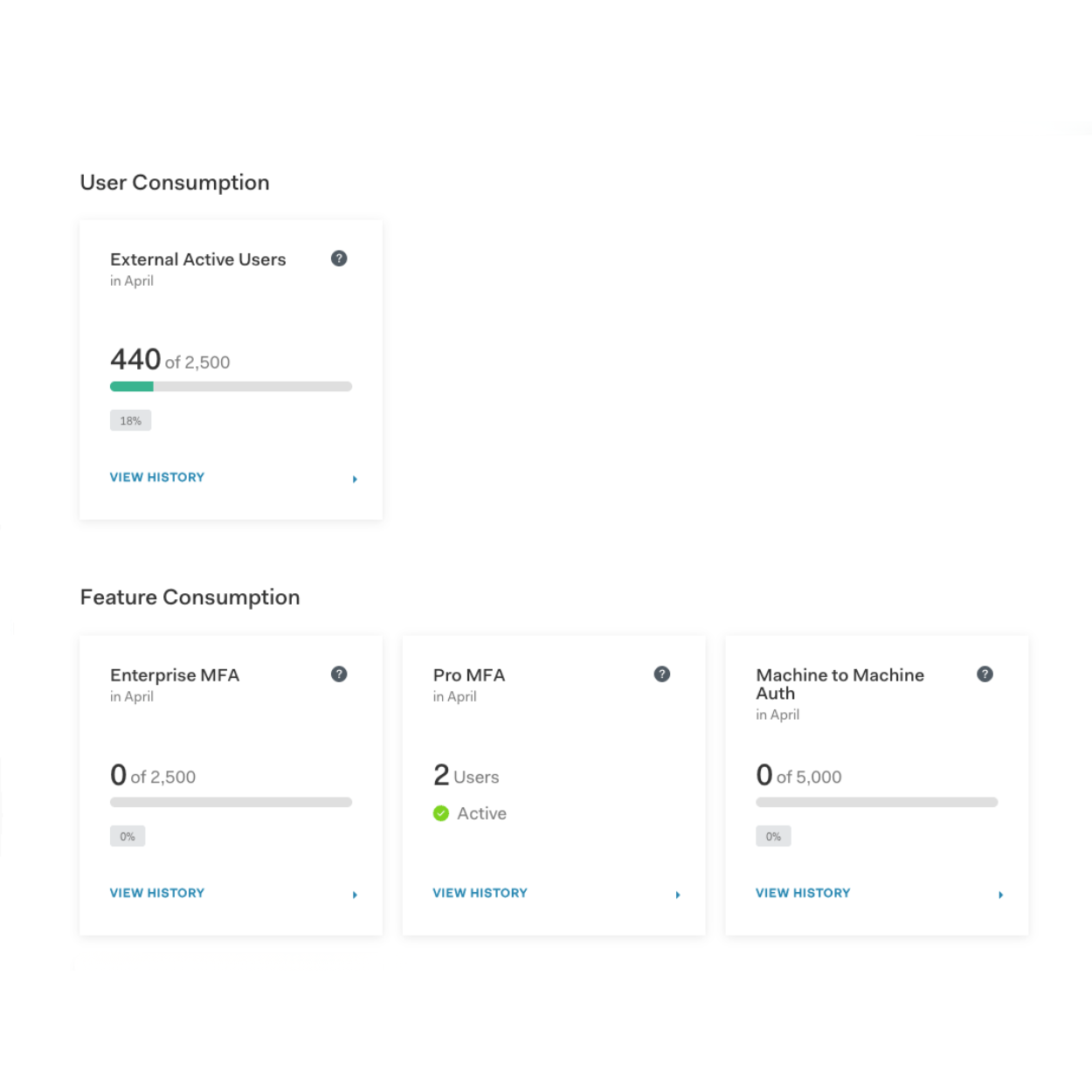
In my conversations with customers, many teams are not fully aware of the Auth0 tools available to track their usage. When your application is growing quickly, keeping an eye on these metrics is key to avoiding unexpected bill spikes or hitting plan limits that could trigger an unexpected auto-upgrade.
This guide provides a straightforward walkthrough of the Auth0 dashboard to help you monitor your usage, understand what drives your consumption, and know when it makes sense to scale up your plan on your own terms.
Where to Find Your Quota Utilization Metrics
To get a clear picture of your current usage, log into the Auth0 Support Center and navigate to Reports > Quota Utilization. This page gives you a helpful summary of your current month’s usage compared to your plan’s limits. You can also download your historical data for the past 12 months.
Your usage is generally broken down into two main buckets: user consumption and feature consumption.
User consumption (active users)
This is the number of unique users who have logged in or signed up during the calendar month. A user is counted only once per month, regardless of how many times they log in during those 30 days. Keeping an eye on this number is the best way to forecast your future needs as your app grows.
Feature consumption
This tracks the specific Auth0 features your application relies on. The most important ones to watch include:
- Enterprise Connections: This counts the enterprise identity providers (like Azure AD or Google Workspace) that are actively being used by your customers this month (note: the Okta Workforce connection is not counted here).
- Machine-to-Machine (M2M) Authentication: This counts the access tokens issued when your different software systems or APIs talk to each other in the background.
- Multi-factor Authentication (MFA): The total number of users who have successfully completed an MFA prompt. (Enterprise MFA and Pro MFA).
How to Control M2M Usage
A very common issue I see with scaling applications is an unexpected jump in M2M consumption. If you are burning through your M2M quota, it is usually because your systems are asking Auth0 for a brand new "access pass" for every single background action.
M2M token usage can be fixed by working with your engineering team to ensure your systems are securely "caching" or reusing these access passes until they naturally expire. Reusing these tokens instead of constantly asking for new ones is a simple fix that will immediately reduce your monthly usage and even make your app run a bit faster.
How to Track Organizations and Actions/Forms
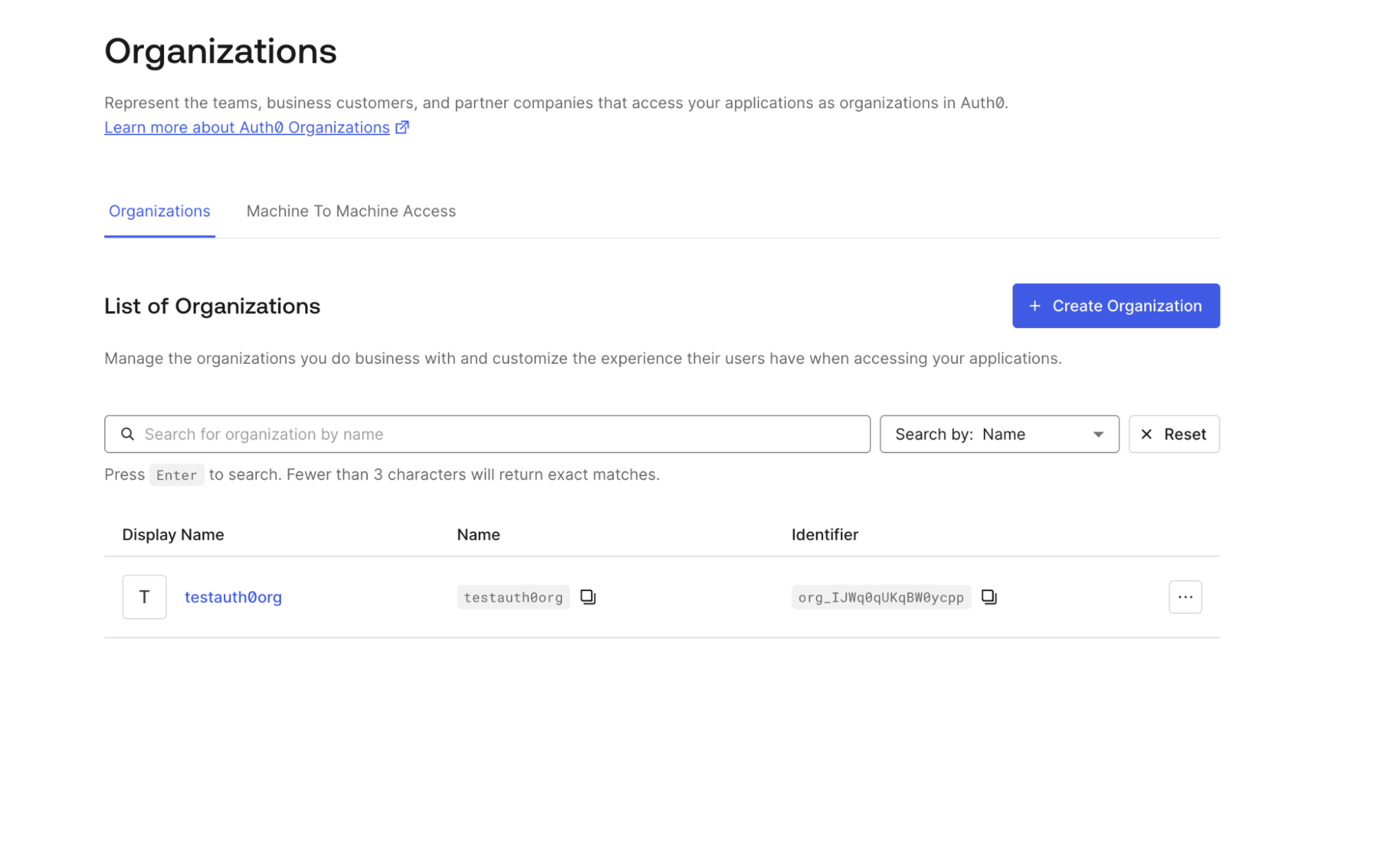
While the Quota Utilization page is great for users and tokens, there are two other important limits you will want to keep an eye on, especially if you are building an app for other businesses: Organizations and Actions/Forms.
Your self-service plan has a set limit on how many Organizations and Actions/Forms you can create, and currently, this number does not show up in the main quota report. However, you can easily check how many are active! Just navigate directly to either Organizations or Actions in the left-hand menu of your tenant dashboard. I recommend periodically checking this list to ensure you are not getting too close to your plan's cap.
How to Automate Monitoring via Log Streaming
You cannot manage what you do not measure. While downloading a CSV from the dashboard is helpful for a quick check, many teams prefer automated alerts.
Currently, there is not a direct API to automatically pull your quota numbers. However, the best practice is to leverage Auth0 Log Streaming.
Instead of manually checking the dashboard, Log Streaming allows your team to send a real-time feed of Auth0 activity directly into the monitoring tools they already use, like Datadog, Splunk, or AWS. From there, your team can set up automated alerts to notify them if token usage suddenly spikes, helping you catch potential issues long before you get your monthly bill.
When to Upgrade Your Plan
As your app becomes more popular, you are not just scaling the number of users — you are scaling the features and limits your business needs to operate smoothly.
Here is a crucial detail that often surprises teams: Auth0 generally does not prevent your application from exceeding its feature limits. If your app suddenly needs more Organizations or M2M tokens than your plan allows, we will not break your app or block your customers. Instead, you will start receiving email alerts and notifications when you exceed your limits. If your usage continues to stay above those limits, your account will eventually be automatically upgraded to the next tier to keep everything running seamlessly — which can result in exactly the kind of unexpected bill we want to help you avoid.
Rather than reacting to automated warnings, proactively moving to a higher self-service tier, like our Professional or B2B Pro plans, allows you to predict your costs and unlocks powerful new capabilities:
- Higher Usage Allowances: More headroom for Active Users, M2M tokens, and Organizations, so your application can continue to grow predictably, keeping you in complete control of your budget rather than reacting to upgrade alerts.
- Advanced Features for B2B: Upgrading unlocks capabilities like Role-Based Access Control (RBAC), which makes managing granular permissions for your business customers much easier.
- Custom Domains and Branding: Higher tiers allow you to fully white-label the login experience with custom domains, providing a seamless, highly professional look for your customers.
| Metric/Feature | Where to Find It | What it Measures |
|---|---|---|
| Active Users | Auth0 Support Center > Reports > Quota Utilization | The number of unique users who have logged in or signed up during the calendar month. |
| Enterprise Connections | Auth0 Support Center > Reports > Quota Utilization | The number of active enterprise identity providers used during the month. |
| M2M Authentication | Auth0 Support Center > Reports > Quota Utilization | The count of access tokens issued for machine-to-machine communication. |
| MFA | Auth0 Support Center > Reports > Quota Utilization | The total number of users who have successfully completed an MFA prompt. |
| Organizations | Tenant Dashboard > Organizations | The total number of active Organizations you have created. |
| Actions/Forms | Tenant Dashboard > Actions | The total number of Actions or Forms you have created. |
By keeping an eye on your usage trends and your active Organizations and Actions/Forms, you can make an informed, stress-free decision about when it is the right time to move up to the next plan and unlock the features you need for your next stage of growth.
Ready to put this guide into action? Log in to the Auth0 Support Center now to review your Quota Utilization report. By taking a proactive look at your usage today, you can make an informed decision about the future of your application. If you have questions or want to explore a plan that better fits your growth, the Customer Advocate team is here to help you make the right choice, stress-free.
Frequently Asked Questions
About the author

Alisha Tingle
Senior Customer Advocate, DLG