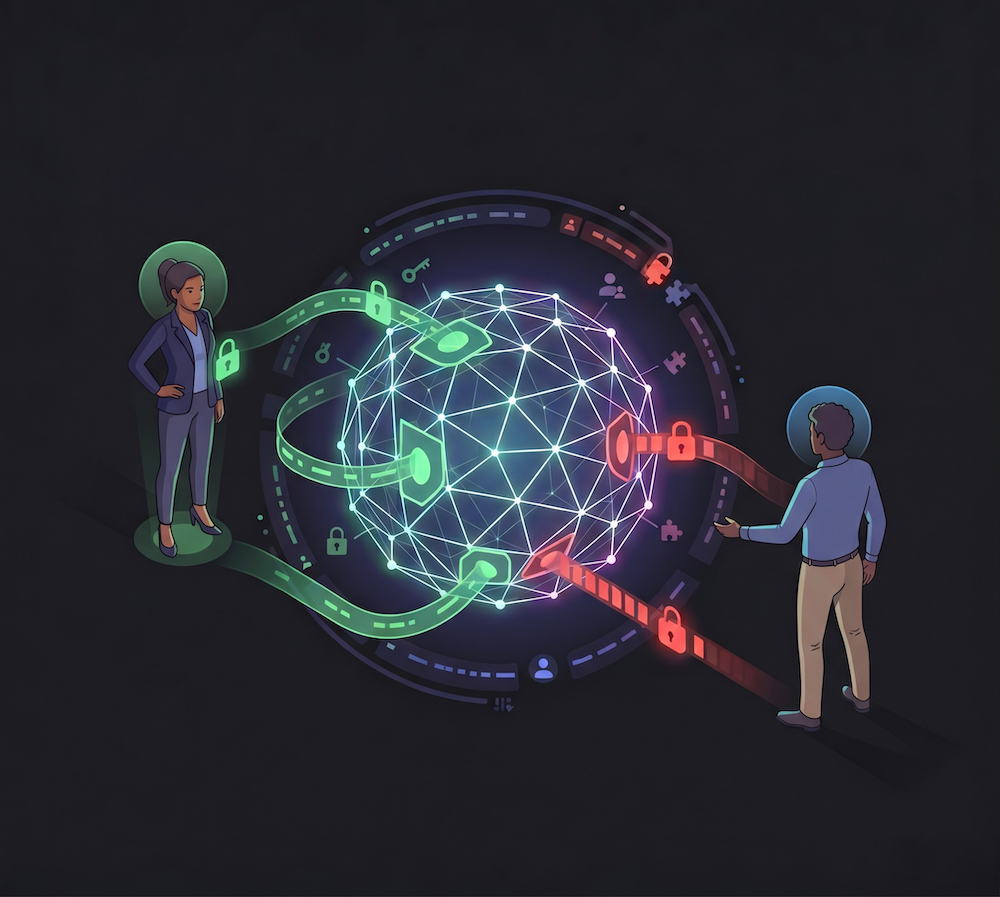
TL;DR: As AI agents handle increasingly complex, asynchronous workflows, relying on shared service accounts creates significant security and auditing risks. This article introduces Identity-Chained Authorization, a secure pattern utilizing Auth0 Token Vault and durable workflows to allow agents to act on behalf of specific users. This architecture provides three critical guarantees for agentic systems: zero credential exposure, just-in-time access, and verifiable accountability.
AI has undoubtedly been a multiplying force for human productivity. But in the workplace, almost nobody works alone, and everyone executing at 2x or even 10x speeds creates a coordination bottleneck.
To push work forward, AI output has to be passed around manually, in meetings, on Slack, and in private messages. An agent, constrained to one user and their own session, assists each person in isolation and cannot coordinate across principals. Each step still requires a human to push it to the next.
Engineering incident response is the sharpest example of this gap. When something breaks in production, the team collectively needs to triage, diagnose, revert, review, merge, and notify, in that order and with accountability at every step. Even with AI assistance, the chain of custody remains manual because no existing tool can hold the entire chain and act across it.
Department of Incidents, the grand prize winner of Auth0's Authorized to Act hackathon, proposes a different model: one agent, multiple engineers, each action executed on behalf of the correct human's identity. The agent doesn't just assist; it drives — acting as a true member of the team.
Agent Credential Anti-Patterns
When an agent needs to act on a team’s behalf, using a single shared credential is lacking accountability.
A service account token erases authorship. Every commit, PR, and merge shows up as incidents-bot. Code-owner review requirements may block bot-opened PRs outright in organizations that require human authors. The audit log tells you the bot acted; it tells you nothing about who authorized it or why.
A long-lived personal access token stored per engineer pins accountability to one person. That engineer's token acts on every incident regardless of who is on call. It can't be rotated per-user, scoped per-action, or revoked cleanly when someone leaves the team. If it leaks, the blast radius is the entire organization.
The third option, passing credentials as LLM tool parameters, is the worst of all:
// What you do NOT want
openRevertPr: tool({
  parameters: z.object({
    githubToken: z.string(), // ← credential in model context. Never.
    commitSha: z.string(),
  })
})
The credential lives in the model's context window, in every log line, and potentially in fine-tuning data. There is no recovery path if the model surfaces it.
In high-stakes scenarios where a clear chain of accountability is required, all three approaches fall short. What closes the gap is every GitHub action executing on behalf of a real engineer, delegated fresh at the moment of execution, and invisible to the model.
What Is Identity-Chained Authorization
Identity-chained authorization is a security model where an application or AI agent executes actions on behalf of a specific user by dynamically resolving their individual identity and permissions at runtime.
Instead of relying on a broad, shared service account, the system securely stores the individual user's access credentials (such as OAuth tokens) during onboarding. Whenever the agent needs to perform an action (like an API or tool call), it retrieves and exchanges these tokens to act under the appropriate human principal's identity. This ensures that the agent's actions are strictly limited to the permissions of the consenting user and provides a clear, accurate audit trail of who authorized each specific action.
How Does the Department of Incidents Platform Work?
Department of Incidents is an agentic, human(s)-in-the-loop incident response platform. When an Application Performance Monitoring (APM) alert fires, the agent wakes up, without any active browser session or human prompting, and begins investigating using GitHub tools:
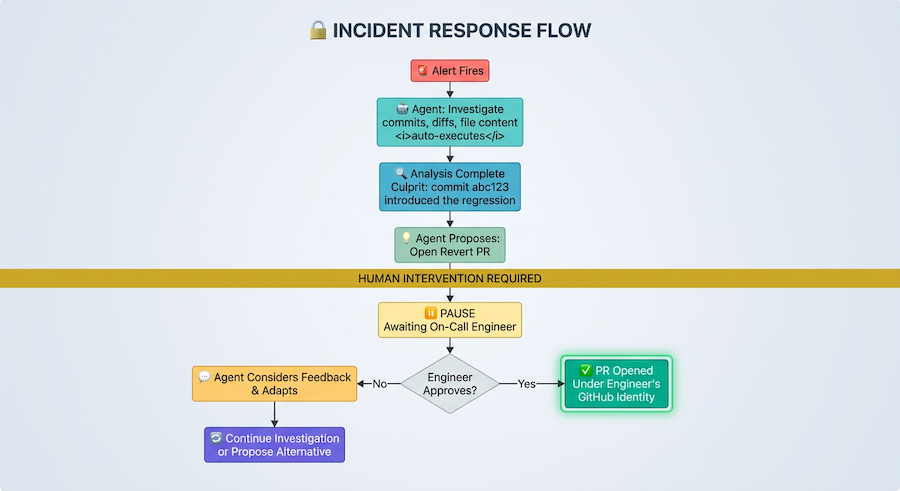
Once the agent identifies a culprit, it surfaces an inline approval request. The on-call engineer approves or pushes back. If they approve, the revert PR goes out under their GitHub identity. The agent pulls in the code owner for review. Final merge approval routes back to the on-call engineer. The merge executes under whoever said yes.
Human-in-the-loop stands as a vital part of the architecture: the approval is what confers identity.
What is the Department of Incidents Architecture?
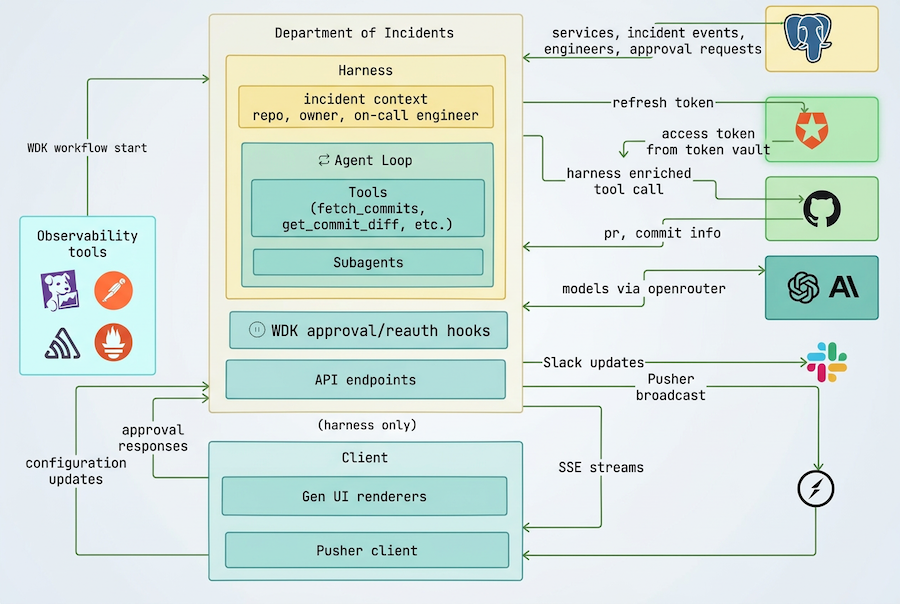
Department of Incidents is built around explicit permission boundaries. Tools are classified as open (read-only investigation: fetching commits, diagnosing, looking up code owners) or protected (mutating github: opening PRs, merging). Open tools execute immediately; protected tools pause the agentic loop and require human approval before any action is taken.
Identity delegation is handled by Auth0 Token Vault. During onboarding, each engineer connects their GitHub account via Auth0's connected accounts flow, which stores their GitHub tokens (repo and read:user scopes) in Token Vault. Their Auth0 refresh token is encrypted and stored separately. When the agent needs to act on GitHub on an engineer's behalf, it resolves their identity at runtime via Token Vault's token exchange endpoint (POST /oauth/token, RFC 8693). No active browser session is required. Every GitHub operation carries a real human author; there is no service account.
Human-in-the-loop is implemented via Vercel workflow hooks. When the agent calls a protected tool, execution suspends: an awaiting_approval event is broadcast to the dashboard via Pusher, and the workflow blocks on a hook. Approval comes from the dashboard. On approval, the hook resumes with the approving engineer's identity, and the action executes under their Token Vault credential. On decline, the agent receives a rejection and decides how to proceed.
The agent runs inside a durable Workflow Development Kit (WDK) workflow so it can stay alive across multi-hour human approval waits without consuming CPU hours. It reasons, calls tools, gets results, and keeps going. Tools emit Pusher events as side effects, and its reasoning and output are broadcast to the dashboard with Server Sent Events (SSE). A custom generative UI layer transforms these into an activity stream that's backed up with a Postgres database and remains as an audit trail.
The following picture represents the components of the system and their interactions:
The LLM Never Sees a Credential
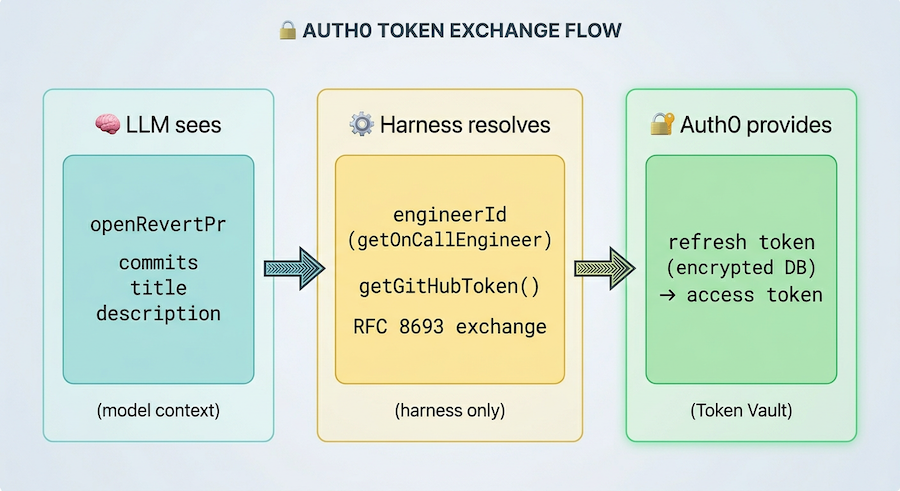
During onboarding, engineers authorize Department of Incidents to their GitHub account via Auth0 Connected Accounts, which stores their GitHub tokens with repo and read:user scopes in Token Vault. Their Auth0 refresh token is encrypted with AES-256-GCM and stored separately in the application database (db/schema.ts:21-30).
At runtime, the model's tool schemas contain zero credential parameters. For example, when executing the open_revert_pr tool, the model sees only what it needs to express intent:
// agent/tools/definitions/open-revert-pr.ts:9-24
const inputSchema = z.object({
  commits: commitInputSchema.array().min(1).describe(
    "One or more commits to revert, oldest first..."
  ),
  title: z.string().describe("Pull request title..."),
  description: z.string().describe("Pull request body..."),
});
Just the commits, title, and description, without an engineerId, repoOwner, or token of any kind.
The credential logic lives in dispatch functions inside toolRegistry, which is never passed to streamText. The model only receives agentTools, the AI SDK tool definitions:
// agent/tools/index.ts:122-124
export const agentTools: Record<ToolName, Tool> = Object.fromEntries(
  Object.entries(toolRegistry).map(([name, entry]) => [name, entry.definition]),
) as Record<ToolName, Tool>;
The engineerId that ultimately triggers the token exchange never comes from the model, but instead from getOnCallEngineer(), a DB query run by the harness (agent/steps/approval.ts:36-44). The harness even explicitly marks the boundary in event metadata, separating what the model provided (args) from what the harness injected (harnessInjected: { repoOwner, repoName, assignedEngineerHandle }), visible in the activity stream for every tool call.
Approval Is What Confers Identity
The agent nominates an engineer when it calls a protected tool, but it does not yet have their identity. The GitHub action executes under whoever actually approves. The engineerId is returned by the approval hook (agent/tools/dispatch.ts:106-110) only after the engineer clicks Approve. The Auth0 token exchange happens only then. Authority to act as that person materializes at the moment of approval, not before.
This is also why the on-call engineer is fixed at incident registration and cannot be changed mid-incident. Changing ownership mid-investigation would split the audit trail, resulting in different identities for different phases of the same incident. Who investigated under which identity, and why did that change? Accountability is established at the moment of assignment. The next incident assigns ownership to whoever is on call then.
The agent's ability to act under real human identities and the team's ability to oversee those actions turned out to be the same mechanism.
Dealing with Token Timing in Durable Workflows
Department of Incidents runs inside a durable workflow, a Vercel WDK workflow that can suspend for hours while waiting for human approval, then resume exactly where it left off without consuming CPU. A GitHub access token fetched before that suspension will be expired by the time the action executes. The failure mode: the workflow resumes, the action fires, and it 401s for no obvious reason, from no obvious cause.
The fix is structural: tokens are fetched inside the "use step" execution boundary that runs after the approval hook resolves rather than before.
Tracing the call chain in open-revert-pr.ts:
// agent/tools/definitions/open-revert-pr.ts:73-91
export const dispatch: ToolDispatchFn = async (input, context, hooks) => {
  const approval = await runApprovalFlow(input, context, hooks);
  // ↑ workflow suspends here — hours may pass
  if (!approval.granted) return approval.dispatchResult;

  const result = await executeOpenRevertPr({
    engineerId: approval.engineerId, // ← identity from post-approval hook
    ...
  });
  ...
};
// agent/tools/definitions/open-revert-pr.ts:32-71
export async function executeOpenRevertPr(args: { engineerId: string; ... }) {
  "use step"; // ← token fetch happens inside this boundary
  const branchName = await createRevertBranch(args.engineerId, ...);
createRevertBranch calls getOctokit(engineerId) (services/github/client.ts:19-22) which calls getGitHubToken(engineerId) (lib/auth0-ai.ts:50-64), which makes a live RFC 8693 exchange against Auth0:
// lib/auth0-ai.ts:26-40
const response = await fetch(`https://${AUTH0_DOMAIN}/oauth/token`, {
  method: "POST",
  body: JSON.stringify({
    grant_type:
      "urn:auth0:params:oauth:grant-type:token-exchange:federated-connection-access-token",
    subject_token_type: "urn:ietf:params:oauth:token-type:refresh_token",
    requested_token_type:
      "http://auth0.com/oauth/token-type/federated-connection-access-token",
    subject_token: refreshToken,
    connection: "github",
    client_id: AUTH0_CLIENT_ID,
    client_secret: AUTH0_CLIENT_SECRET,
  }),
});
The sequence, annotated:
- The workflow begins when dispatch() is called.
- This initiates runApprovalFlow(), which pauses the process and waits for human intervention. This suspension can last for hours.
- When an engineer approves the action, the workflow resumes, now associated with that specific engineerId.
- Next, executeOpenRevertPr("use step") is called. This is the point where the process to get a fresh token begins.
- The getGitHubToken() function is invoked.
- It reads an encrypted refresh token from the database.
- An RFC 8693 POST request is sent to Auth0, exchanging the refresh token for a fresh access token.
- Finally, the required GitHub API calls are executed using this new token.
Here is the sequence visualized:
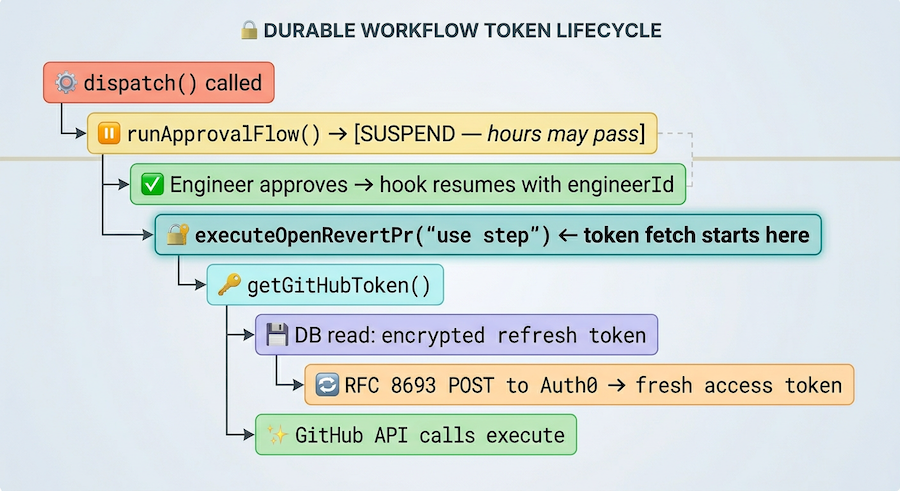
There is no caching at any layer. Every protected action fetches a fresh token at the start of its execution step. The token's lifetime starts at the moment of execution, not the moment of proposal.
The implementation began with the @auth0/ai-vercel SDK's token exchange utility, which exchanges the currently active user's token. However, for a background agent with no active browser session, that was a dead end. Reading the underlying API docs revealed that the same RFC 8693 call works with any stored Auth0 refresh token, so calling the endpoint directly, with a stored refresh token resolved by engineerId, made the exchange work from any execution context, under any engineer's identity, without requiring an active session.
Expired Tokens and the Nested Interrupt
Even with fresh token fetches at execution time, there is one more failure mode to plan for: Auth0 refresh tokens can expire or be revoked between when an engineer completed onboarding and when their token is needed.
The on-call engineer and the code owner reviewer are usually different people with tokens of different ages. approve_pr targets the reviewer by GitHub handle, a completely different engineer from whoever opened the PR. Either can hit expiry independently on the same incident.
The system handles this gracefully with a typed GitHubTokenExpiredError (lib/auth0-ai.ts:9-17) error. Every protected tool catches it and returns a structured result the model can read and act on:
// agent/tools/definitions/open-revert-pr.ts:61-70
} catch (error) {
  if (error instanceof GitHubTokenExpiredError) {
    return {
      status: "github_token_expired",
      engineerId: error.engineerId,
      message:
        "The engineer's GitHub token has expired. Call ask_engineer_to_reauthorize with this engineerId, then retry.",
    };
  }
}
The model reads { status: "github_token_expired", engineerId } and calls ask_engineer_to_reauthorize. That tool opens a second workflow suspension, a nested interrupt inside the outer approval loop (agent/tools/dispatch.ts:113-155).
Here is the sequence annotated:
- The initial workflow is suspended, waiting for an engineer's approval.
- After the engineer approves, the system attempts to get a GitHub token by contacting Auth0, but this fails because the token has expired, resulting in a 4xx error.
- This failure triggers a GitHubTokenExpiredError.
- The system identifies the error status as github_token_expired and notes the engineerId associated with the failed token.
- The AI model is then instructed to call ask_engineer_to_reauthorize.
- This initiates a second, nested suspension within the original approval loop, pausing the workflow again.
- The targeted engineer is prompted to re-authenticate, typically through a Token Vault popup.
- Upon successful re-authentication, the workflow resumes, the token exchange is automatically retried, and the process continues to a successful completion.
And here is the sequence visualized:
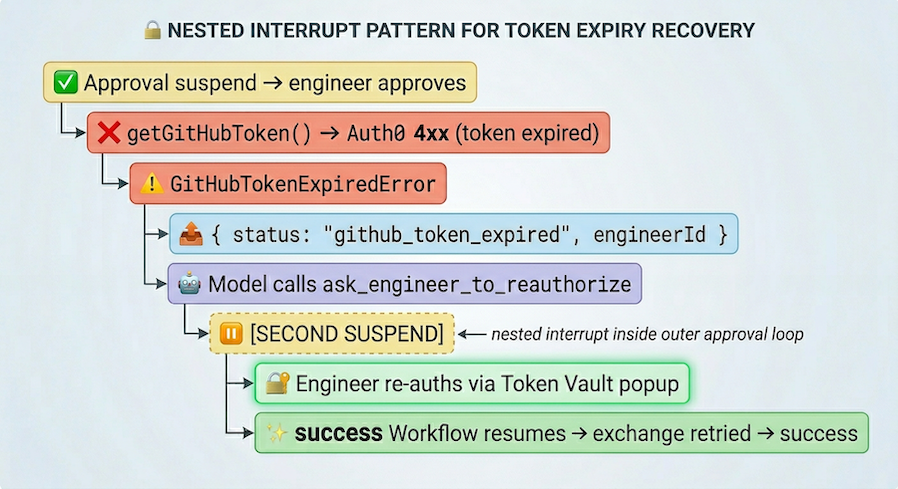
Two separate defineHook calls (agent/hooks.ts) handle the two suspensions: approvalHook for action approval, reAuthHook for token re-authorization. Each has its own resume path and its own timeout.
An engineer who completed onboarding months ago and hasn't been on call since is a likely candidate with stale tokens. The nested interrupt pattern, approval suspend → execution → token expiry → re-auth suspend → retry, is the architecture to plan for when designing a potentially long running workflow..
One Identity, Resolved Twice
The system closes the identity loop by resolving the same identity in two places: once in the backend for action and once on the frontend for presentation. The backend's durable workflow, or "harness," resolves an engineerId to authorize actions, while the frontend independently resolves the viewing user's engineerId to render the correct UI.
getViewer() (lib/viewer.ts:6-12) resolves the current Auth0 session server-side to { engineerId, githubHandle }. When the harness targets an engineer for approval or re-auth, it stamps that engineer's engineerId into the event metadata persisted to incident_events and broadcast via Pusher. Every engineer watching the incident receives the same event.
EventCard (components/event-card.tsx:15-16) computes a single boolean before rendering:
const isTargetEngineer =
  props.viewer?.engineerId === props.event.metadata?.engineerId;
If true, the targeted engineer sees live Approve or Re-authorize buttons. Everyone else sees "Waiting for @handle."
What the Identity-Chained Authorization Pattern Gives You
The architecture described above provides three guarantees regardless of the domain:
The model never sees a credential. The LLM's tool schemas are structurally incapable of expressing credentials. The harness resolves identity independently. Even if the model were compromised or logged, there is nothing to extract.
Tokens are always fresh at execution time. Durable workflows can suspend for arbitrary durations. Fetching tokens inside step boundaries after approval hooks resolve ensures the exchange always happens immediately before use, eliminating stale token troubles.
The audit trail is real. Every GitHub action carries a human author, the person who approved it. The activity stream shows who consented to each action and in what capacity.
These properties are not specific to incident response. Any multi-stakeholder, agentic, asynchronous workflow has the same shape: an agent coordinates, humans authorize, and each authorization materializes the right identity at the right moment. Whether deployment gates, expense approvals, code review orchestration, legal document signing, the primitives are the same. The one-to-many agent model that Token Vault enables opens up new avenues for human-AI collaboration in any domain where accountability matters.
The agent's ability to act under real human identities and the team's ability to oversee those actions turned out to be the same mechanism.
Try It Out
The Department of Incidents source code is available on GitHub. It includes the full durable workflow harness, the Token Vault exchange implementation, the approval hooks, the nested re-auth interrupt pattern, and the generative UI layer.
To build your own agentic systems with this pattern, sign up for a free Auth0 account. To set up Auth0 Token Vault with Connected Accounts in your own project, start with the Token Vault documentation and the Connected Accounts setup guide. The RFC 8693 exchange endpoint is documented under Refresh Token Exchange with Token Vault.
The Department of Incidents took the grand prize at Auth0's Authorized to Act hackathon. The full submission and project context are on Devpost.
Join the Auth0 for Startups Program
With the Auth0 for Startups program, get one year of B2B Professional capabilities so your users and AI agents can more securely access what they need. The startup plan includes: up to 100,000 monthly active users, access to Organizations, inbound SCIM, and more. Apply today.
About the author

Atib Jawad Zion
Software Engineer