
TL;DR: Authentication in Next.js has changed significantly — patterns like client-side session hooks and middleware-only authorization can become insecure in a server-first application. Auth0's Next.js SDK v4 aligns with the App Router by replacing legacy route handlers, simplifying session access across server contexts, and supporting route protection.
Authentication in Next.js has changed significantly over the last few major releases. With Next.js 16, the framework fully embraces a server-first architecture: Server Components render on the server by default, Server Actions execute mutations server-side, and the App Router pushes developers toward colocated backend logic rather than traditional API-centric patterns.
That shift changes how authentication should be implemented. Patterns that worked well in older Next.js applications, such as client-side session hooks, /api/auth/* route handlers, and middleware-only authorization checks, can become awkward or even insecure in a server-first application. Session assumptions that were safe in client-heavy architectures no longer hold with Server Actions. Many developers upgrading existing applications discover that older Auth0 integration patterns simply no longer map cleanly to the App Router model.
Instead of working around the framework, the latest Auth0 Next.js SDK is designed specifically for this architecture and integrates directly with the server-first model that Next.js 16 promotes. In this guide, you will learn how to build a production-grade authentication layer in a Next.js 16 App Router application using Auth0’s Next.js SDK v4. This article will cover:
- The architectural shift from SDK v3 to v4
- How
proxy.tsreplaces legacy auth route handlers - Session access patterns in Server Components, Server Actions, and API routes
- Practical route protection strategies
- Security considerations that matter in real-world deployments
What Changed in Auth0 Next.js SDK v4 (and Why It Matters)
Before App Router and Server Components became the default, authentication in Next.js typically revolved around API routes. In the Pages Router era, Auth0 integrations commonly looked like this:
// pages/api/auth/[auth0].ts

import { handleAuth } from '@auth0/nextjs-auth0';

export default handleAuth();
Protected API routes used wrappers like:
withApiAuthRequired()
Session access relied on request/response objects:
getSession(req, res)
This model worked well because applications were heavily request-oriented. Rendering often happened client-side or through getServerSideProps, and API routes formed the natural backend boundary. Next.js 16 changes the execution model entirely. Server Components run directly on the server without explicit request handlers. Server Actions execute independently from page renders, and route segments can stream progressively. The framework assumes that most logic lives server-side from the beginning.
The diagram below shows how Auth0 SDK v4 aligns directly with that architecture, tracing a request from initial HTTP call through to protected mutation.
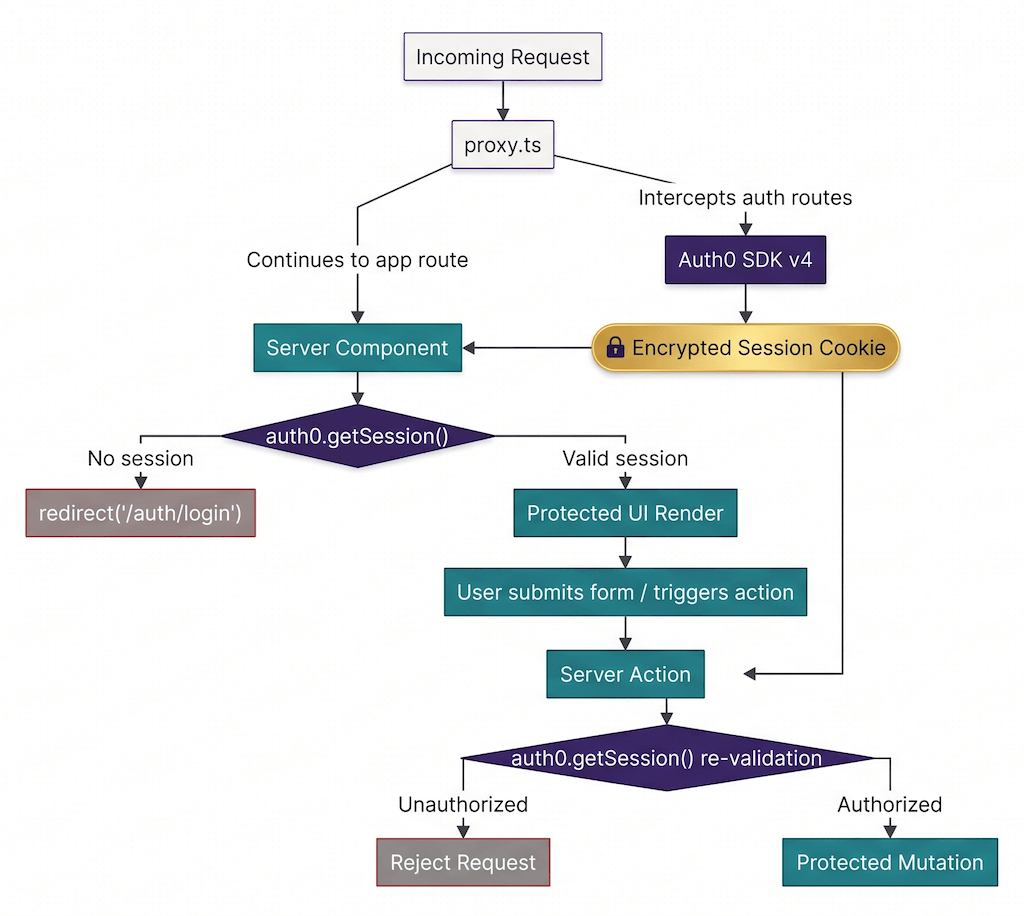
Instead of manually defining /api/auth/[auth0], the SDK now auto-mounts authentication routes like /auth/login, /auth/logout, /auth/profile, etc. when you include a properly configured proxy.ts file (more on this file in the next section).
The SDK also simplifies configuration substantially. For example, you can create a shared Auth0 client with only one line of code:
// src/lib/auth0.ts

import { Auth0Client } from '@auth0/nextjs-auth0/server';

export const auth0 = new Auth0Client();
The SDK automatically reads environment variables like AUTH0_DOMAIN, AUTH0_CLIENT_ID, AUTH0_CLIENT_SECRET, AUTH0_SECRET, APP_BASE_URL
This minimal, boilerplate-free setup is intentional. The SDK naturally integrates into the Next.js server-first runtime rather than requiring extensive bootstrapping code.
The biggest practical change is session access. Instead of:
getSession(req, res)
you now use:
await auth0.getSession()
with no request or response arguments.
That works because the SDK reads encrypted session cookies directly from the current server execution context.
The proxy.ts Pattern
The most important architectural concept in Auth0 SDK v4 is proxy.ts.
In Next.js 16, proxy.ts acts as a request interceptor that executes before the framework processes a route. It replaces the former middleware.ts convention, with the new name emphasizing that this code runs at the network boundary and can rewrite, redirect, or modify requests and responses before they reach your application routes. For Auth0, this interception point allows the SDK to handle authentication routes and session-related processing before the request continues into the application.
Here is the standard implementation:
// src/proxy.ts

import type { NextRequest } from 'next/server';
import { auth0 } from './lib/auth0';

export async function proxy(request: NextRequest) {
  return await auth0.middleware(request);
}

export const config = {
  matcher: [
    /*
     * Match all request paths except:
     * - _next/static
     * - _next/image
     * - favicon.ico
     * - sitemap.xml
     * - robots.txt
     */
    '/((?!_next/static|_next/image|favicon.ico|sitemap.xml|robots.txt).*)',
  ],
};
This file is the mechanism that enables the SDK to intercept and handle authentication routes automatically. Without it, requests to /auth/login or /auth/callback will typically return 404 errors.
Understanding the matcher pattern
The matcher pattern is more important than it initially appears.
This line tells Next.js which requests should pass through the Auth0 proxy layer:
'/((?!_next/static|_next/image|favicon.ico|sitemap.xml|robots.txt).*)'
The exclusions affect both performance and security. For example, paths like _next/image serve optimized image requests, which should not be intercepted as this can introduce unnecessary auth processing overhead and break asset delivery. On the other hand, paths like favicon.ico and robots.txt are public assets that should not be protected behind authentication. You must also set up the matcher to exclude any other public routes in your app, but be careful not to accidentally exclude sensitive paths, as this may cause them to bypass auth interception entirely. This is why you should treat matcher configuration as part of your security model, not merely routing boilerplate.
Auto-mounted routes
Once proxy.ts is configured, the SDK automatically mounts several auth endpoints:
/auth/login/auth/logout/auth/callback/auth/profile/auth/access-token- and others
These routes are now part of the SDK contract, and you no longer need to manually implement them yourself.
Session Access in the Server with Components, Actions, and API Routes
One of the most important concepts in Next.js 16 authentication is understanding that each server execution context behaves differently. Server Components, Server Actions, and API routes all run on the server, but session access patterns are not identical across them.
Server Components
Server Components are the cleanest place to access session state. Because they execute directly on the server, they can read encrypted session cookies without any client-side round trip.
Here is an example:
// app/dashboard/page.tsx

import { redirect } from 'next/navigation';
import { auth0 } from '@/lib/auth0';

export default async function DashboardPage() {
  const session = await auth0.getSession();

  if (!session) {
    redirect('/auth/login');
  }

  return (
    <main>
      <h1>Welcome, {session.user.name}</h1>
    </main>
  );
}
getSession() reads directly from encrypted cookies. If no session is found, the user is redirected. No API request is required, and no token exchange happens during rendering. The redirect occurs server-side before protected content renders. This is both simpler and more secure than relying on client-side auth checks after hydration.
Server Actions
Server Actions are where many developers accidentally introduce security gaps. Even though Server Actions execute on the server, they are invoked independently from the client. That means they cannot assume the session state from a previous page render is still valid, and every Server Action must re-validate authentication explicitly.
For example:
// app/actions/update-profile.ts

'use server';

import { auth0 } from '@/lib/auth0';

export async function updateProfile(data: FormData) {
  const session = await auth0.getSession();

  if (!session) {
    throw new Error('Unauthorized');
  }

  const userId = session.user.sub;

  // Protected mutation logic
  await saveUserProfile(userId, data);
}
Some developers see this repeated session validation as redundant, but it is not. Server Actions are independent execution contexts. A user may have logged out, had their session invalidated, or switched accounts between the initial render and the action invocation. That is why you should treat every Server Action as a fresh authenticated request in order to avoid critical authorization bugs.
API routes
For API routes, the SDK still provides a convenient protection wrapper:
// app/api/admin/route.ts

import { auth0 } from '@/lib/auth0';

export const GET = auth0.withApiAuthRequired(async function GET() {
  return Response.json({
    success: true,
  });
});
This is often the most straightforward approach for protected APIs because unauthenticated requests automatically receive a 401 Unauthorized response.
Accessing User Data and Tokens
Once you have a session, you can access user information directly:
const session = await auth0.getSession();

const user = session?.user;
If you need to call a third-party API on behalf of the user, you can also retrieve the access token:
const token = await auth0.getAccessToken();
Route Protection Strategies
There is no single “correct” protection strategy in Next.js 16. The right approach depends on how much of your application is private and how centralized you want authorization logic to be.
Page-level protection
The most explicit strategy is protecting individual pages:
const session = await auth0.getSession();

if (!session) {
  redirect('/auth/login');
}
This approach gives maximum control and clarity since you can tweak the authorization logic for each page.
Protecting individual pages works especially well when:
- Only some routes are protected
- Authorization rules vary per page
- You need custom redirect logic
The downside is repetition at scale. Having this guard for every page can get too verbose.
Layout-level protection
For larger applications, layout-level protection is usually more maintainable.
For example, this specifies that everything nested under /dashboard now requires authentication automatically:
// app/dashboard/layout.tsx

import { redirect } from 'next/navigation';
import { auth0 } from '@/lib/auth0';

export default async function DashboardLayout({
  children,
}: {
  children: React.ReactNode;
}) {
  const session = await auth0.getSession();

  if (!session) {
    redirect('/auth/login');
  }

  return <>{children}</>;
}
This is often the best tradeoff for applications with clearly separated public and private route segments, such as a CMS with a public homepage and a dashboard for authenticated users.
proxy.ts-level protection
For applications where nearly every route requires authentication, protection can move even higher into the request pipeline. You can extend the proxy matcher to blanket-protect large portions of the app. This reduces duplication and centralizes enforcement. However, it is usually less flexible than page or layout-level checks for applications that mix public marketing pages with authenticated dashboards.
Using useUser()
So far, you have seen how we can authenticate the user on the server. But what about user profile access on the client-side? The SDK also provides a client-side hook:
useUser()
useUser() is useful for authentication and authorization in the UI, such as conditional UI rendering, user avatars, client-side personalization, navigation states, etc., but it should not be trusted for authorization decisions. Client-side state can be stale, manipulated, or temporarily inconsistent. For anything involving data access, mutations, permissions, or protected rendering, you should always validate using getSession() on the server.
Security Considerations
The following are some of the most common security tips that you should keep in mind when using Auth0 with Next.js Server Actions and Middleware.
AUTH0_SECRET rotation
The AUTH0_SECRET environment variable encrypts session cookies. If it changes, existing cookies can no longer be decrypted, resulting in errors like JWEDecryptionFailed.
In practice, users may need to clear cookies or re-authenticate after secret rotation. This becomes particularly important in CI/CD environments where secrets may accidentally differ across deployments.
Allowed callback, logout, and origin URLs
These Auth0 dashboard settings are security controls, not just configuration details.
Examples include:
- Allowed Callback URLs
- Allowed Logout URLs
- Allowed Web Origins
These settings protect against malicious redirect flows and unauthorized origins. If they do not match your deployed application URLs exactly, authentication flows will fail intentionally.
Do not trust client-side session state
Authorization decisions should always happen server-side. This principle deserves repeating:
useUser()is for UIgetSession()is for authorization in the server
Relying on the client state for protected actions is one of the easiest ways to introduce privilege escalation bugs into Next.js applications.
Protect environment variables
Secrets like AUTH0_CLIENT_SECRET must never be exposed to the client bundle. Fortunately, Next.js only exposes variables prefixed with NEXT_PUBLIC_ to client-side code. None of the Auth0 secrets use that prefix, so they are safe from being exposed by Next.js.
However, they can still be accidentally made public. To prevent that, always store them in a .env file, and never check it into version control.
Rethinking Auth in the Server Actions Era
Authentication in Next.js 16 requires a different mindset than earlier generations of the framework. The App Router, Server Components, and Server Actions fundamentally change where code executes and how you trust boundaries should be enforced.
In this guide, you learned how Auth0’s Next.js SDK v4 aligns with that architecture by replacing legacy route handlers with the proxy.ts interception model, simplifying session access through server-native APIs, and supporting protection strategies that scale from individual pages to entire application segments. You also saw why session validation must happen independently across Server Components, Server Actions, and API routes, and why server-side authorization remains essential even in highly interactive React applications.
Auth0 is the identity platform behind all of this: developer-first, deeply flexible, and designed to scale from a weekend project to enterprise-grade infrastructure without forcing teams to trade control for convenience.
The Next.js SDK v4 is a strong example of that philosophy in practice. Instead of layering abstractions on top of the framework, it embraces the Next.js server-first architecture directly through patterns like proxy.ts, server-native session access, and streamlined configuration. The result is an authentication model that feels natural inside modern Next.js applications while still supporting the advanced authorization, multi-tenant identity, and extensibility requirements that growing applications eventually need.
About the author

Aniket Bhattacharyea
Web Developer