
Passkeys are fast becoming an appealing alternative to passwords. Built on standards developed by the FIDO Alliance and supported by companies like Apple, Google, and Microsoft, passkeys allow users to authenticate with biometrics, device PINs, or hardware-backed credentials instead of remembering passwords.
For enterprises, there are some compelling arguments for switching to passkeys: stronger protection against phishing attacks and a promised, improved user experience. However, adopting passkeys also raises some questions around legacy systems, device management, recovery workflows, and rollout strategies.
This article explains what passkeys are, how synced and device-bound passkeys differ, the operational challenges to consider, and where passkeys offer advantages over traditional passwords. In short, you’ll learn whether passkey adoption is truly worth it yet.
What Are Passkeys?
Passkeys are a passwordless authentication method that uses public-key cryptography to verify a user’s identity. Instead of creating and storing a traditional password, a user’s device generates a cryptographic key pair: a private key that stays securely on the device and a public key that is shared with the application or service.
When the user signs in to an application or a website, a challenge, that is, a random cryptographic string, is sent to their device. The user unlocks access to the private key stored on their device using a biometric factor like a fingerprint or face scan, or a device PIN. The private key then signs the challenge, which is sent back to the application or website for verification. The following diagram shows this sign-in flow from challenge to verified access.
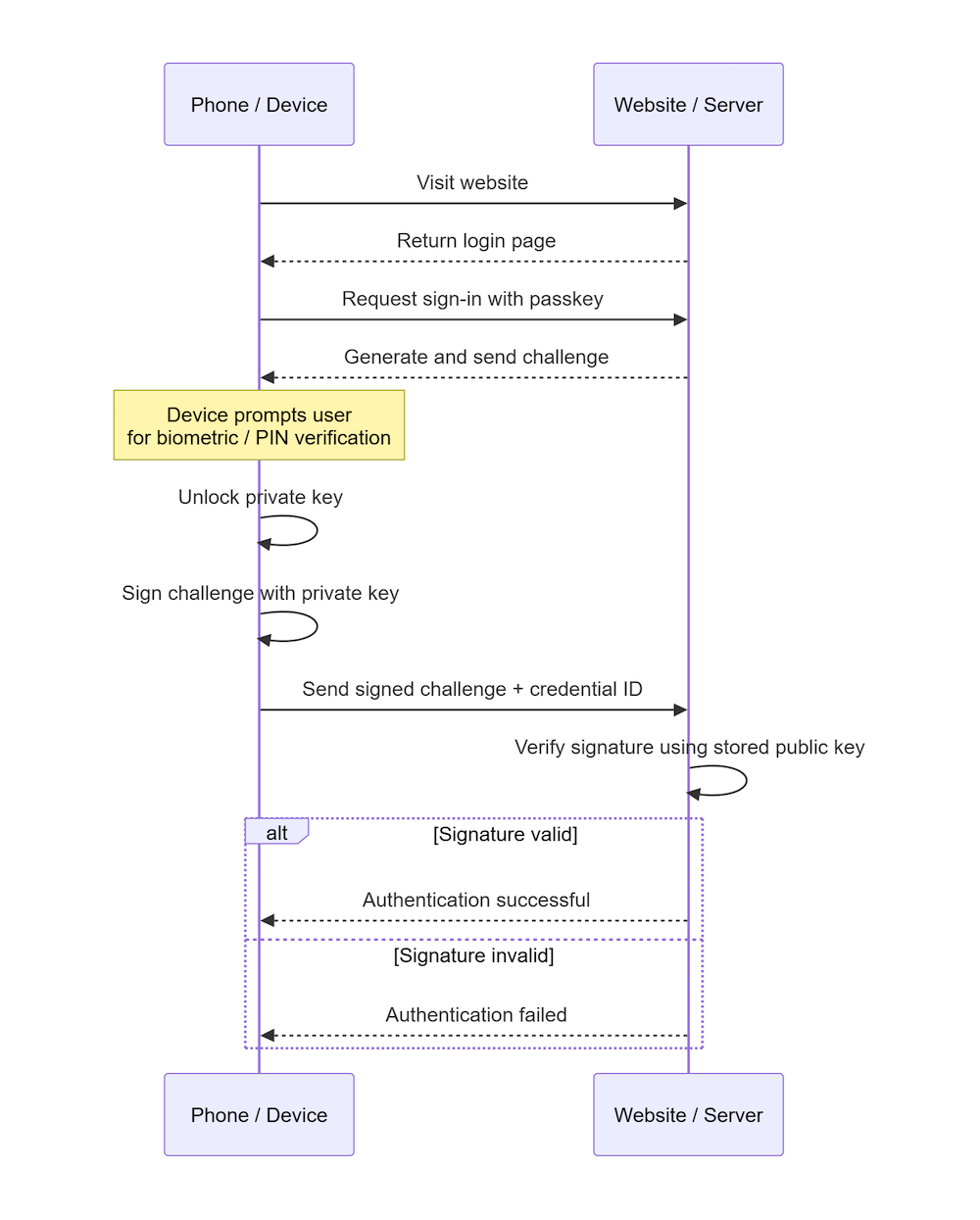
Because the private key never leaves the device and there is no shared secret to steal, passkeys are far more resistant to phishing, credential theft, and password reuse attacks than traditional passwords.
Passkeys are built on standards developed by the FIDO Alliance and the World Wide Web Consortium (W3C), allowing them to work across modern browsers, operating systems, and devices. Major platforms such as Apple, Google, and Microsoft have integrated passkey support directly into their ecosystems, helping to accelerate adoption across both consumer and enterprise environments.
Different Types of Passkeys
Broadly speaking, you will encounter two main types: synced passkeys and device-bound passkeys.
Synced passkeys
Synced passkeys are designed for convenience and portability. These passkeys are securely synchronized across a user’s devices through a cloud ecosystem such as Apple iCloud Keychain or Google Password Manager. This allows users to enroll a passkey on one device and use it on another device connected to the same account.
Synced passkeys can significantly improve the user experience and reduce onboarding friction. Employees can move between laptops, phones, and tablets without repeatedly registering new credentials. However, organizations might have concerns about control and recovery, particularly in regulated environments where credentials being synchronized through personal cloud accounts could introduce governance or compliance challenges.
Device-bound passkeys
Device-bound passkeys remain tied to a specific device or hardware authenticator and are not synchronized elsewhere. Examples include credentials stored in hardware security keys, such as Yubico, or TPM-backed credentials managed directly on enterprise-controlled devices.
They provide stronger control over where credentials are stored and are often preferred in high-security environments. If an attacker compromises a cloud account, they do not also gain access to the credentials because the passkey never leaves the original device. The tradeoff, however, is a loss of usability and convenience. Replacing lost devices, onboarding additional devices, or recovering credentials can become more operationally complex for both users and IT teams.
What Are the Main Benefits of Using Passkeys in the Enterprise?
The biggest benefit for considering passkeys is risk reduction.
Because authentication is tied to a set of cryptographic credentials, rather than a shared secret, you can dramatically reduce your users' exposure to phishing campaigns and other credential-related attacks. For phishing in particular, since the private key is bound to a specific web domain, it cannot be used to authenticate the user on a different domain.
Passkeys can also improve your efficiency. Password resets are probably one of the more common helpdesk requests in many companies. Reducing the reliance on passwords can lower your support overhead. Your users will also appreciate the smoother sign-in experience.
Finally, the switch to passkeys definitely aligns more closely with modern security strategies. Companies are actively pursuing zero-trust architectures and stronger MFA adoption. Passwordless initiatives like passkeys fit neatly into those efforts, and can help enterprises modernize their authentication strategy.
What Are Some of the Main Challenges of Using Passkeys?
In spite of the benefits, switching to passkeys is not as simple as just enabling a new login option.
Many organizations have older applications and internal systems that do not support passkeys and might need to be retrofitted to do so. Third-party platforms also might not support passkeys yet, so you are stuck with using passwords on those platforms until they decide to support them.
In reality, this means that enterprises would probably need to manage a hybrid authentication model during any transition period.
Recovery and lifecycle management also plays a much bigger role with passkeys. When employees lose a device or leave the company, IT teams need clear processes for credential recovery, re-enrollment, and revocation. These workflows can be more complex than traditional password reset processes.
Because passkeys are more than likely device-bound, there is no central credential to reset. Instead, IT teams must verify the user's identity through a separate, out-of-band process before issuing a new enrollment, and any previously registered passkeys on lost or decommissioned devices need to be explicitly revoked.
Finally, organizations need to decide whether they prefer device-bound or synced passkeys, and whether different choices should apply to contractors and remote employees.
What About Legacy Systems?
If you are considering implementing passkeys for your organization, legacy systems are probably going to be one of the bigger hurdles. Older applications might not support modern authentication standards like WebAuthn or FIDO2.
That does not always mean that passkeys are off the table. You can implement identity platforms or single sign-on (SSO) platforms in front of legacy applications to handle the authentication in a more modern way.
In practice, most organizations will likely operate hybrid authentication environments for some time, using passkeys where they fit naturally while maintaining alternative authentication methods for systems that cannot support them yet.
Consider a Phased Rollout
For most organizations, a phased rollout is usually the most practical approach to any new implementation, but especially for passkeys. Rather than forcing the entire company to migrate immediately, it is a good idea to start with smaller user groups or lower-risk applications.
A gradual rollout allows IT and security teams to evaluate the user experience at multiple points during the process. This can help to identify compatibility issues, and to refine existing recovery and support processes before you expand to a larger audience.
Passkeys are likely to coexist with passwords for some time, especially if legacy systems are involved. A phased rollout will help organizations to modernize any internal applications and systems they might have under their control.
Passkeys vs. Passwords
Passwords remain an embedded part of enterprise environments everywhere. Despite their weaknesses, they offer flexibility and a universal compatibility that systems and users understand. Given that you will likely still have to rely on passwords for some time, you might be weighing up whether passkeys deserve a place in your authentication strategy.
This is not simply a case of "new versus old". Passkeys were created to solve many of the security and usability problems that passwords have struggled with traditionally, as can be seen in the pros and cons of both authentication methods.
| Pros | Cons | |
|---|---|---|
| Passwords | Universally supported by practically any system Familiar to users and systems alike Easier to centrally control and reset Does not require modern devices or hardware Simpler to use in legacy environments | Vulnerable to phishing attacks Users often create weak or reused passwords MFA adds friction and can still be bypassed |
| Passkeys | Strong resistance to credential theft and phishing Faster and smoother login experience Reduces password resets and support overhead No passwords for users to remember | Legacy systems may not support them Losing a device can cause significant headaches Enterprise rollouts require planning and user education Synced passkeys could raise governance concerns |
So, Is Passkey Adoption Worth It?
In many cases, the answer is "yes", but with an important caveat: the value you might derive from switching to passkeys depends heavily on your company's infrastructure and security priorities.
For enterprises that are already investing in modern identity platforms, zero-trust initiatives and managed devices, passkeys are a natural fit and can provide meaningful security and usability improvements for large parts of your organization.
The strongest argument for passkeys is that they directly address many of the weaknesses that have plagued passwords for years. Passkeys reduce exposure to phishing and credential theft. Passkeys in general also make the authentication process feel smoother for most users. No need to remember long passwords, or open your password manager for the umpteenth time.
With all that said, that does not mean passkeys are a magic replacement for all your authentication woes. Enterprises still need to think carefully about recovery workflows, device management and legacy application support. You will need to have governance policies and employee training guides in place before you transition to passkeys.
Passkeys are not an "all or nothing" decision to make, but something that requires a gradual and strategic adoption plan. They are probably worth considering if your organization answers "yes" to at least two of these statements:
- You want stronger protection against phishing and credential-related attacks.
- You manage corporate devices for your employees.
- You are already in the process of modernizing your IAM infrastructure.
- You want to reduce password-related support costs and friction.
So passkeys might not completely replace passwords overnight, but for many enterprises, they are a mature enough technology to justify consideration as part of a long-term authentication plan.
Passkeys Are a Strategic Decision
The question of whether to adopt passkeys is less about whether they are inherently good or bad, and more about whether your organization is ready to support them effectively. Factors like device management, governance policies, and infrastructure readiness play an important role in figuring out whether passkeys will provide value in your environment.
For many companies, the path forward should be a gradual one: Introduce passkeys where they make the most sense, while continuing to support traditional authentication methods where necessary. Adoption should continue to grow across third-party platforms and other enterprise tooling too, and you can enable passkeys on these platforms as they become available.
Passkeys are less of an experimental feature like they were a few years ago, and more of a serious consideration for a long-term authentication strategy.
About the author

Thinus Swart
Cybersecurity Specialist