
I was building out the Danger Zone section of the admin panel for the Agentic Arcade and decided to give Cursor a single prompt to add the whole feature:
Add an admin-only "reset all scores" feature to the Agentic Arcade — a button in the admin panel that permanently wipes every player's scores, gated by a fresh Multi-factor authentication (MFA) step-up.
Cursor built the whole thing from scratch. This post walks through what Cursor produced and explains why each piece matters. A security feature like this deserves more than a quick "looks good" before you merge, especially if you are vibecoding your apps.
Tip: If you are using Cursor, install the Auth0 Cursor plugin before you start. It ships with Auth0's documentation and SDK knowledge built in, so the model already understands Auth0's SDK and step-up patterns without you having to paste docs into the prompt.
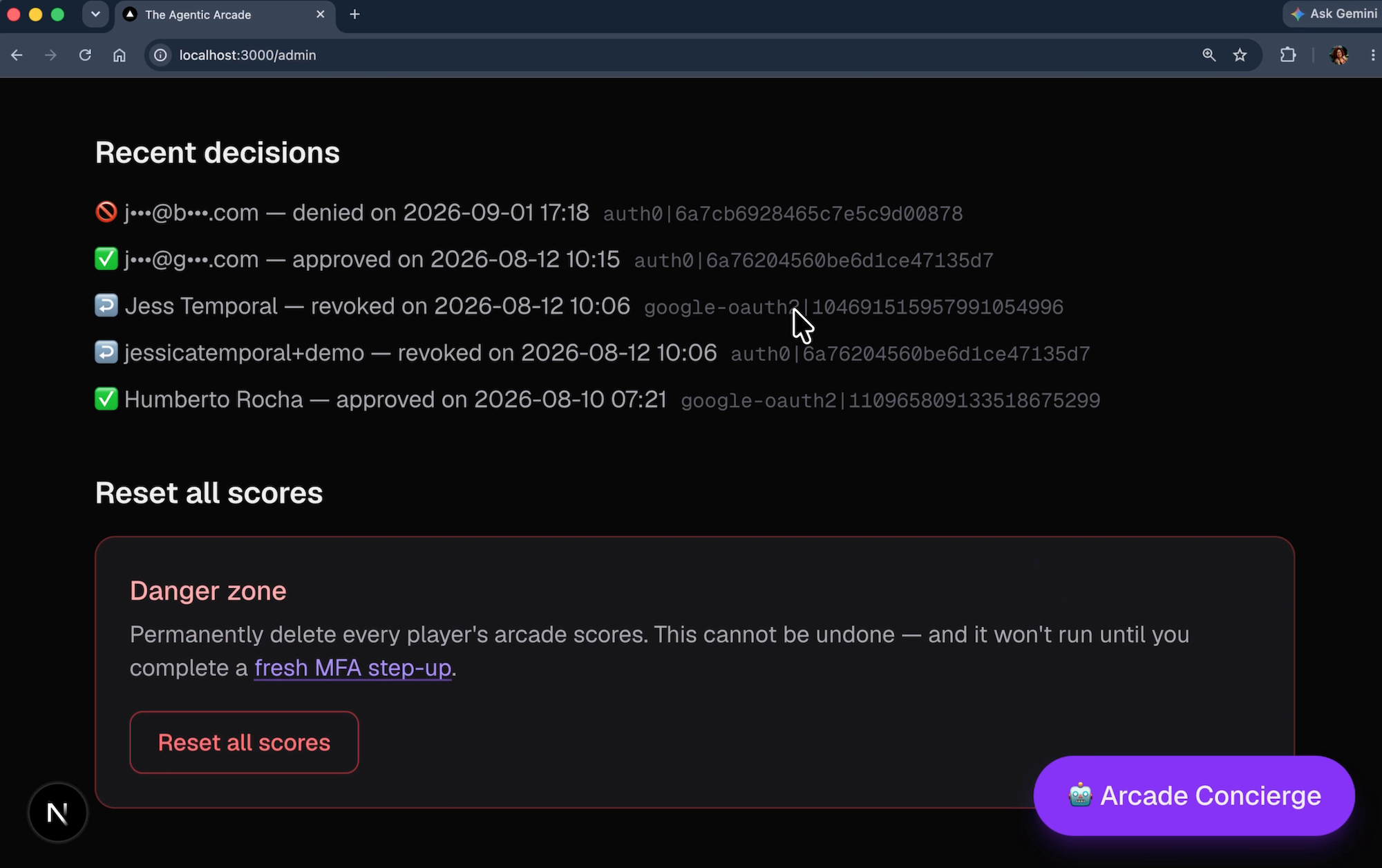
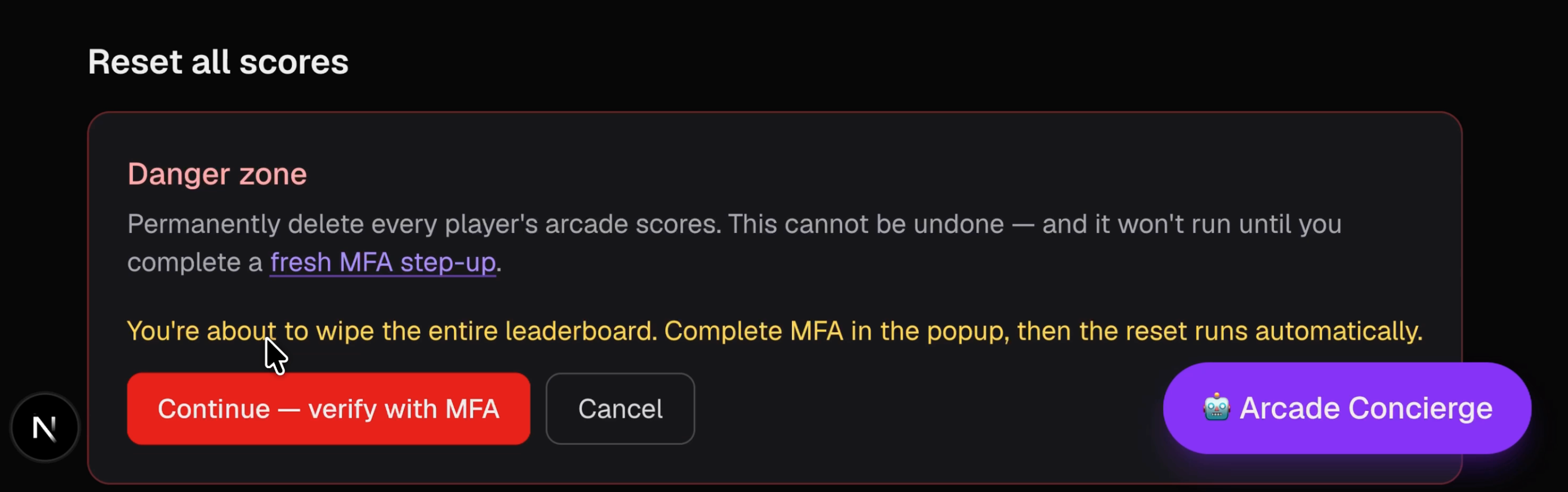
Here is what using it looks like: You open the /admin panel, scroll to the Danger Zone, and click "Reset all scores…" A confirm prompt appears. You click through. A popup opens proactively, before the reset request is ever sent. You complete the MFA challenge. The popup closes. The reset runs.
That sequence is not accidental. Let's dive in on how it is wired so a stale session cannot fire the wipe.
Prerequisites
The Agentic Arcade is a Next.js app that I like to use to demo Auth0 for AI Agents various features. The README walks through the full tenant setup. This feature specifically needs:
- Steps 1–2 (Application
- Scores API): basic user authentication and the app running locally.
- Step 3 (
step-up-mfaAction): the Post-Login Action that issues a Guardian challenge whenacr_valuesrequests MFA. You don't need the full Google/Token Vault setup, just the Action itself deployed and added to the post-login flow. - Step 6 (
arcade-adminrole): your user needs this role to access/admin.
You can clone the repo here, install the Auth0 plugin in Cursor and ask Cursor to set up the application for you.
If you already have the arcade running and you have completed those steps, you are ready. If you are starting fresh, work through the README.md first and come back here.
Why Roles Are Not Enough for High Impact Actions
The obvious implementation to allow a user to run the scores reset is a role check. The /admin endpoint reads the user's Auth0 roles, confirms arcade-admin is present, and runs the reset. Done.
For most endpoints, that is fine. For a powerful button (one that wipes every player's history in a single request), it is not.
Role checks answer one question: Is this person an admin? They do not answer: Is this person actively present at their keyboard right now, intending to do this specific thing?
Think about what a valid admin session looks like after a long workday: You logged in at 9 a.m. with MFA. Eight hours later your session is still live. The arcade-admin role is still there. From the server's perspective, every request from your browser is indistinguishable from one made at 9:01 a.m. if the session did not expire. The role usually does not change that frequently. A stolen session token, a shared laptop left unlocked, or a muscle-memory click on a dangerous button all look the same.
MFA at login time is not the same as MFA at action time. For example, think of your bank: it does not just check that you have an account before wiring money. It re-verifies your identity at the moment of a large transfer. The same logic applies to any action where the blast radius is every user, not one.
The Pattern: Role Check with Step-Up Authentication
Three tiers of protection, each closing a different gap:
- Role check alone: keeps non-admins out, but any stolen admin session or unlocked laptop can fire the reset. The server cannot tell the difference.
- Role check + MFA present in session: better. The admin enrolled MFA at some point, but
auth_timecould be hours old. A session that authenticated with MFA this morning is indistinguishable from one that authenticated right now. - Role check + step-up authentication (
amrcontainsmfa,auth_timewithin 5 minutes,max_age=0on the popup): forces re-authentication with MFA at the moment of the action. Any session without a fresh MFA factor hits a popup and must complete a challenge before the reset runs.
Rule of thumb: a session with MFA is not the same as a step-up authentication flow. Enrollment proves the method exists. amr says whether it ran this session. auth_time says when. It is worth mentioning that both the amr and auth_time claims are present in the ID token for a given user after the authentication.
Adding Step-Up Authentication in the App
In the game-library-demo, the existing /admin panel handles access requests and all-access passes. From the Cursor prompt, it generated three new files:
src/lib/mfa-step-up.ts: shared helpers for building the step-up URL and checking freshness server-sidesrc/components/AdminResetScores.tsx: a client component that lives in the admin Danger Zonesrc/app/api/admin/reset-scores/route.ts: the endpoint it calls
Step 1: The Step-Up Helper
Before looking at the endpoint or the button, let's look at the shared module they both import from:
export const MFA_ACR =
  "http://schemas.openid.net/pape/policies/2007/06/multi-factor";

/** Custom claim the tenant Action sets after a completed step-up authentication. */
export const MFA_STEPUP_CLAIM = "https://agentic-arcade/mfa_stepup";

export const MFA_FRESH_WINDOW_SECONDS = 5 * 60;

export function buildMfaStepUpUrl(
  returnTo: string,
  options?: { forceReauth?: boolean },
) {
  const params = new URLSearchParams({
    acr_values: MFA_ACR,
    returnTo,
  });
  if (options?.forceReauth) {
    params.set("max_age", "0");
  }
  return `/auth/login?${params}`;
}

function hasStepUpSignal(user: Record<string, unknown>): boolean {
  if (asStringArray(user.amr).includes("mfa")) return true;
  if (user.acr === MFA_ACR || asStringArray(user.acr).includes(MFA_ACR)) {
    return true;
  }
  return user[MFA_STEPUP_CLAIM] === true;
}

export function hasFreshMfaStepUp(user: unknown): boolean {
  if (!user || typeof user !== "object") return false;
  const claims = user as Record<string, unknown>;
  if (!hasStepUpSignal(claims)) return false;
  const now = Math.floor(Date.now() / 1000);
  for (const ts of [claims.auth_time, claims.iat]) {
    const age = ageSeconds(ts, now);
    if (age !== null && age <= MFA_FRESH_WINDOW_SECONDS) return true;
  }
  return false;
}
hasStepUpSignal checks three independent signals that a step-up challenge completed: amr contains "mfa", acr matches the PAPE URI, or the custom MFA_STEPUP_CLAIM set by the tenant Action equals true. Any one of them is enough — different Auth0 tenant configurations surface the step-up differently, and this catches all three.
hasFreshMfaStepUp combines that signal check with a freshness check. It looks at auth_time first, then falls back to iat: an MFA-only step-up (without max_age) sometimes omits auth_time from the returned token, but the new token's iat is still just-issued proof the challenge ran. Either is enough within the window.
buildMfaStepUpUrl now takes an optional forceReauth flag. When the admin's session is already recent, acr_values alone is enough to trigger the MFA challenge without forcing a full re-login. When the session is stale, forceReauth: true adds max_age=0, which forces Auth0 to issue a fresh auth_time on the returned session. The component decides which path to take based on a recentLogin prop (covered in Step 4).
Step 2: Preserve the Step-Up Claims
The issue is that hasFreshMfaStepUp reads amr, auth_time, iat, acr, and the custom claim off the session user object, but the Auth0 Next.js SDK's default claim filter drops all of them. Without this step, every signal is undefined and hasFreshMfaStepUp always returns false.
The fix is a beforeSessionSaved hook on the Auth0Client:
export const auth0 = new Auth0Client({
  // ...existing config...
  async beforeSessionSaved(session) {
    return {
      ...session,
      user: {
        ...filterDefaultIdTokenClaims(session.user),
        ...(session.user.amr !== undefined ? { amr: session.user.amr } : {}),
        ...(typeof session.user.auth_time === "number"
          ? { auth_time: session.user.auth_time }
          : {}),
        ...(typeof session.user.iat === "number"
          ? { iat: session.user.iat }
          : {}),
        ...(typeof session.user.acr === "string"
          ? { acr: session.user.acr }
          : {}),
        ...(session.user[MFA_STEPUP_CLAIM] !== undefined
          ? { [MFA_STEPUP_CLAIM]: session.user[MFA_STEPUP_CLAIM] }
          : {}),
      },
    };
  },
});
filterDefaultIdTokenClaims runs the normal filter, then we manually re-add all five step-up signals if they are present on the token. The iat fallback matters here: an MFA-only step-up popup (no max_age) does not always refresh auth_time, but it does mint a new ID token with a new iat. Without this line, hasFreshMfaStepUp would silently fail on that code path. Type guards ensure nothing undefined or wrong-typed leaks in.
Note: Add this hook before testing anything else. Without it, no amount of correct step-up logic on the endpoint will work.
Step 3: The Endpoint
With the helper module and session claims in place, let's look at the endpoint that ties them together. POST /api/admin/reset-scores runs three checks before touching any data (session, role, then freshness) and fails closed at each one:
export async function POST() {
  // Gate 1: active admin session
  const session = await auth0.getSession();
  if (!session) {
    return NextResponse.json({ error: "unauthorized" }, { status: 401 });
  }

  // Gate 2: arcade-admin role (server-side check, never trust the client)
  const roles = await getUserRoles(session.user.sub as string);
  if (!roles.includes("arcade-admin")) {
    return NextResponse.json(
      { error: "You need the arcade-admin role to do this." },
      { status: 403 },
    );
  }

  if (!hasFreshMfaStepUp(session.user)) {
    return NextResponse.json(
      {
        error: "mfa_required",
        error_description:
          "Resetting every player's scores needs a fresh MFA step-up. Complete the challenge and try again.",
      },
      { status: 403 },
    );
  }

  const { players, scores } = await resetAllScores();
  return NextResponse.json({ reset: true, deletedPlayers: players, deletedScores: scores });
}
Gate 1 and Gate 2 are the standard role-check pattern already used across the app. Gate 3 is what this post adds: a single call to hasFreshMfaStepUp, which handles the multi-signal step-up detection and freshness check from Step 1.
The underlying resetAllScores() in src/lib/scores.ts:
export async function resetAllScores(): Promise<{ players: number; scores: number }> {
  const store = await load();
  const players = Object.keys(store).length;
  const scores = Object.values(store).reduce((n, p) => n + p.scores.length, 0);
  await saveJson(FILE, {});
  return { players, scores };
}
It clears the entire store in one write and returns counts so the success message can be specific.
Step 4: The Admin Button
The component takes two props from the server page and tracks one of five phases: idle → confirm → step up → wiping → done. The key difference from a "request-then-react" pattern: the popup opens proactively from the confirm step, not reactively from an mfa_required response. The reset request only fires after the SDK popup resolves successfully.
async function wipe() {
  setError(null);
  setPhase("wiping");
  try {
    const res = await fetch("/api/admin/reset-scores", { method: "POST" });
    const body = await res.json().catch(() => ({}));
    if (!res.ok) {
      throw new Error(
        body.error_description ?? body.error ?? `Failed (${res.status})`,
      );
    }
    setResult({
      deletedPlayers: body.deletedPlayers ?? 0,
      deletedScores: body.deletedScores ?? 0,
    });
    setPhase("done");
  } catch (e) {
    setError(e instanceof Error ? e.message : "Something went wrong.");
    setPhase("confirm");
  }
}

async function startStepUp() {
  setError(null);
  setPhase("stepup");
  try {
    await mfa.challengeWithPopup({
      audience,
      acr_values: MFA_ACR,
      ...(recentLogin ? {} : { prompt: "login" }),
      popupWidth: 500,
      popupHeight: 700,
      timeout: 180_000,
    });
    await wipe();
  } catch (e) {
    if (e instanceof PopupCancelledError) {
      setError("MFA was cancelled before it finished.");
    } else if (e instanceof PopupBlockedError) {
      setError("Popup blocked — allow popups for this site and try again.");
    } else if (e instanceof PopupTimeoutError) {
      setError("MFA timed out. Approve the Guardian push, then try again.");
    } else {
      setError(e instanceof Error ? e.message : "Something went wrong.");
    }
    setPhase("confirm");
  }
}
When you click "Continue — verify with MFA", startStepUp calls mfa.challengeWithPopup() from the Auth0 SDK. The SDK opens the popup, waits for the /auth/callback response to write the session cookie (not just for window.closed), then resolves. Only after that does wipe() fire. If the admin cancels, the browser blocks the popup, or the Guardian push times out, the SDK throws a typed error (PopupCancelledError, PopupBlockedError, PopupTimeoutError) and wipe() is never called.
The recentLogin prop controls whether a full re-login is required. If the admin's session started within the freshness window, acr_values alone triggers the MFA challenge without forcing a fresh password login. If the session is older, prompt: "login" is added, which forces Auth0 to re-authenticate the user completely before issuing the step-up token. The server page computes this flag from isRecentLogin(session) before rendering the component (covered in Step 6).
Step 5: The Action You Already Have
Gate 3 checks three signals: amr, acr, and the custom MFA_STEPUP_CLAIM. The first two are standard OIDC claims that Auth0 issues natively when MFA runs. The custom claim is set by the tenant's Post-Login Action after a successful step-up challenge. No additional Action is needed beyond what the demo already requires.
The MFA enforcement comes from the step-up-mfa Post-Login Action the demo already requires (README Step 3, the same Action that backs the Token Vault consent flow). When the popup's acr_values request arrives, that Action issues a Guardian challenge and stamps the custom MFA_STEPUP_CLAIM on the ID token once the challenge completes. The server checks all three signals to stay compatible with different tenant configurations — any one of them is sufficient proof that you just cleared the challenge.
Note: If you already followed the README through Step 3, this feature works with no additional Actions and no tenant policy changes.
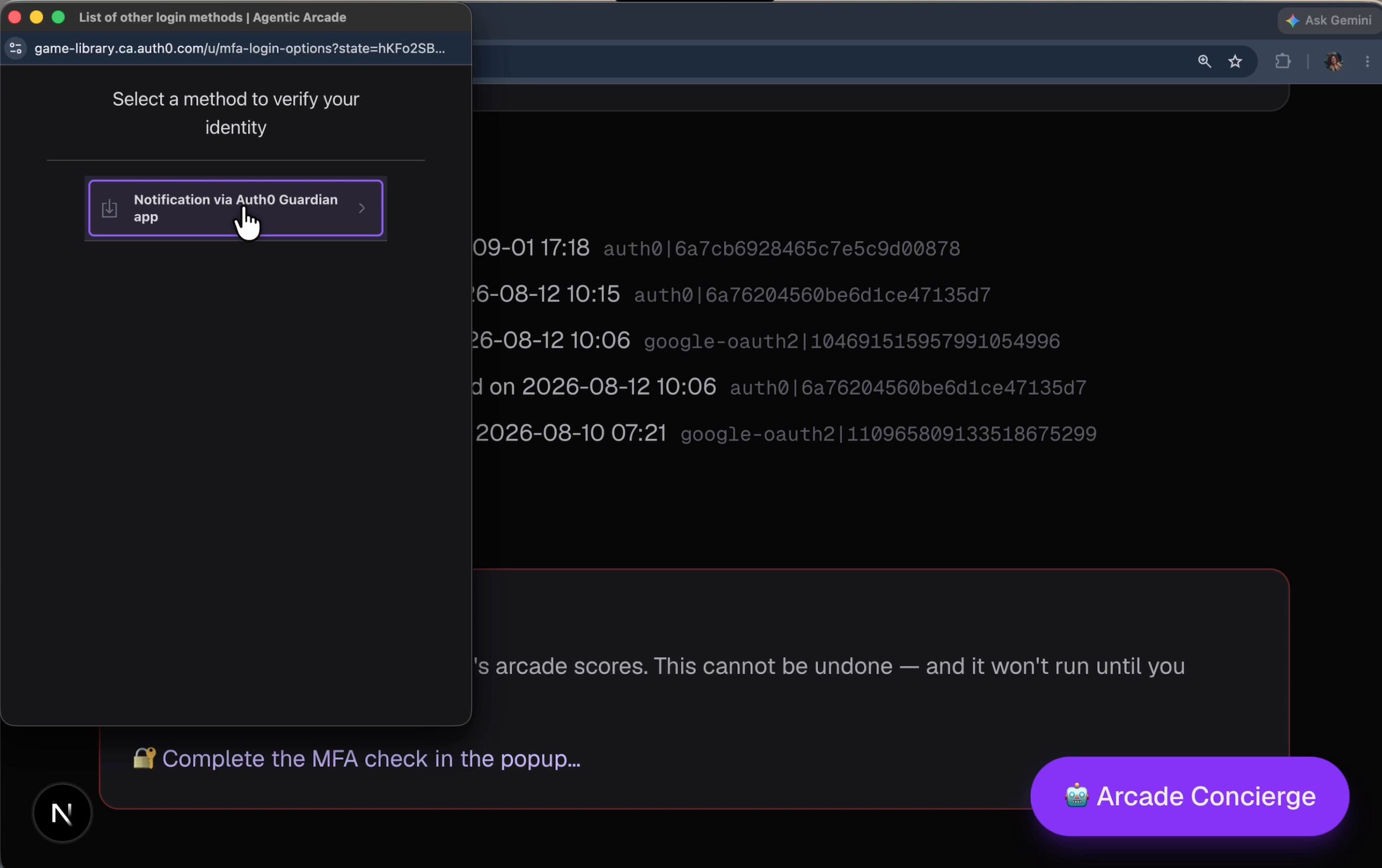
The image above shows the option to receive the push notification via Auth0 Guardian for MFA since this account already had Guardian registered for MFA before. After the notification is approved on mobile the pop up will automatically close.
Step 6 — Wire the button into the admin page
src/app/admin/page.tsx imports the component and passes it two props:
import AdminResetScores from "@/components/AdminResetScores";
import { isRecentLogin } from "@/lib/mfa-step-up";

// ...

<h2 className="mb-3 mt-8 text-lg font-semibold">Reset all scores</h2>
<AdminResetScores
  recentLogin={isRecentLogin(session!)}
  audience={process.env.AUTH0_AUDIENCE ?? "https://arcade-scores-api"}
/>
The admin page is a server component. AdminResetScores is a client component ("use client"). The page computes recentLogin server-side using isRecentLogin, which checks whether the session's auth_time (or iat as fallback) is within the 5-minute freshness window. The audience prop is the Scores API audience string, needed by mfa.challengeWithPopup() to scope the step-up token correctly. The page renders the button. The button owns the fetch, phase state, and popup lifecycle.
The full flow, end to end
Let's recap the flow for a user with an arcade-admin role wanting to delete all scores in the database:
- You navigate to
/admin - Scroll down, click "Reset all scores"
- Read the confirm prompt, click "Continue — verify with MFA"
mfa.challengeWithPopup()opens.acr_valuestriggers the MFA challenge. (If the session was stale,prompt: "login"is also sent, requiring a full re-login first.)- You complete the Guardian push. SDK popup resolves, session cookie updated.
wipe()fires:POST /api/admin/reset-scores - Gate 1: session present ✓
- Gate 2:
arcade-adminrole ✓ - Gate 3:
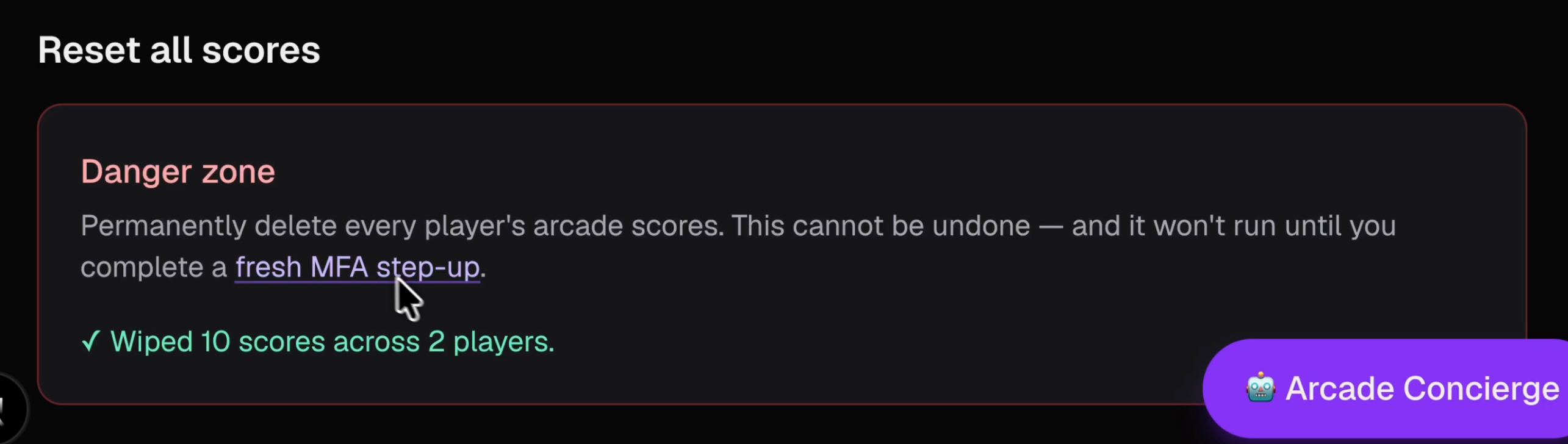
hasFreshMfaStepUpcheck passes (step-up signal found ✓,auth_timeoriatwithin 5 minutes ✓) resetAllScores()runs, entire score store is cleared- Danger zone shows something like: "✓ Wiped 10 scores across 2 players"
Happy path: roughly 10 seconds from confirm click to success.
Gotchas worth knowing
beforeSessionSaved is not optional. The SDK drops amr, auth_time, iat, acr, and the custom claim by default. If you skip the hook, every signal hasFreshMfaStepUp checks is undefined and the button is permanently stuck at mfa_required. Add the hook before testing anything else. Do not forget iat — without it, an MFA-only step-up (no max_age) silently fails because auth_time is often absent from that flow.
A step-up signal and a freshness timestamp are both required. Checking only the timestamp opens a gap: a password-only login within the freshness window would pass without MFA running. Checking only the signal is not enough because it does not tell you when the challenge ran. Both together mean "MFA ran and it ran recently."
The arcade-admin role does not bypass the MFA gate. Role is Gate 2. Freshness is Gate 3. An admin with a valid role and no recent MFA factor still gets mfa_required. There is no fast path for role holders. The policy is in the code.
auth_time freshness is the policy. The 5-minute window lives in MFA_FRESH_WINDOW_SECONDS in mfa-step-up.ts. Adjust it to match your threat model. Too tight and admins get re-challenged mid-workflow. Too loose and a stale step-up slips through. Five minutes is a reasonable default for an action that cannot be undone.
Popup blocked. If the browser blocks the popup, mfa.challengeWithPopup() throws PopupBlockedError and AdminResetScores surfaces "Popup blocked — allow popups for this site and try again." The callback URL for the step-up flow must be in the allowed callback URLs for the Auth0 application — if it is missing, the popup will open but hang at the redirect.
Dismissed step-ups never reach the endpoint. If the admin cancels the MFA challenge, the SDK throws PopupCancelledError and wipe() is never called. Gate 3 is still the hard stop if a request somehow arrives without a fresh step-up, but the SDK prevents that from happening on the happy path. Consider logging PopupCancelledError events to Auth0 Log Streams — a cancelled step-up on a destructive admin action is worth flagging.
Wrap up
One prompt built all three files so a stale session cannot fire the wipe.
What I found interesting about Cursor's output was that it got the security model right. Three gates: multi-signal step-up detection paired with a freshness timestamp, the SDK popup opened proactively. It also got beforeSessionSaved right — including the iat fallback — that is Auth0 SDK-specific behavior, and the Auth0 Cursor plugin did its job. Without that hook, the whole thing silently breaks.
The pattern applies to any button where blast radius > one user. A step-up signal (amr, acr, or the custom claim) combined with a recent auth_time or iat is the question: did this person just authenticate with MFA, and did it happen recently? Pair that check with mfa.challengeWithPopup(), the beforeSessionSaved hook to keep the claims alive, and the existing step-up-mfa Action. That is an identity gate that closes the gap between "this person enrolled MFA" and "this person just re-verified right now."
Try it yourself:
- See the full diff in PR #1.
- Read the Auth0 step-up authentication docs for the
acr_valuespattern and Post-Login Action details. - Read the Auth0
auth_timeclaim docs for how Auth0 issues and refreshes the claim.
About the author

Jessica Temporal
Sr. Developer Advocate