
AI agents create a new kind of audit gap. When agents act on behalf of a user, they may use tokens issued under that user’s identity, even though the action is executed by the agent. When a high-privilege action shows up in your logs, you need to know whether it came from a human developer, a scheduled backend job, or an AI agent acting with delegated authority. If you only look at traditional audit logs, it can appear that user X did Y, even when the action was carried out indirectly by an agent.
Auditing and traceability get harder as agents operate across identity providers, SaaS platforms, and internal services. A single user request can turn into a chain of delegated actions where intent, authorization, and execution happen in different places. Closing the audit gap means capturing not only what happened, but also who initiated it, how delegation occurred, what permission was used, and what approvals happened along the way.
In this article, you will learn how to use Auth0’s monitoring and logs to capture agent-related activity, how to interpret event types in delegated authorization flows, and how to assemble a practical workflow using Auth0’s built-in monitoring features, logs, and log streams.
Understanding the Audit Gap in AI Agent Systems
Identity models are typically built around a simple flow. A human authenticates, their application receives a token, and calls an API. Even service-to-service calls are usually modeled as explicit machine identities with clear boundaries and predictable lifecycles.
Agentic systems use a similar authentication and authorization model, but the operational context around that delegation changes. You still have a human identity, but you also have an agent that can act for that human, often across multiple external providers. The delegation chain can include a UI action, a background job, a token exchange, and a series of API calls. Many logging pipelines do not represent those handoffs clearly.
The core problem is indirect execution. Attribution gets harder because the actor that initiated intent (the human) and the actor that executed the call (the agent) may not share a runtime, IP, device, or even the same system. For example, when a user asks an agent to pull the latest pipeline from Salesforce and summarize it. The agent would use the stored OAuth 2.0 tokens to call Salesforce APIs. Without explicit delegation context, the audit trail can make the action look like normal user access, even when it was performed by an agent acting on the user’s behalf. For agents, that distinction matters because they may act on a user’s authorization across background workflows, not just in response to a direct click.
Auth0 monitoring and tenant logs help by providing a consistent identity-layer record of authentication, authorization, and delegation-related events. You can correlate token issuance, exchanges, approvals, failures, and downstream activity. Auth0 helps ensure the delegation layer emits enough signals to reconstruct who authorized what, how the agent obtained the ability to do it, and which workflow used that access.
For example, if an agent accesses Google Drive on behalf of a user, you should be able to correlate the user’s original connection to Google, the scopes granted, the token access or refresh event, the agent run ID, and the downstream file access. If the same agent later accesses Salesforce, you should be able to perform the same reconstruction across a different provider. This correlation is what turns disconnected logs into an audit trail.
Monitoring Agent-Driven API Access with Token Vault
Token Vault is designed for applications (and agents) that call external providers like Google or Salesforce on behalf of users. Instead of storing long-lived third‑party refresh tokens in your agent’s database, Token Vault stores provider access and refresh tokens and brokers access to them. Your agent retrieves what it needs at run time to call external APIs under the user’s delegated authorization. This matters because external provider tokens are often the bridge between user intent and agent execution. If every team stores provider refresh tokens in its own service, you quickly lose centralized visibility. You also increase the number of places where sensitive credentials can leak, be misused, or be refreshed without a clear audit trail. Token Vault reduces that sprawl by making token storage and access part of the identity layer, as shown in the diagram below.
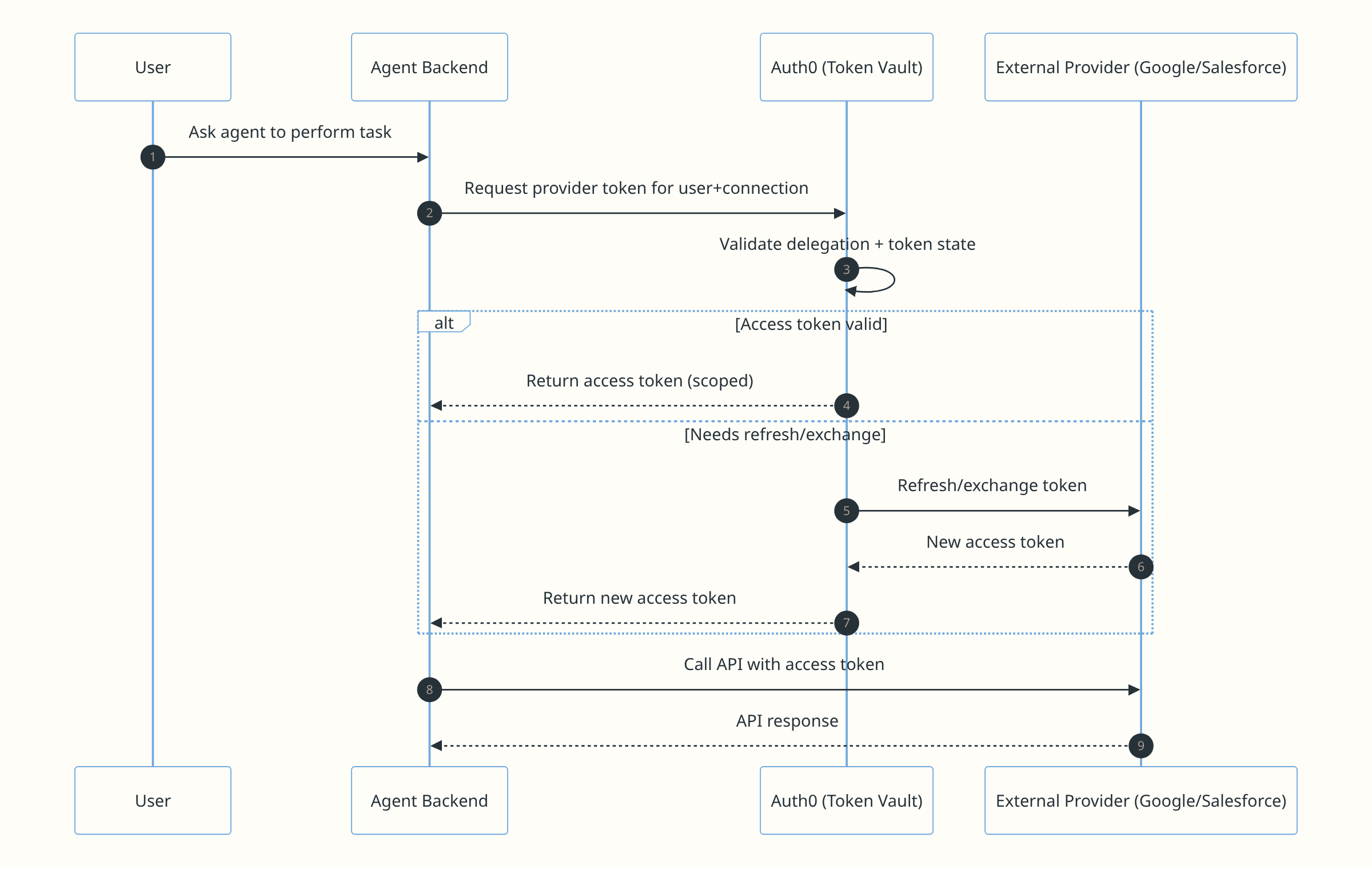
When the user first authorizes access to an external provider, Auth0 stores those provider tokens in Token Vault. When the agent later needs to act on the user’s behalf, it retrieves the required token through Auth0. It then uses that token to call the provider API without storing long-lived credentials in the agent backend.
A token vault enables end-to-end audit trails and traceability. Some of its advantages include:
- Reduces token sprawl: Centralized storage narrows the number of places where token issuance, refresh, and retrieval can occur.
- Helps maintain user context: The agent can act “as the user” without shared service credentials that erase attribution. This does not fully solve the audit gap, but it keeps delegation anchored to a user grant.
- Supports asynchronous work without weakening controls: Users authorize once. Agents can operate later. You can still enforce scope and lifecycle controls centrally.
- Improves investigation quality: During an incident, investigators can ask which connected account was used, which scopes were available, when the token was accessed, and which agent workflow was running at the time.
Consider a scenario where you are building an agent that can draft a customer follow-up email by pulling context from Google Drive and Salesforce. The user authorizes the required providers once. Later, the agent runs in the background, retrieves the relevant access tokens, reads a document from Google Drive, checks customer details in Salesforce, and drafts a response. With Token Vault in the middle, you will see identity-layer logs worth monitoring:
- When the user first connects Google (initial consent and token storage).
- When an access token is retrieved for an agent-run task.
- When a refresh occurs because the access token has expired.
- When scopes change (for example, the agent now needs additional permissions).
If an agent claims it needed Google Drive access, you should see a corresponding event around the same time. If you see repeated refreshes for Google OAuth tokens at unusual hours, that can indicate a loop, an overly broad integration, or a compromised workflow.
Monitoring Approvals in Async Authorization Flows with CIBA
CIBA (Client-Initiated Backchannel Authentication) is a decoupled OAuth/OIDC flow. It lets a client application initiate an authentication or authorization request without the user being present in the same browser session. This fits agent workflows where the agent wants to do something sensitive, but you still want a human approval step before it proceeds. The following diagram shows the CIBA flow in detail:
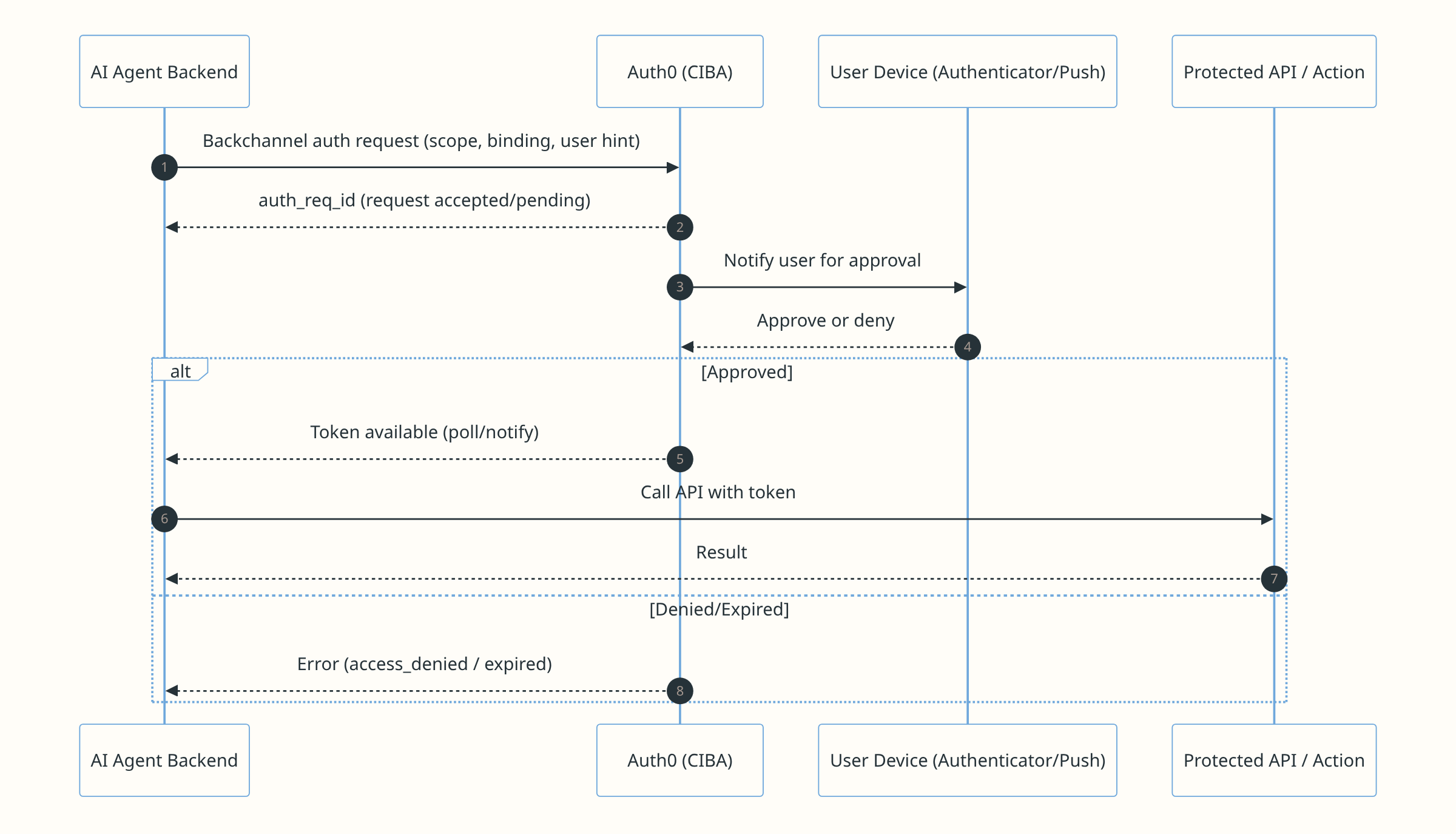
As shown above, initially, the agent backend sends a backchannel authorization request to Auth0 with the requested scope, binding, and user hint. Auth0 then prompts the user for approval. If approved, the agent receives a token and calls the protected API, while denied or expired requests return an error instead.
CIBA creates explicit, loggable checkpoints in the delegation chain. In a typical “agent just runs” model, you may only see downstream API calls and a token refresh. With CIBA, you can monitor:
- When an agent initiated an authorization request: This is an “agent intent” signal that the agent attempted to obtain permission to proceed.
- Whether the user approved, denied, or the flow failed/expired: This becomes a clean audit artifact for compliance and incident response.
CIBA fits best when you want agent productivity without silent escalation. For example, if your agent wants to download a customer list from Salesforce and attach it to an internal ticket. Instead of letting the agent use existing tokens silently, you require a CIBA approval with the “export customers” scope.
- The agent backend initiates the request.
- The user receives a push notification on their phone.
- The agent only receives a token that allows the export after approval.
- If the request is denied or times out, the agent can fall back to asking the user for a different approach.
To close the audit gap, treat these CIBA events as first-class monitoring signals. In Auth0 logs, look for the sequence of request initiated > pending > approved/denied/expired. Correlate that sequence to token issuance and API activity. Attach a stable correlation ID (agent run ID, job ID, or workflow ID) to the CIBA initiation. Propagate it through internal logs so you can tie “approval granted” to “action executed”. Additionally, you should also decide which actions require CIBA approval. Not every agent action needs a human checkpoint. Reading a calendar to schedule a meeting may be low risk if the user has already granted the right scope. Exporting customer data, sending money, modifying permissions, deleting files, or publishing content may require explicit approval. The goal is to apply approvals where they create meaningful accountability, not to slow every workflow down.
How To Make Delegated Actions Traceable
When working with AI agents, you can do the following to help make delegated actions traceable across identity, application, and provider layers:
- Capture identity-layer events in Auth0: Use Auth0 tenant logs to track authentication, authorization, and delegation-related activity via logs.
- Centralize external provider tokens: Use Token Vault so token storage, refresh, and retrieval are observable in one place.
- Add explicit approvals for sensitive actions: Use CIBA when you need a clear “approved/denied” checkpoint.
- Stream logs to your analysis platform: Use log streams to forward Auth0 events to your SIEM (Security Information and Event Management) or data platform.
- Propagate correlation IDs end-to-end: Use a stable ID (agent run ID, job ID, workflow ID) across Auth0 initiation, backend execution, and provider API calls.
Auth0 Monitoring Closes the Agent Audit Gap
AI agents create a traceability problem when delegated actions are logged as simple user activity. In third-party integrations, and especially for agentic clients, you need to preserve the difference between the human who authorized access and the system that used it. During an incident, that context helps you answer who authorized the action, which agent or workflow executed it, how access was obtained, and whether a human approved it.
Auth0 provides building blocks to monitor delegated flows at the identity layer. Use monitoring and tenant logs to observe authentication and authorization events. Use Token Vault to centralize external provider tokens used by agents. Use CIBA to add explicit human approvals to asynchronous workflows. With log streams, you can push those events into your data platform and correlate them with application traces and downstream provider audit logs.
Build your agent features so token retrieval, refresh, and approval checkpoints are observable and tied together with correlation IDs. That is the most reliable way to close the audit gap without slowing down developers or agents. Explore Auth0 monitoring and logs today to enhance your visibility and control over agent-driven activities.
About the author

Vivek Kumar Maskara
Senior Software Engineer